About this task
NOTE: The following procedure applies only to computers shipped with an M.2 2230 solid-state drive.
NOTE: Your computer has two solid-state drive slots (SSD-1 and SSD-2). The M.2 card installed on M.2 slot will depend on the
configuration ordered. Supported card configurations:
● M.2 2230 solid-state drive + 2230 mounting bracket
● M.2 2280 solid-state drive
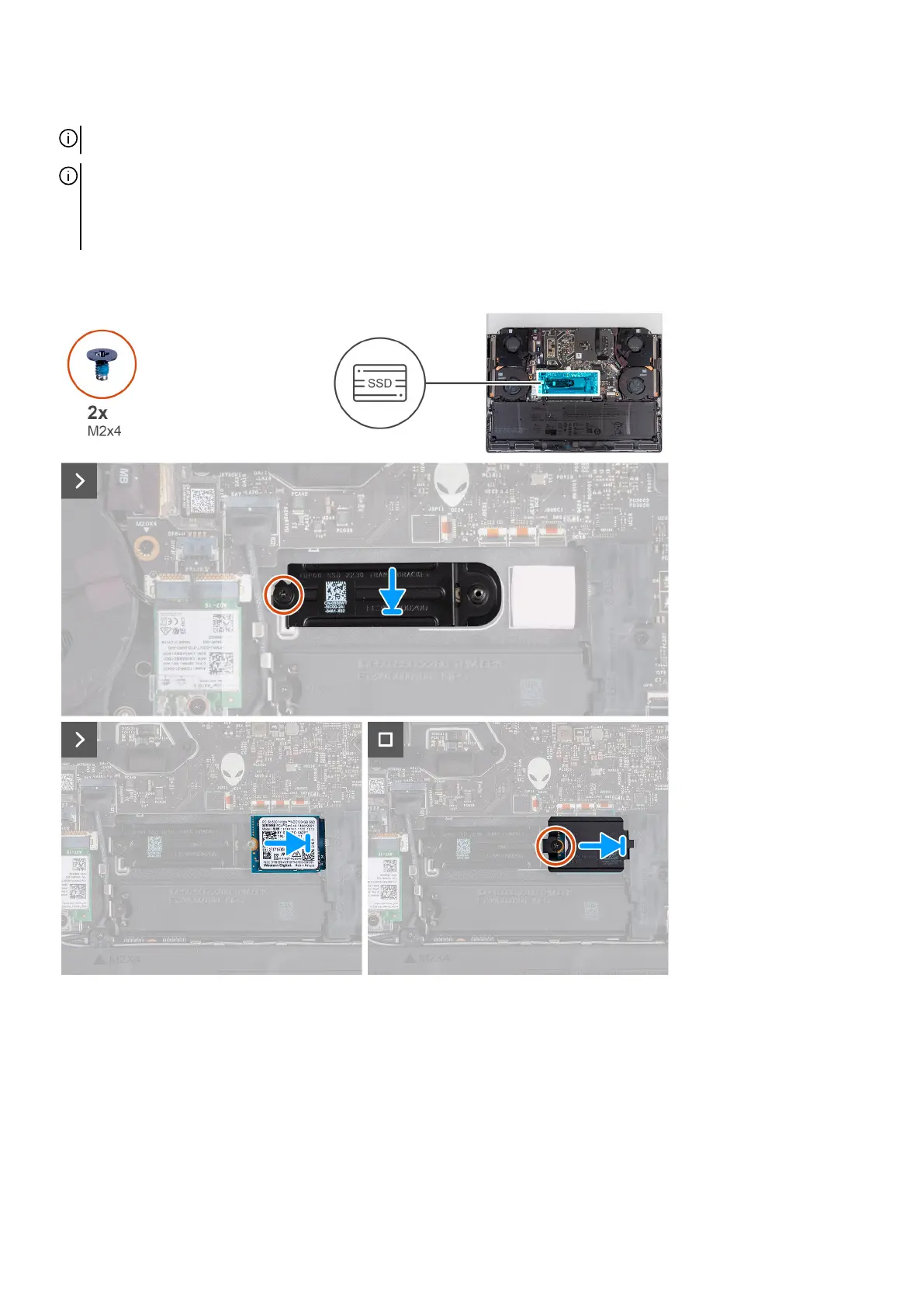
The following image(s) indicate the location of the M.2 2230 solid-state drive in SSD-2 and provides a visual representation of the
installation procedure.
Steps
1. Align the screw hole on the solid-state drive mounting bracket with the screw hole on the palm-rest and keyboard assembly.
2. Replace the screw (M2x4) that secures the M.2 2230 solid-state drive mounting bracket to the palm-rest and keyboard
assembly.
3. Align the notch on the solid-state drive with the tab on the solid-state drive slot.
4. Slide the solid-state drive into the solid-state drive slot.
5. Slide the solid-state drive thermal shield into the solid-state drive slot.
6. Align the screw hole on the solid-state drive thermal shield with the screw hole on the solid-state drive and palm-rest and
keyboard assembly.
31








 To Next Page