2. Using the alignment post on the PCIe slot, insert the card into the slot on the system board, and press down firmly. Ensure
that the card is firmly seated.
3. Close the PCIe door.
4. Insert the graphics-card support bracket onto the retaining rails.
NOTE: The size and location of the graphic-card middle holder may vary depending on the graphics card configuration
on your computer.
5. Push the graphics-card supporting bracket down until it locks into position.
6. Connect the graphics-card power cable to the graphics card.
7. Place the computer in an upright position.
Next steps
1. Install the left-side cover.
2. Follow the procedure in After working inside your computer.
Memory modules
Removing the memory modules
Prerequisites
1. Follow the procedure in Before working inside your computer.
2. Remove the left-side cover.
About this task
NOTE: This computer may have up to two memory modules installed.
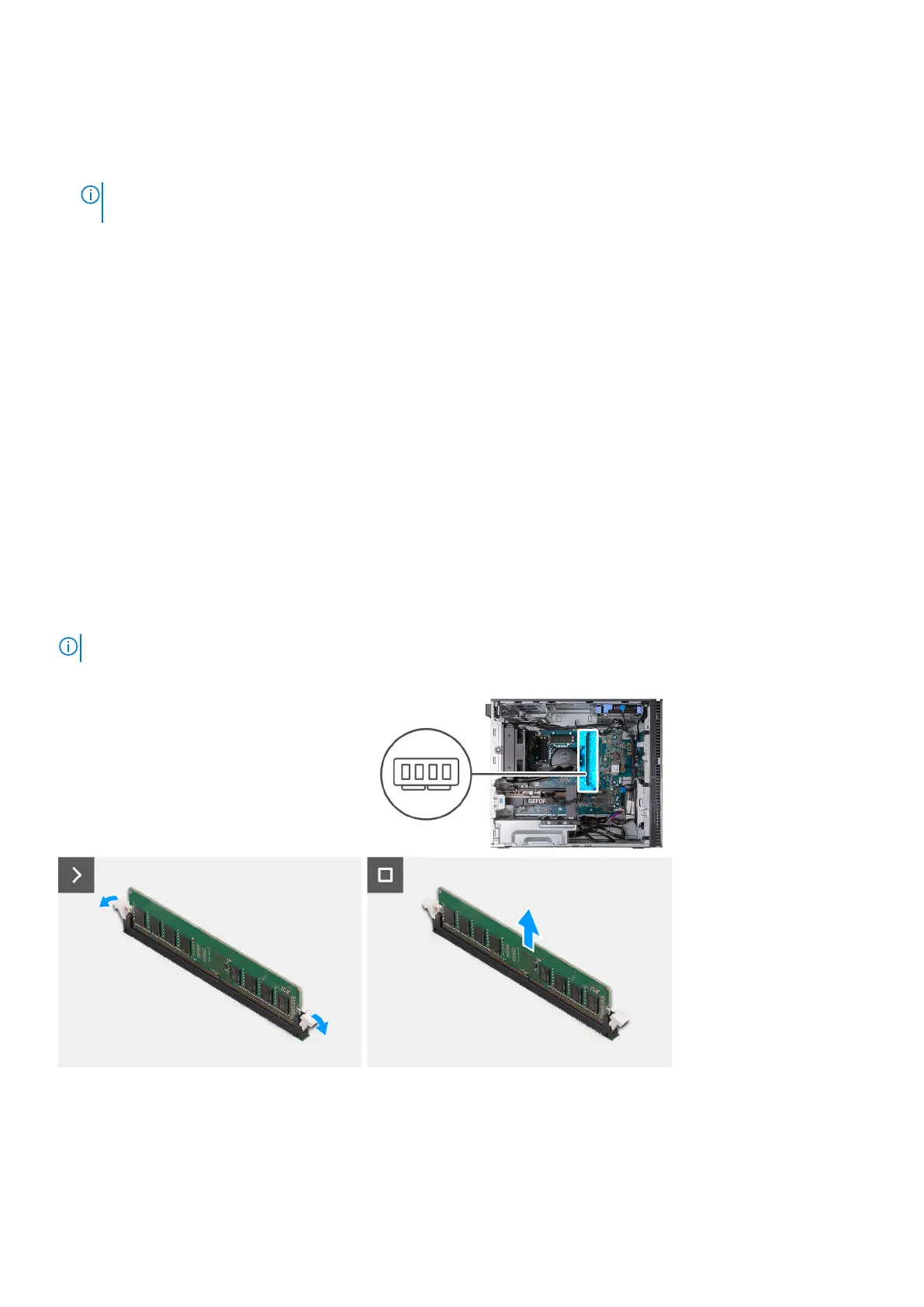
The following image(s) indicate the location of the memory and provides a visual representation of the removal procedure.
Steps
1. Place the computer on its side with the left side facing up.
2. Carefully spread apart the securing-clips on each end of the memory-module slot.
3. Grasp the memory module near the securing clip, and then gently ease the memory module out of the memory-module slot.
26
Removing and installing components















 To Next Page