Steps
1. Place and align the screw holes on the power-supply unit to the screw holes on the chassis.
2. Replace the four screws (#6-32) that secure the power-supply unit to the chassis.
3. Place and align the screw holes on the power-supply cage to the screw holes on the chassis.
4. Replace the two screws (#6-32) that secure the power-supply cage to the chassis.
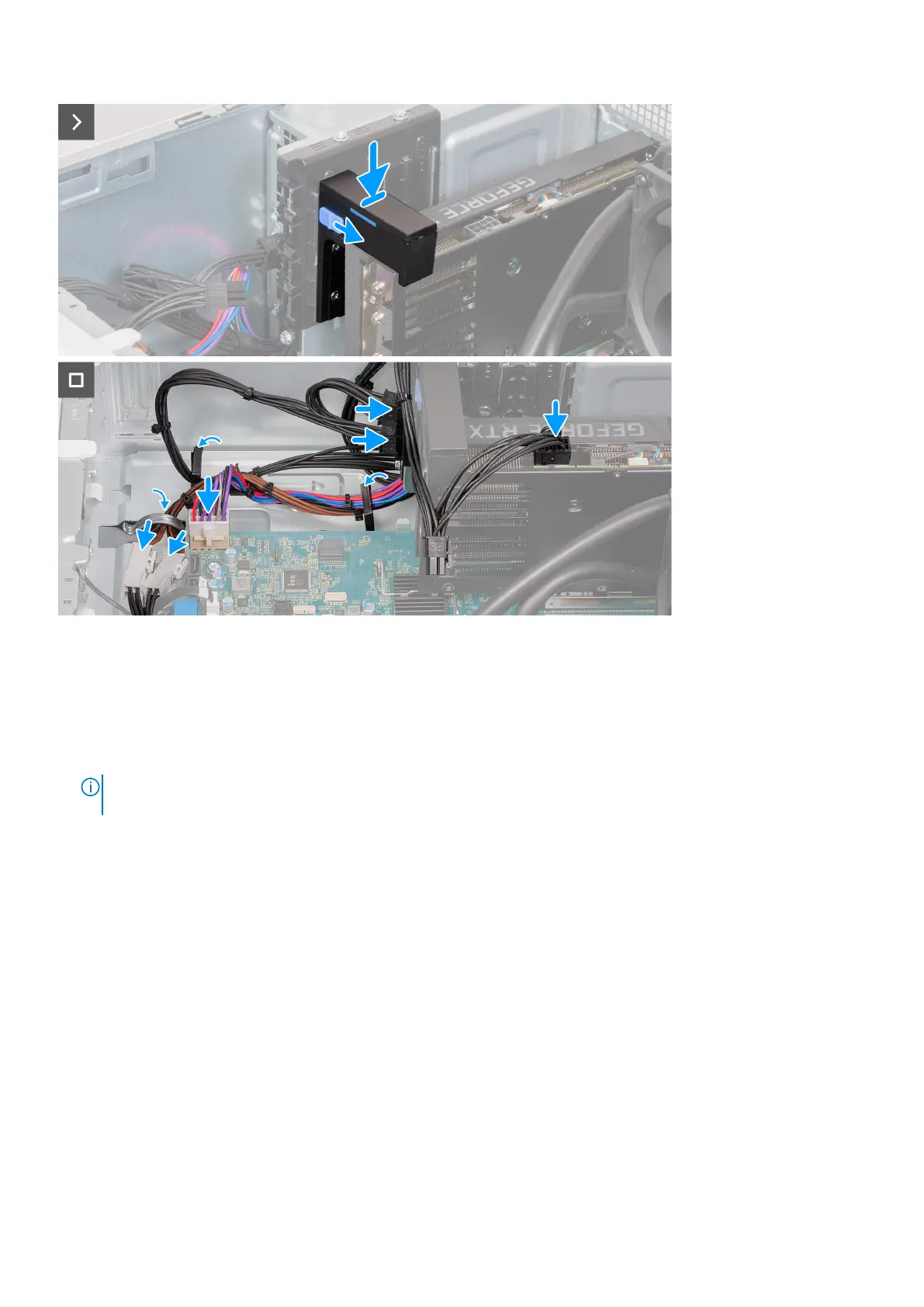
5. Insert the graphics-card support bracket onto the retaining rails.
NOTE:
The size and location of the graphic-card middle holder may vary depending on the graphics card configuration
on your computer.
6. Push the graphics-card supporting bracket down until it locks into position.
7. Connect the system-board power cable to the system board.
8. Connect the power-supply cables to the processor-power cables.
9. Route the power-supply cables through the routing guides on the chassis.
10. Connect the graphics-card power cables to the power-supply unit.
11. Connect the graphics-card power cables to the graphics card.
12. Place the computer in an upright position.
Next steps
1. Install the left-side cover.
2. Follow the procedure in After working inside your computer.
Removing and installing components
41















 To Next Page