Setting up the monitor 25
Setting up the monitor
Attaching the stand
NOTE: The stand is not attached when the monitor is shipped from the factory.
NOTE: The following instructions are applicable only for the stand that was shipped with your monitor. If you are attaching a stand
that you purchased from any other source, follow the setup instructions that were included with the stand.
To attach the monitor stand:
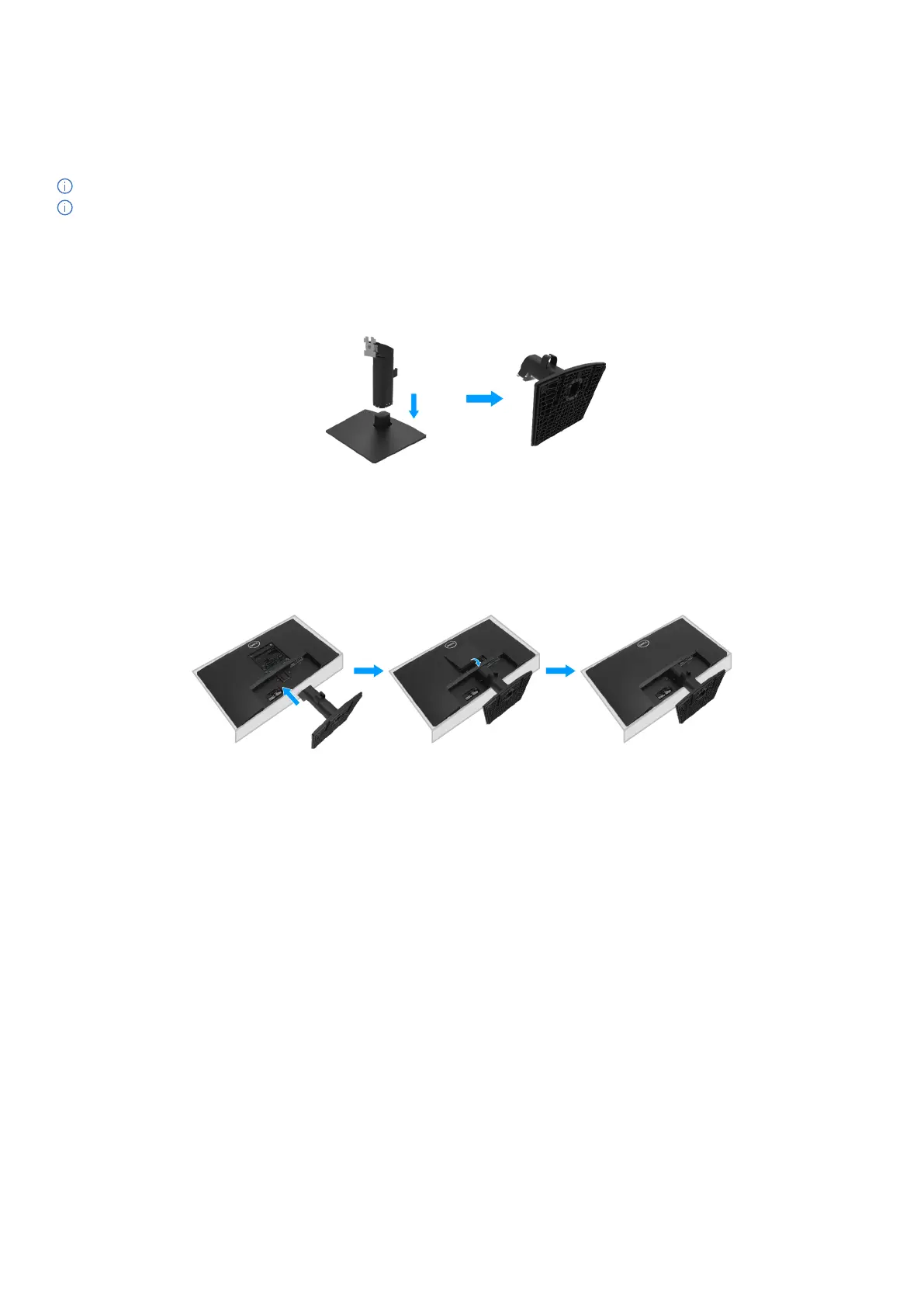
1. Assemble the stand riser to stand base.
a. Place the monitor stand base on a stable table top.
b. Slide the monitor stand body in the correct direction down onto the stand base until it clicks into place.
Figure 12. Assemble the stand
2. Attach the stand assembly to the monitor.
a. Place the monitor on a soft cloth or cushion near the edge of the desk.
b. Align the stand assembly bracket to the monitor groove.
c. Insert the bracket towards monitor until it locks in place.
d. Attach VESA cover.
Figure 13. Attach the stand



 To Next Page