28 Setting up the monitor
Removing the monitor stand
NOTE: To prevent scratches on the LCD screen when removing the stand, ensure that the monitor is placed on a soft surface and
handle it carefully.
NOTE: The following instructions are applicable only for the stand that was shipped with your monitor. If you are removing a stand
that you purchased from any other source, follow the setup instructions that are included with the stand.
NOTE: Before removing the stand, ensure that you have disconnected all the cables from the monitor.
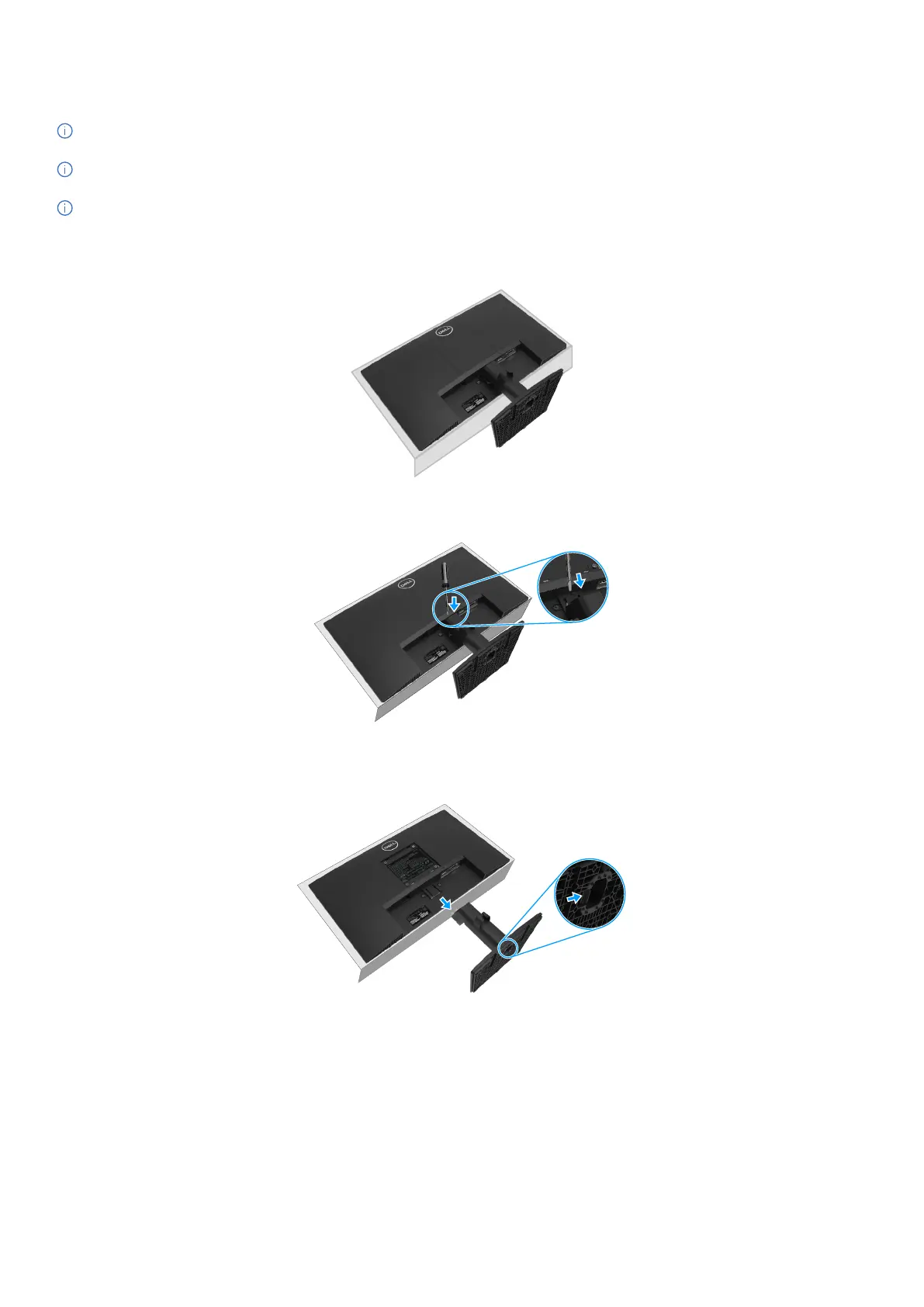
To remove the stand
1. Place the monitor on a soft cloth along the desk.
Figure 18. Place the monitor on the desk
2. Use a long and thin screwdriver to push the released button.
Figure 19. Push the release button
3. While keeping the release button pressed, pull the stand out from the monitor. Then press the quick release tab on the bottom of the
base, to separate the stand base from the stand riser.
Figure 20. Remove the stand



 To Next Page