PS6010 Hardware Maintenance Maintaining Control Modules
3–10
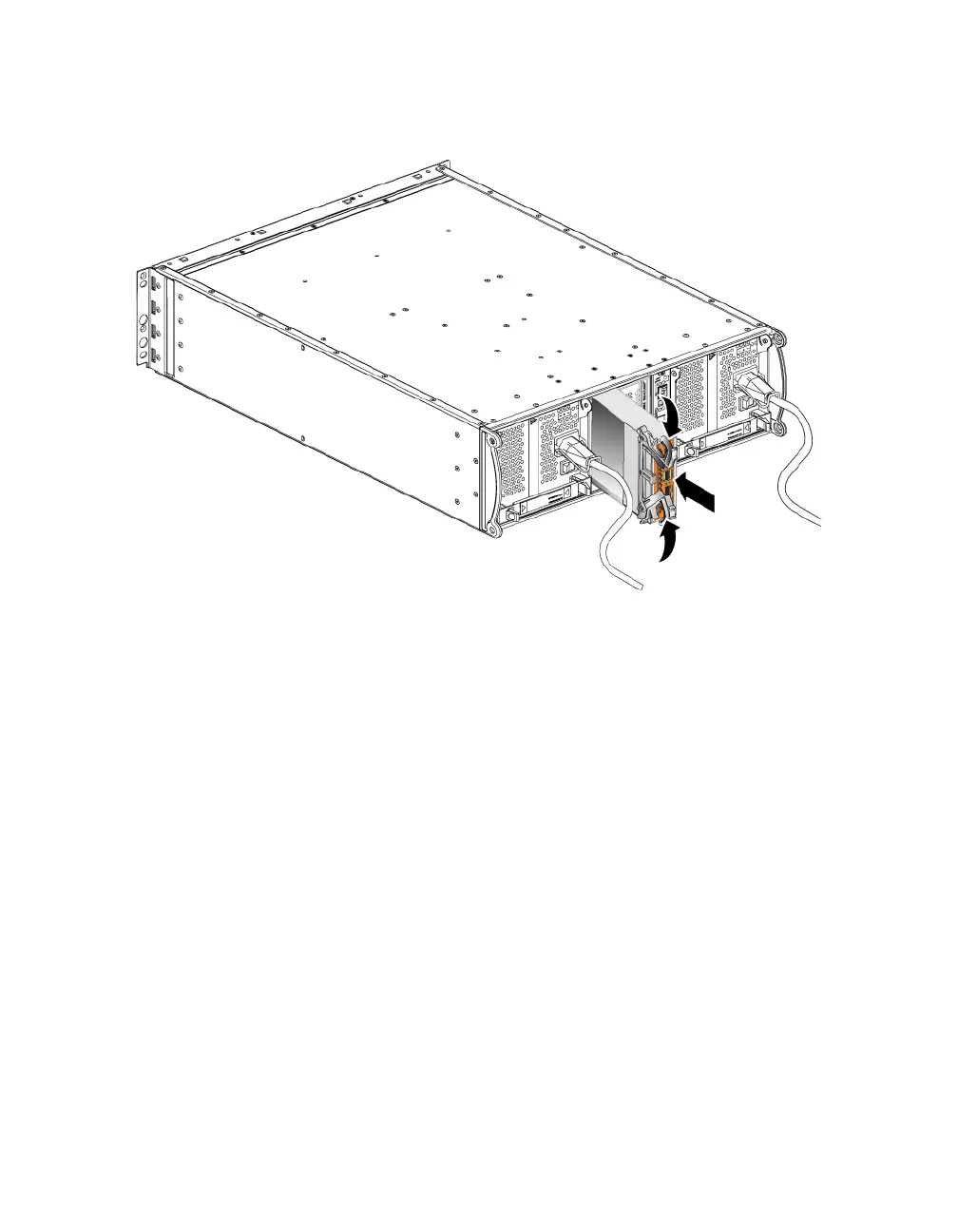
Figure 3-5: Installing a Control Module
4. Rotate each latch inward, while pushing the control module completely into
the slot. The latches will snap into place (Figure 3-5).
5. Connect the network cables. For detailed information, see the Installation and
Setup guide.
6. If the array was shut down, turn on power to the array.
7. Make sure the control module is operationa.l See Interpreting Control Module
LEDs on page 3-2.
If two control modules are installed but only one appears in the GUI or CLI, the
control module may not be properly installed. Reinstall the control module. If
both control modules still do not appear in the GUI or CLI, they may not be
running the same firmware. Contact your array support provider.
Note: When connected, a control module cache battery may begin to charge. If
the low-battery-safe cache policy is enabled (the default), the array will
operate in write-through mode until the cache battery is fully charged.
However, if you need optimal performance before the battery is fully
charged, as soon as the battery status is
good/charging, you can


 To Next Page