66 Installing System Components
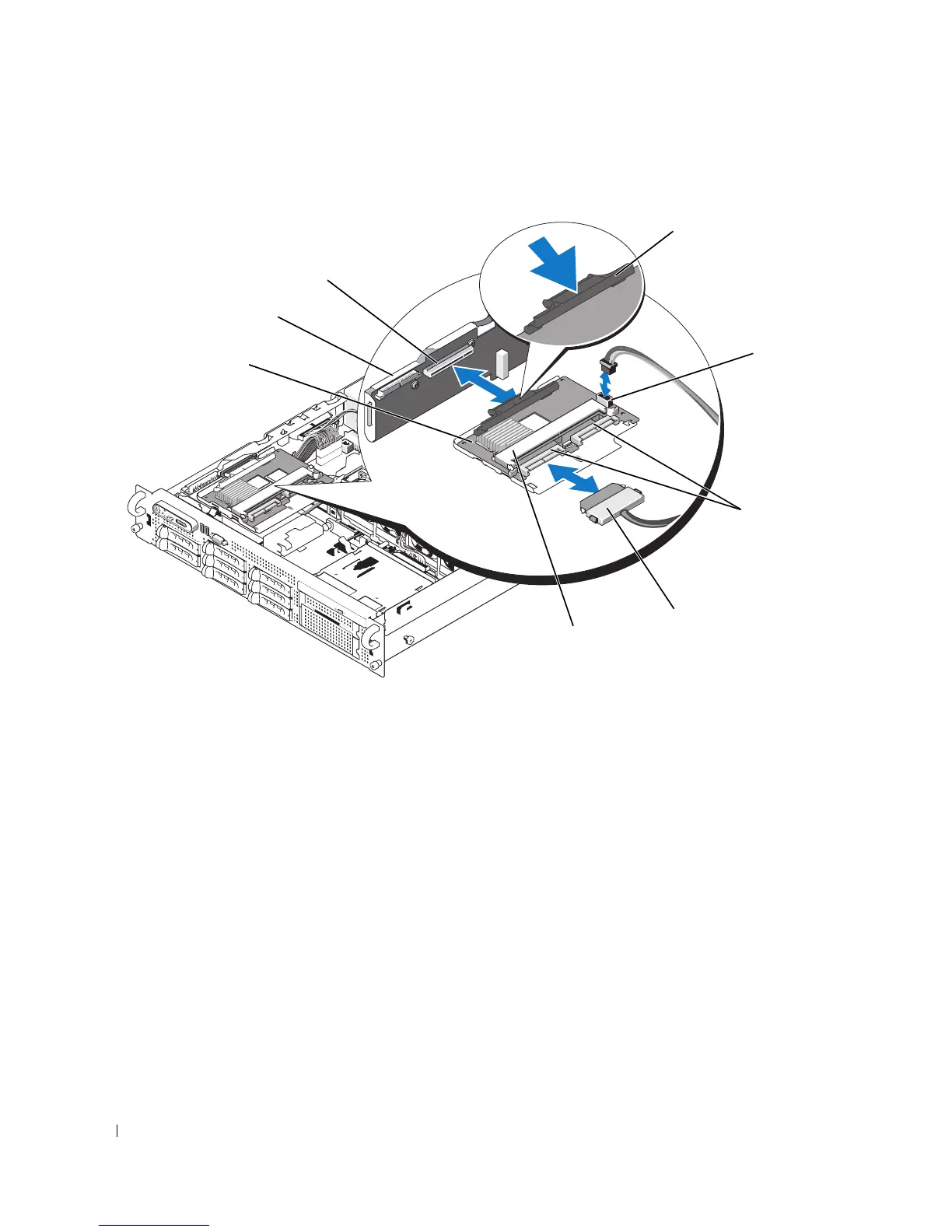
Figure 3-9. Installing a SAS Controller Daughter Card
5
Attach the interface cable(s) to the SAS controller daughter card and to the backplane.
• For a non-RAID SAS controller (with a single connector), attach one end of the interface cable to
connector 0 on the SAS controller and the other end to the SAS_A backplane connector. See
Figure 3-10.
• For a SAS RAID controller (with dual connectors), attach the first interface cable to connector 0
on the SAS RAID controller and to the SAS_A connector on the backplane. Attach the second
interface cable to connector 1 on the SAS RAID controller and to the SAS_B connector on the
backplane. See Figure 3-11.
1 SAS controller daughter card 2 sideplane 3 SAS controller daughter card
socket
4 release tab 5 SAS controller daughter card
battery connector (SAS RAID
only)
6 SAS connector(s) (1 or 2)
7 SAS cable (1 or 2) 8 SAS RAID controller DIMM
(SAS RAID only)
2
5
7
4
3
6
1
8














 To Next Page