1-8 User’s Guide
www.dell.com | support.dell.com
Maintenance
CAUTION: To avoid risk of electric shock, do not disassemble the monitor
cabinet. Users cannot service the monitor. User maintenance is restricted to
cleaning.
CAUTION: Before cleaning the monitor, unplug it from the electrical outlet.
• To clean your flat-panel monitor screen, use a soft, clean cloth lightly dampened with
water or isopropyl alcohol.
• To clean the monitor cabinet, use a cloth lightly dampened with a mild detergent.
• Wipe off stubborn stains from the cabinet with a cloth lightly dampened in isopropyl
alcohol. Do not use benzene, thinner, ammonia, or abrasive cleaners.
Controls and Indicators
Overview
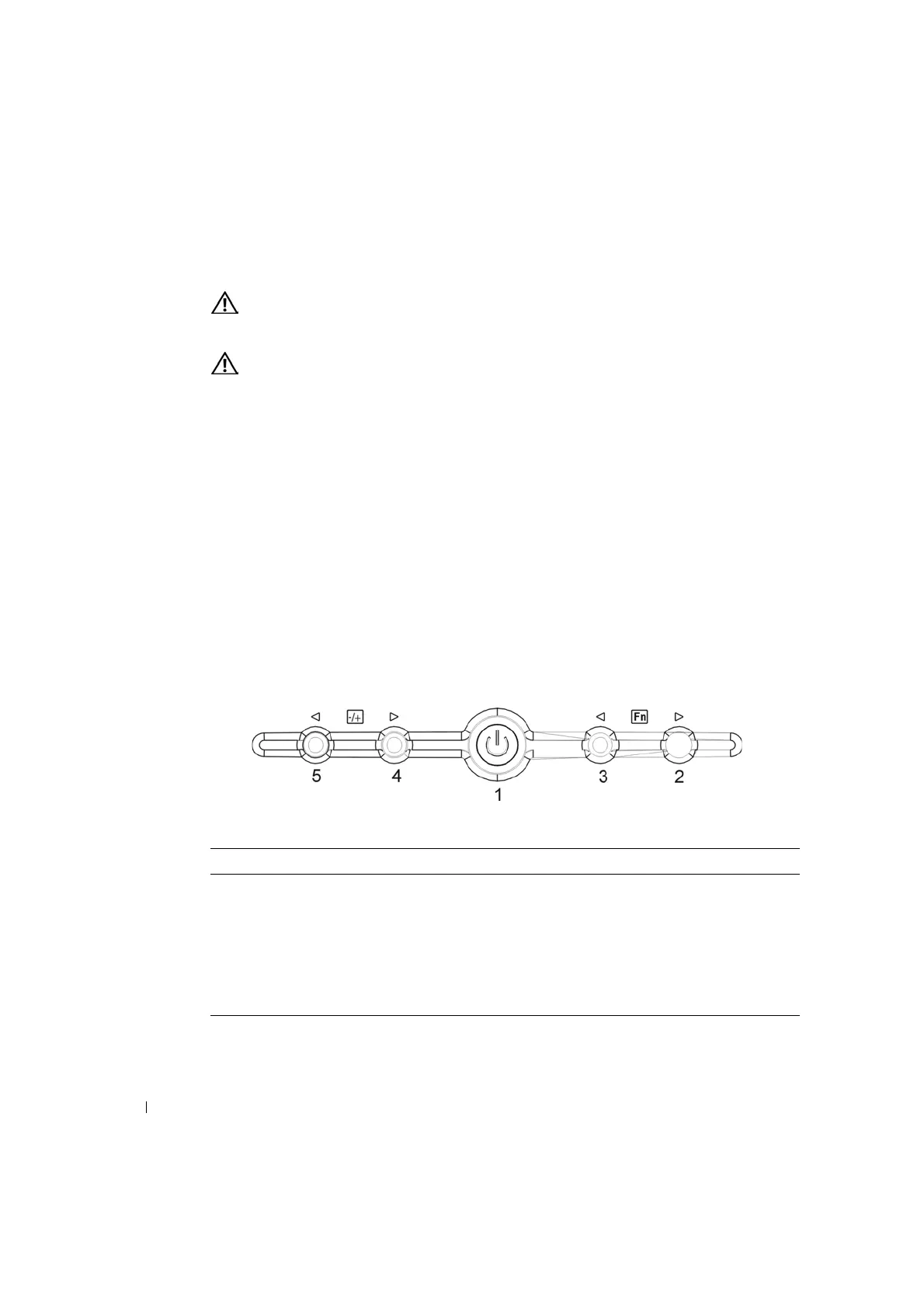
Use the control buttons located below the monitor screen to adjust the characteristics of the
image being displayed.
Figure 1-4. Controls
Table 1-4. Control Panel (Monitor Front Panel)
Control Description
1 Power LED will be full bright (blue) when monitor is on and will be half bright (blue)
when in power saving mode.
2 Function select counter-clockwise.
3 Function select clockwise.
4 Adjust increase.
5 Adjust decrease. (Auto Adjust: Enabled by pressing 1 second)


 To Next Page