38 │ Setting up the monitor
Connecting your monitor
WARNING: Before you begin any of the procedures in this section,
follow the Safety instructions.
NOTE: Dell monitors are designed to work optimally with Dell
supplied inbox cables. Dell does not guarantee the video quality and
performance if non-Dell cables are used.
NOTE: Route the cables through the cable management guide before
connecting them.
NOTE: Do not connect all cables to the computer at the same time.
NOTE: The images are for illustration only. The appearance of the
computer may vary.
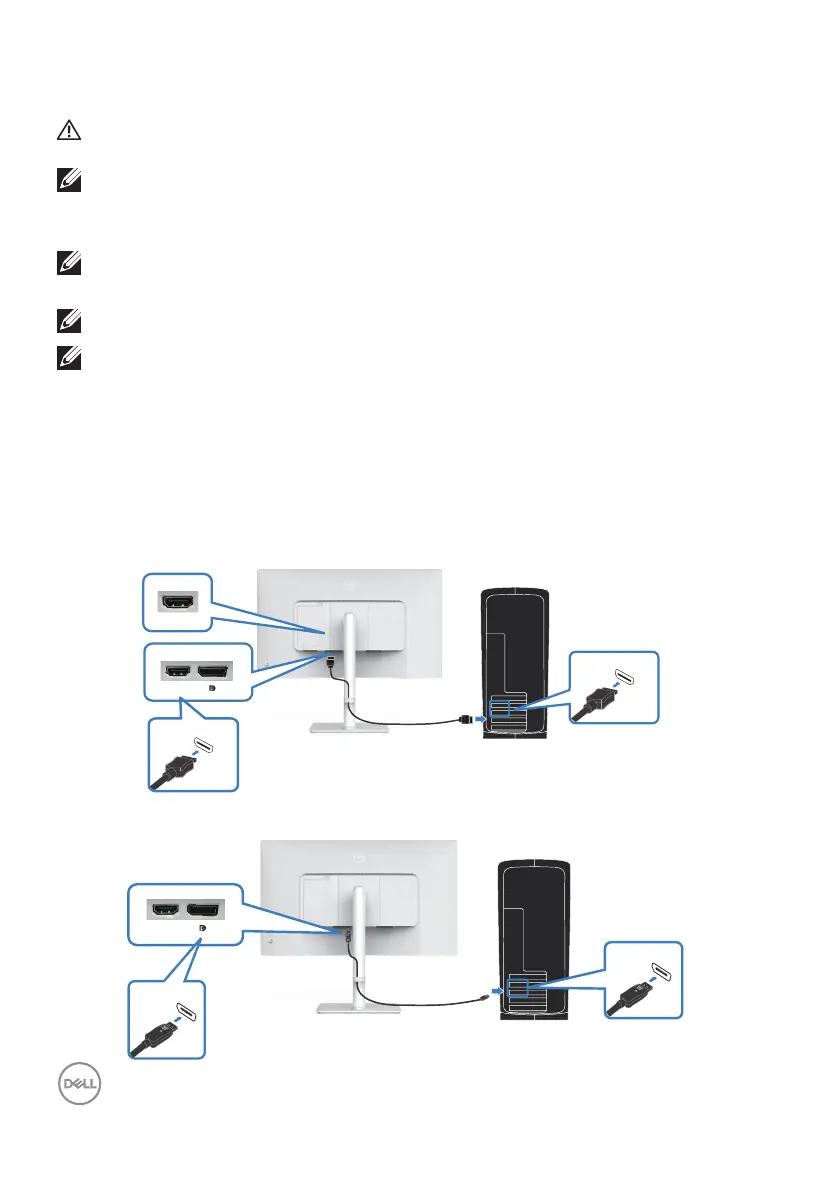
To connect your monitor to the computer:
1. Turn off your computer and disconnect the power cable.
2. Connect your monitor to the computer with a DisplayPort cable or an HDMI
cable.
Connecting the HDMI cable
HDMI 2.1 (TMDS)
HDMI
1
HDMI
2
HDMI 2.1 (TMDS)
Connecting the DisplayPort 1.2 cable (optional)
DP 1.2
DP 1.2
HDMI
1



 To Next Page