Operating your monitor │ 61
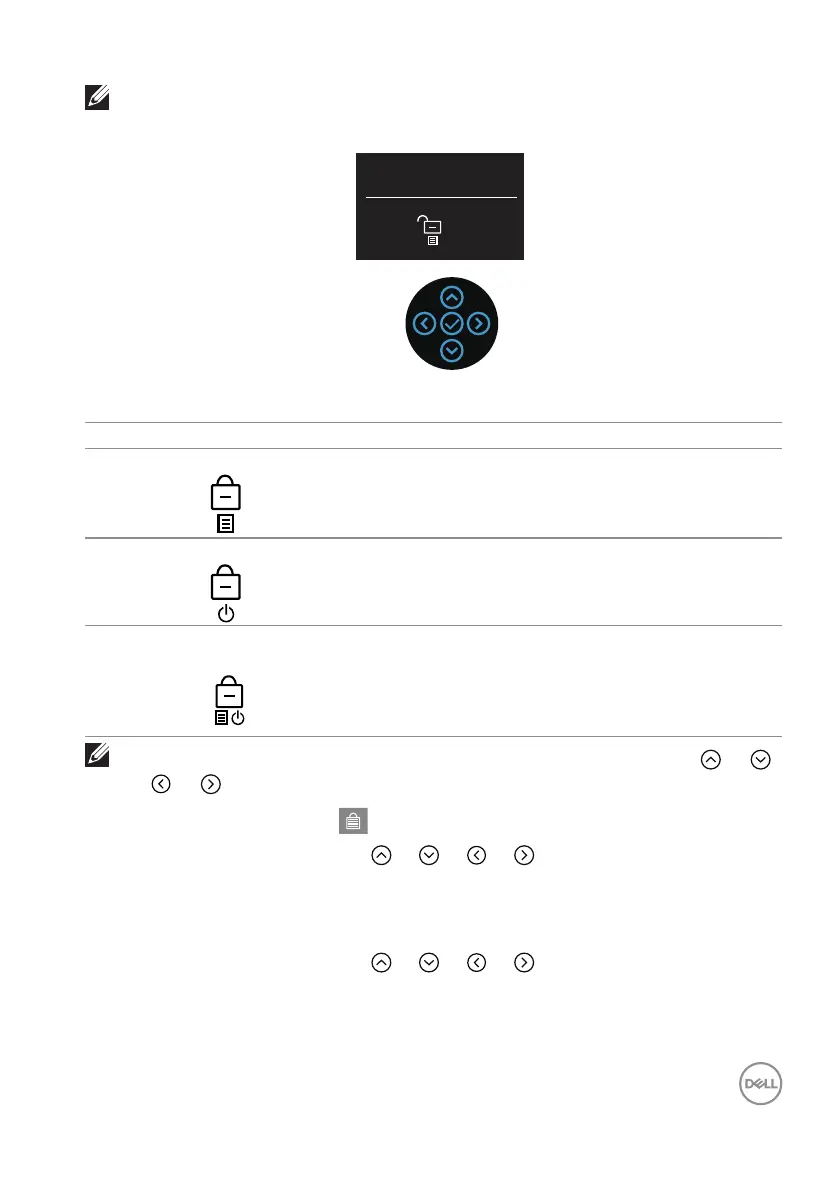
NOTE: The unlock menu can be accessed when the menu and power
buttons are in locked state.
Select option:
There are three lock options.
Menu Description
1 Menu Buttons When Menu Buttons is selected, the OSD menu
settings cannot be changed. All buttons are locked
except for the power button.
2 Power Button When Power Button is selected, the display cannot
be turned off using the power button.
3 Menu + Power
Buttons
When Menu + Power Buttons is selected, the OSD
menu settings cannot be changed and the power
button is locked.
NOTE: To access the Lock or Unlock menu, move the joystick or
or or and hold for four seconds.
In the following scenarios, the icon appears at the center of the display:
• When you move the joystick or or or . It indicates the OSD menu
buttons are in lock state.
• When the power button is pressed. It indicates the power button is in lock
state.
• When you move the joystick or or or and the power button is
pressed. It indicates OSD menu buttons, and the power button is in lock state.



 To Next Page