Dell SonicWALL Directory Services Connector 3.7
Administration Guide
23
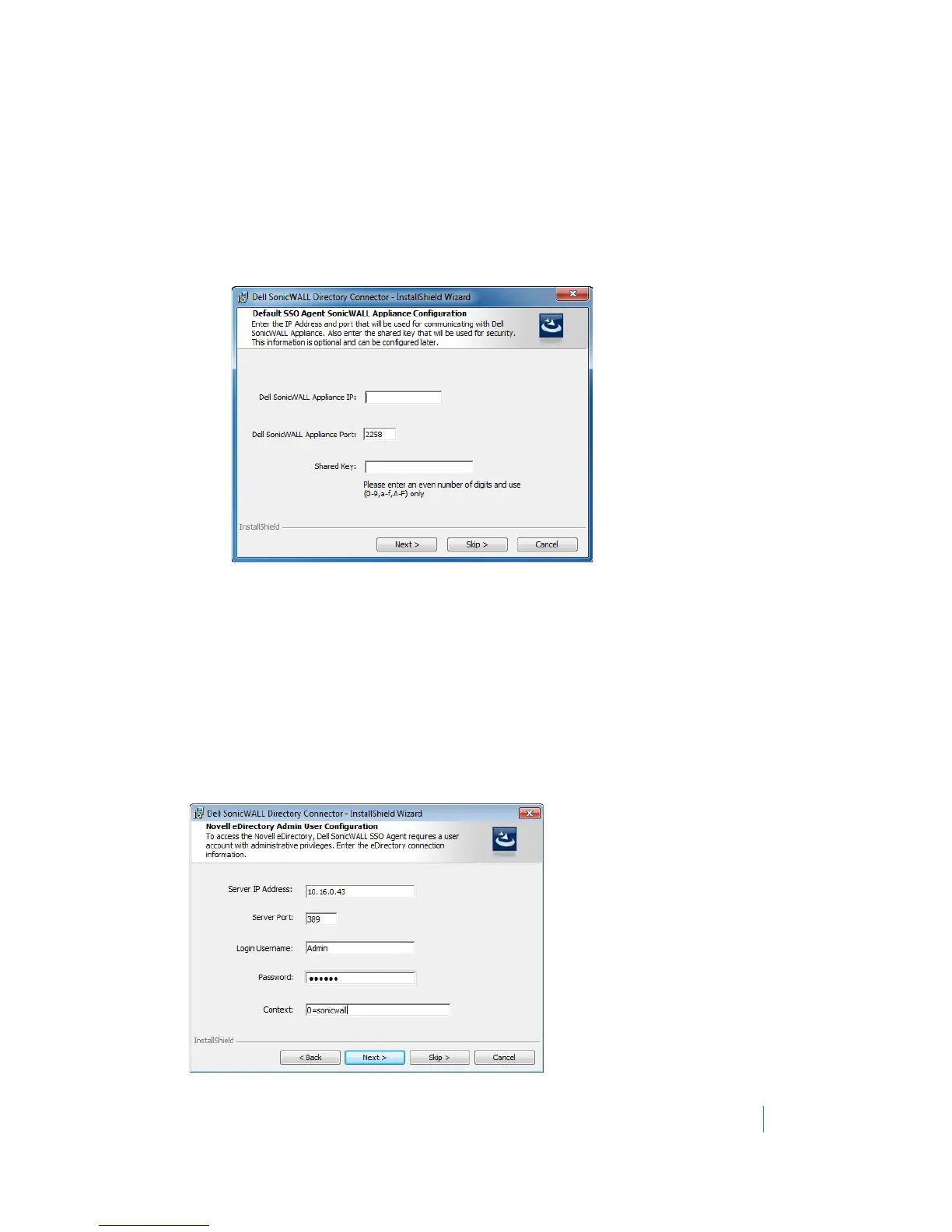
10 In the Default SSO Agent SonicWALL Appliance Configuration screen, enter the Dell SonicWALL appliance
information and then click Next:
• SonicWALL Appliance IP — Type in the Dell SonicWALL appliance IP address.
• SonicWALL Appliance Port — Type in the port used by the SSO Agent to communicate with the
Dell SonicWALL appliance. The default port is 2258.
• Shared Key — Type in a hexadecimal number of up to 16 characters (use an even number of
characters) to use as the key for encrypting messages between the SSO Agent and the Dell
SonicWALL appliance. You must also enter the same key when configuring the appliance to use
Dell SonicWALL SSO.
11 In the Novell eDirectory Admin User Configuration screen, enter the information for the Novell
eDirectory server, and then click Next:
• Server IP Address — eDirectory Server IP Address
• Server Port — eDirectory Server Port (389 by default)
• Login Username — Login username for the administrator account to access the eDirectory server
•Password — Password for the administrator account to access the eDirectory server
•Context — eDirectory context in which the administrator account for the eDirectory server
resides
These same settings can be modified after installation by right-clicking on eDirectory in the Directory
Connector Configuration Tool.











 To Next Page