29
Malfunctions
9 Malfunctions
9.1 Handling of malfunctions
General
CAUTION!
Damage or faulty measuring results in the event of malfunctions!
Therefore, do not continue using the light intensity meter in the event of:
Unusual measuring results
Strongly fl uctuating values
No display
Personal protective equipment
Wear protective clothing when operating the module:
Protective clothes
Safety glasses
Protective gloves
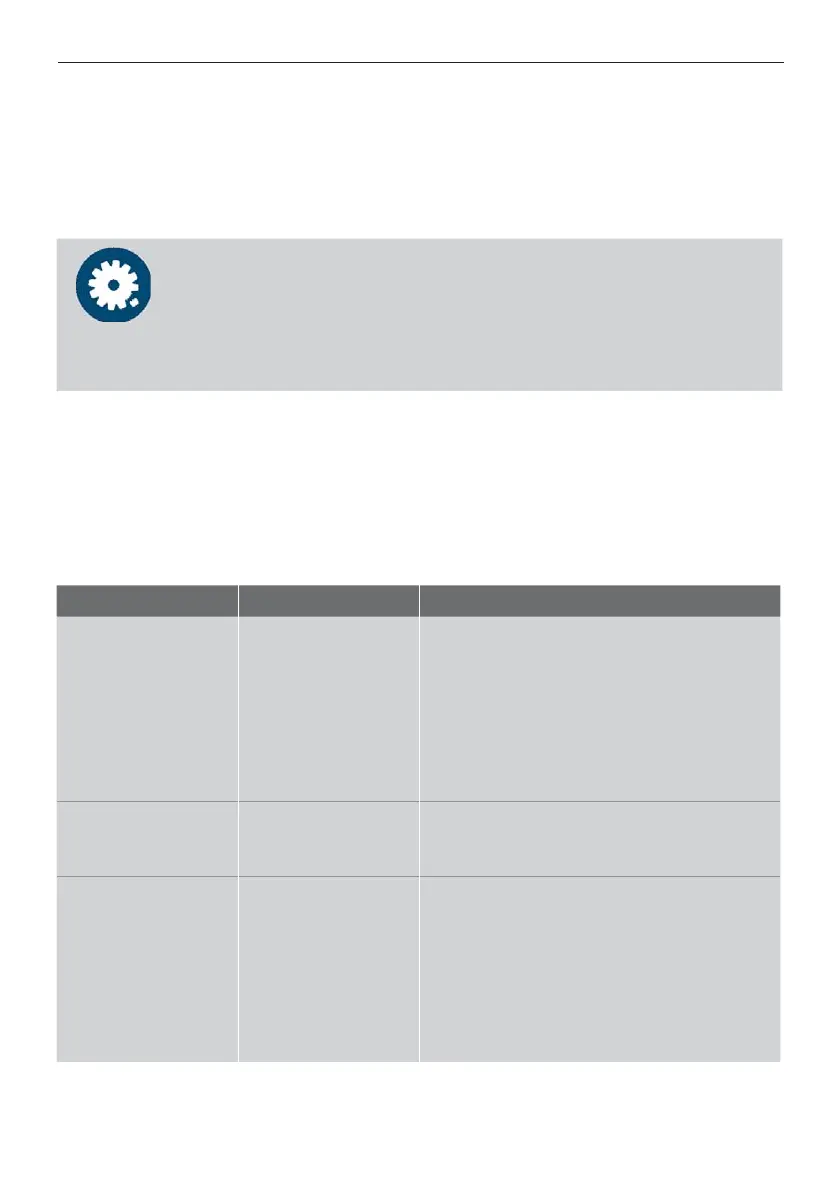
9.2 Possible error causes
Malfunction Possible cause Remedy
Unusual deviations
of measuring values
compared to last
measured values
Contamination or
wrong sensor
Check the measuring cell for
contamination and clean it if necessary.
Check if the selected sensor and the
measuring method correspond with the
attached detector head (adapter).
à Switch off the device, plug in the
detector head anew, switch on the device
again and repeat measuring.
Light intensity
meter cannot be
switched on
Batteries are empty Check if the polarity is correct. Insert new
batteries if necessary.
No measuring value
is displayed
Display:
0.0, UL or OL
Check if the detector head is plugged in
properly.
Check if the selected sensor and the
measuring method correspond with the
attached detector head (adapter).
Check the measuring line for damage.
Check by means of another detector
head if the display unit is functional.
If none of the above causes apply, but the light intensity meter will still not work properly,
send the device to DELO without delay.



 To Next Page