11
7. Programming
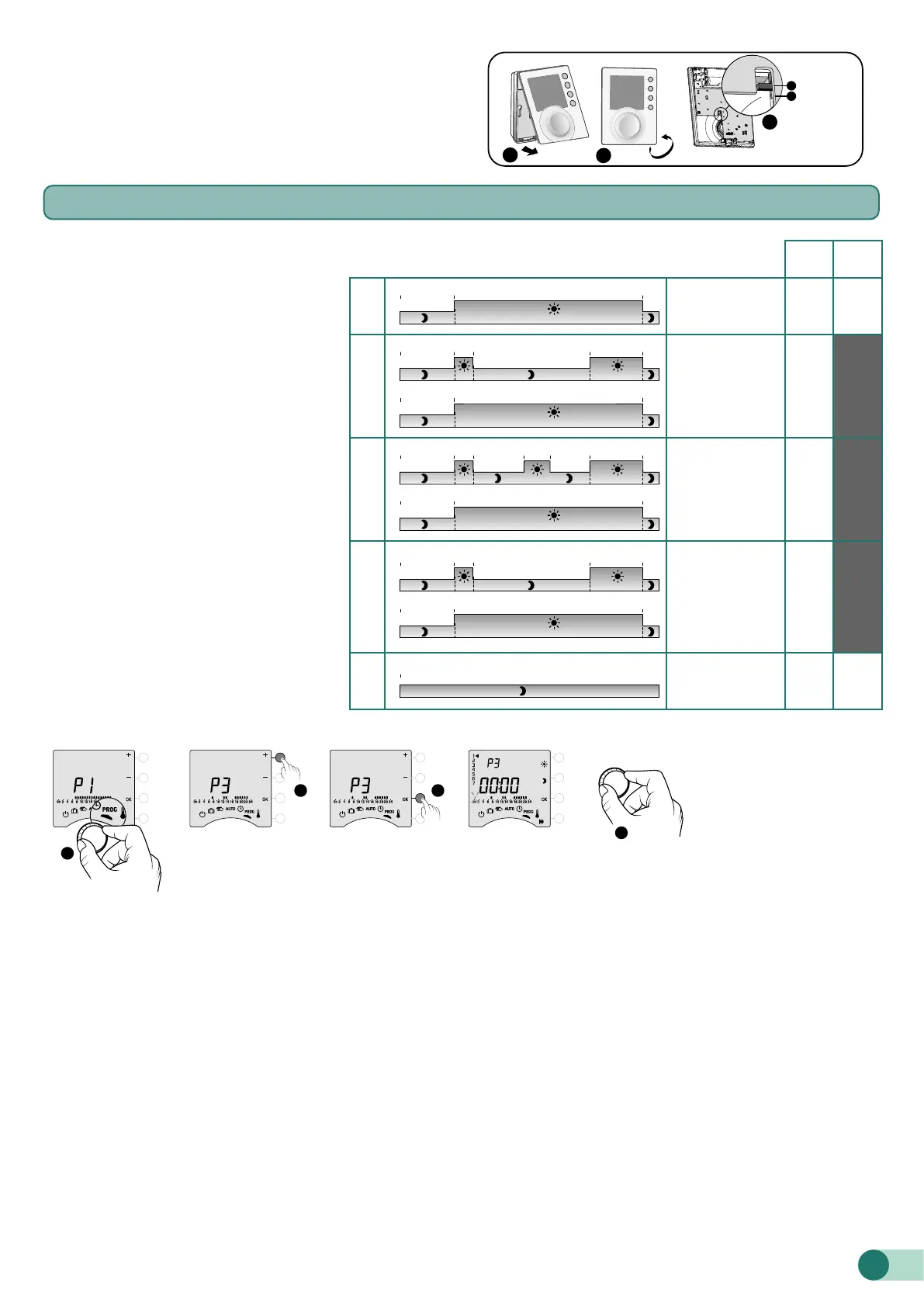
You can opt for weekly (PROGx7) or daily (PROGx1)
programming.
You can select your choice using the switch on the back of
the device.
You can programme in increments of one hour, 30 minutes
or 15 minutes (menu 1-02).
There are two phases of programming :
❶ Quick programming:
Choose from among the pre-set
programmes available (P1 -> P5) and apply
it (see table).
For daily programmes (PROG x1), only P1
and P5 are available.
❷ Programme customisation :
Customise the programme prole applied
to a day based on preferences.
7.1 Quick programming
PROG
x7
PROG
x1
P1
7.00 8.000.00 17.00 23.00
7.00 8.000.00 12.00 14.00 17.00 23.00
0.00
7.00
0.00 23.00
Monday -> Sunday
4 4
P2
7.00 8.00
0.00
17.00 23.00
7.00 8.000.00 12.00 14.00 17.00 23.00
0.00
7.000.00 23.00
7.00 8.000.00 17.00 23.00
7.00 8.000.00 12.00 14.00 17.00 23.00
0.00
7.00
0.00 23.00
Monday -> Friday
+
Saturday, Sunday
4
P3
7.00 8.000.00 17.00 23.00
7.00 8.00
0.00
12.00 14.00 17.00 23.00
0.00
7.000.00 23.00
7.00 8.000.00 17.00 23.00
7.00 8.000.00 12.00 14.00 17.00 23.00
0.00
7.00
0.00 23.00
Monday -> Friday
+
Saturday, Sunday
4
P4
7.00 8.00
0.00
17.00 23.00
7.00 8.000.00 12.00 14.00 17.00 23.00
0.00
7.000.00 23.00
7.00 8.000.00 17.00 23.00
7.00 8.000.00 12.00 14.00 17.00 23.00
0.00
7.00
0.00 23.00
Monday, Tuesday,
Thursday, Friday
+
Wednesday,
Saturday, Sunday
4
P5
7.00 8.000.00 17.00 23.00
7.00 8.000.00 12.00 14.00 17.00 23.00
0.00
Monday -> Sunday
4 4
EXIT
1
2 3
4
❶ Turn the dial to PROG.
❷ Choose the pre-programming to apply
(see table) by successively pressing + or -.
❸ Conrm with OK.
❹ To exit the mode, turn the dial.
1
3
2
PROG x 1
PROG x 7
A
B
An pre-heatfunction is available on this product (see § Pre-heat function).












 To Next Page