19
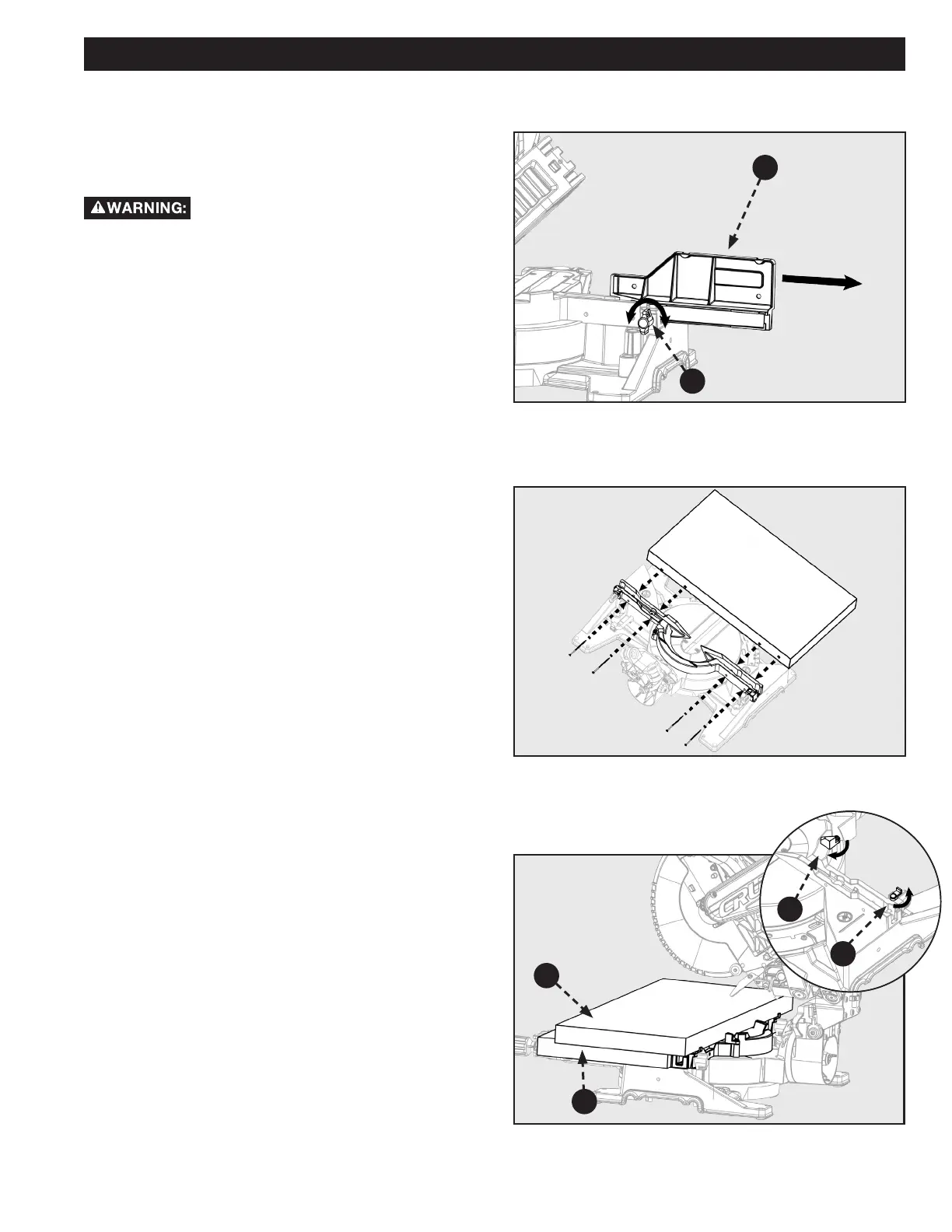
Figure 26
Figure 28
X
X
INCREASE CUT CAPACITY
This saw is designed to allow for large capacity cuts up to (2”
x 16”). In order to make these cuts you will need to configure
your saw appropriately.
Do not use an auxiliary table board which will
not fully support the workpiece during cutting operation.
1. Loosen the fence lock knob (A). Slide the upper
(adjustable) fence completely out of its track and set to
the side. See Figure 26.
2. Flip the support tabs (C & D) into position. Tabs
(D) are on both the left and right sides of the lower
(xed) fence. Tab (C) only exists on the right side of
the lower(fixed) fence. These will function as your
workpiece backstop. See Figure 27.
3. You will need to add an auxiliary table board to (E)
support your large capacity workpiece (F). Place the 2”
x 12” auxiliary table board (E) onto the saw table and
against the lower (xed) section of the saw fence. Make
sure the board is securely positioned against the lower
(xed) fence.
NOTE: Use wood screws to secure the auxillary table board
(D) to the lower (xed) fence. See Figure 27.
4. Use the support tabs (C & D) to secure your workpiece
before making any cuts.
OPERATION
B
A
TIGHTEN
LOOSEN
C
D
E
F
Figure 27


 To Next Page