DVP-ES2/EX2/EC5/SS2/SA2/SX2/SE&TP Operation Manual - Programming
-184
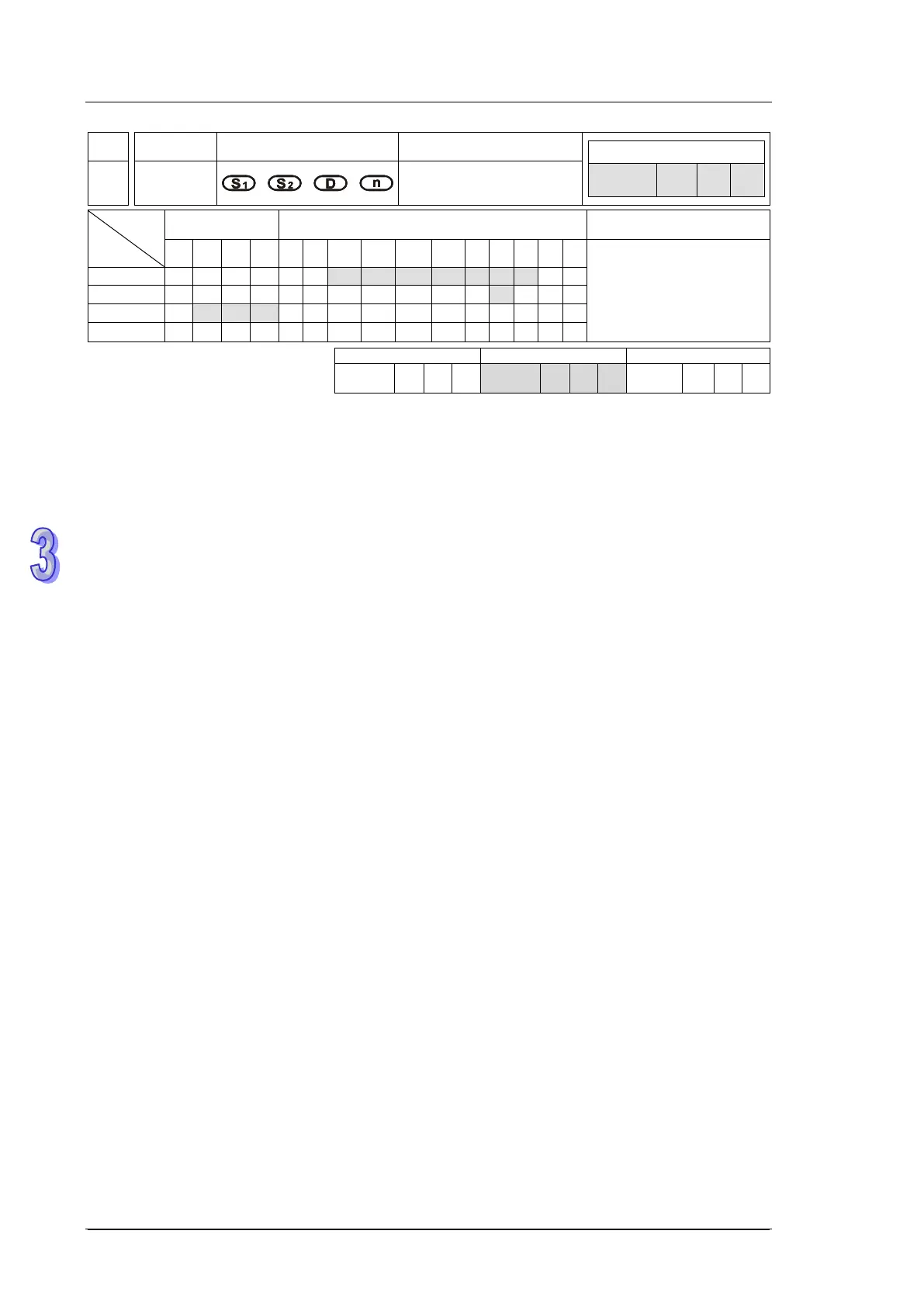
API
Mnemonic
Operands Function
63 INCD
Incremental drum
sequencer
Type
OP
Bit Devices Word devices Program Steps
X Y M S K H KnX
KnY
KnM
KnS
T C D E F
INCD: 9 steps
SS2
SX2
SS2
SX2
SS2
SX2
Operands:
S
1
: Start device of the data table S
2
: No. of counter D: Start device for indicating comparison
result n: Number of data to be compared (n: 1~64)
Explanations:
1. INCD instruction creates various output wave forms according to the current value of the
counter designated by S
2.
and S
2.
+1. Usually, the instruction is applied for relative cam control
2. The current value in S
2
is compared with the set points specified by S
1
(n consecutive devices)
When value in S
2
reaches the first set point, S
2.
+1 counts once for indicating the number of
present section, associated D turns ON, and S
2
is reset then counts up from 0 again. When the
drive contact of INCD instruction is OFF, the content in S
2.
and S
2.
+1 will be cleared.
3. When operand S
1
uses KnX, KnY, KnM, KnS patterns, Kn should be K4 for 16-bit instruction.
4. Operand S
2
should be C0~C198 and occupies 2 consecutive counters.
5. When the comparison of n data has been completed, the execution completed flag M1029 = ON
for one scan cycle.
Program Example:
1. Before the execution of INCD instruction, use MOV instruction to write all the set values into
D100 ~ D104 in advance. D100 = 15, D101 = 30, D102 = 10, D103 = 40, D104 = 25.
2. The current value of counter C10 is compared against the set-point value of D100~D104. Once
the current value is equal to the set-point value, C10 will be reset and count up from 0 again.
Meanwhile C11 counts once for indicating the number of present section
3. When the content of C11 increase 1, M10~M14 will be ON sequentially. Please refer to the
following timing diagram.
4. When the comparison of 5 data has been completed, the execution completed flag M1029 = ON
for one scan cycle and C11 is reset for next comparison cycle.



 To Next Page