11
Chapter 3 Operation Panel
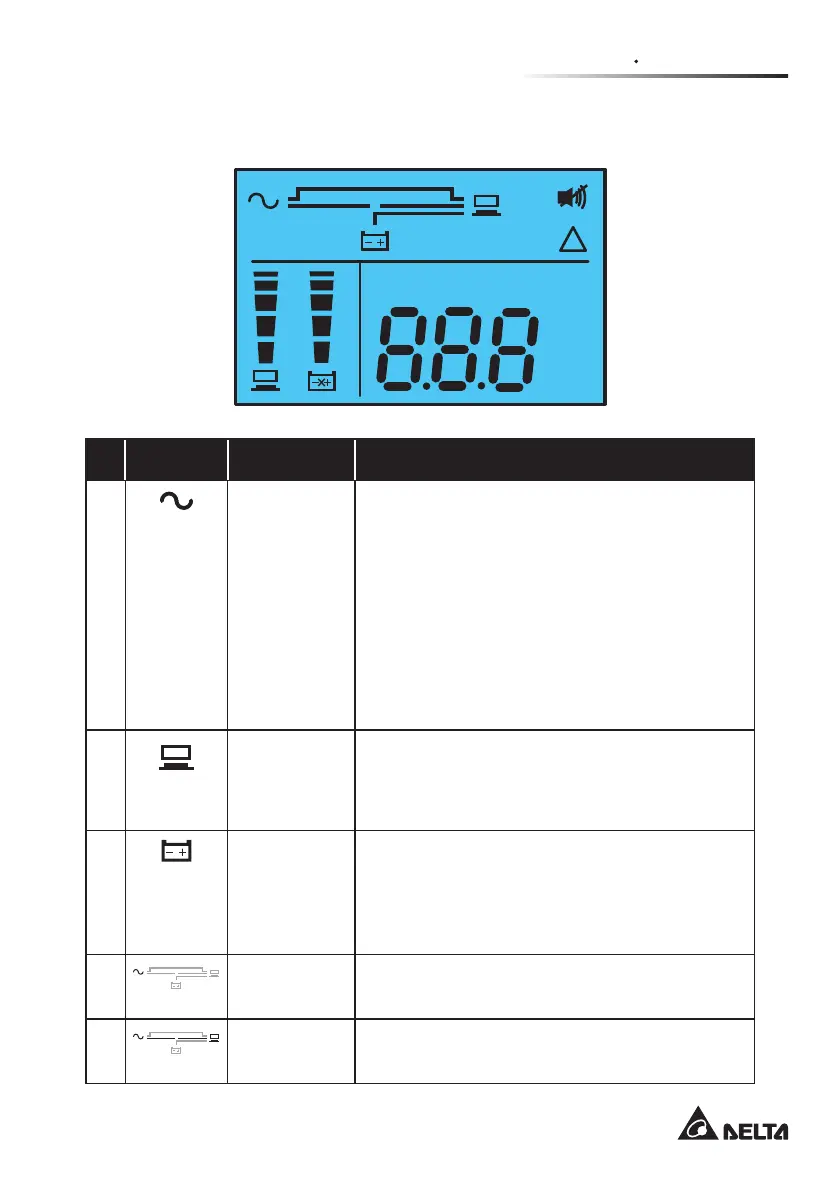
3.3 LCD Display
Hz
KW
KVA
V
MIN
%
IN OUT
SET TEST BATT LOAD
RUN TIME
!
°C
No. Icon Naming Description
1
AC Icon Indicates the input source status.
1. ON: The AC input is within the acceptable
bypass range.
2. Flashing: The AC input is out of the accep-
table bypass range but is still sufcient to let
the unit operate in on-line mode.
3. OFF: The AC input is out of the acceptable
bypass range and is not sufficient to let the
unit operate in on-line mode.
2
Output Icon Indicates the output status.
1. ON: There is output.
2. OFF: There is no output.
3
Battery
Power Icon
Indicates the battery power status.
1. ON: Battery power is on.
2. OFF: Output is not supplied by the battery
power.
4
Standby
Mode Graph
Illuminates when the UPS is operating in stand-
by mode.
5
Online Mode
Graph
Illuminates when the UPS is operating in on-line
mode.








 To Next Page