Chapter 12 Description of Parameter Settings|CFP2000 Series
12.1-06-20
40
50
60
70
80
90
100
25 30 35 40 45 50
R
a
t
i
o
(
%
)
Ambient Temperature (℃)
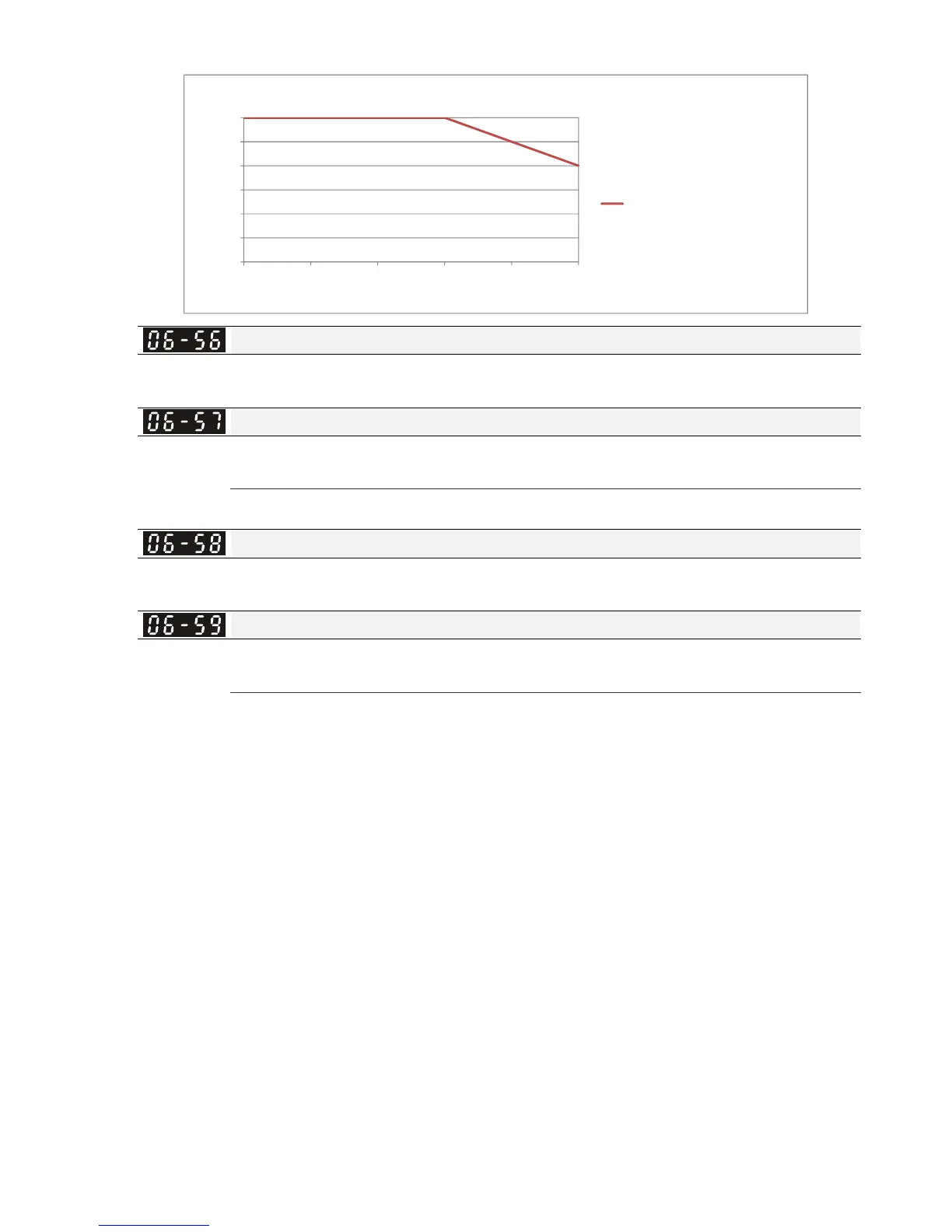
Derating for Ambient Temperature
Operating at Normal Duty Condition /
Light Duty(Derating Fc)
ULOpenType_sidebyside
UL TypeI
PT100 Detection Level 1
Factory Setting:5.000
Settings 0.000~10.000V
PT100 Detection Level 2
Factory Setting: 7.000
Settings 0.000~10.000V
Make sure Pr. 06-57 > Pr.06-56.
PT100 Level 1 Frequency Protection
Factory Setting: 0.00
Settings 0.00~599.00 Hz
PT100 activation level delay time
Factory Setting: 60 sec
Settings 0~6000 sec
PT100 operation
(1) Use AVI1, AVI2 or ACI(set to 0-10V) for analog voltage input and select PT100 mode.
(2) Choose one of the analog voltage input type: (a)AVI 1(Pr.03-00=11), (b) AVI2 (Pr.03-02=11),
or (c) ACI (Pr.03-01=11 and Pr.03-29=1).
(3) When using ACI as analog voltage input, set Pr.03-01=11 and Pr.03-29=1. Then switch
SW2 to 0-10V on the I/O control terminal block.
(4) Set Pr.03-23=23 and AFM2 to constant current output. Switch AFM2 (SW2) to 0-20mA on
the I/O control terminal block and set constant current output to 9mA by setting Pr.03-33=45.
The AFM2 constant output current is 20mA * 45% = 9mA.
(5) Pr.03-33 is for adjusting the constant voltage or constant current of AFM2, the setting range
is 0~100.00%.
(6) There are two types of action level for PT100. The diagram of PT protecting action is shown
as below:




 To Next Page