Chapter 12 Description of Parameter Settings|CFP2000 Series
12.1-12-1
12 Pump Parameters
This parameter can be set during operation.
Circulative Control
Factory Setting: 0
Settings 0: No operation
1: Fixed Time Circulation (by time)
2: Fixed Quantity
3: Fixed quantity control
4: Fixed Time Circulation + Fixed Quantity Circulation
5: Fixed Time Circulation + Fixed Quantity Control
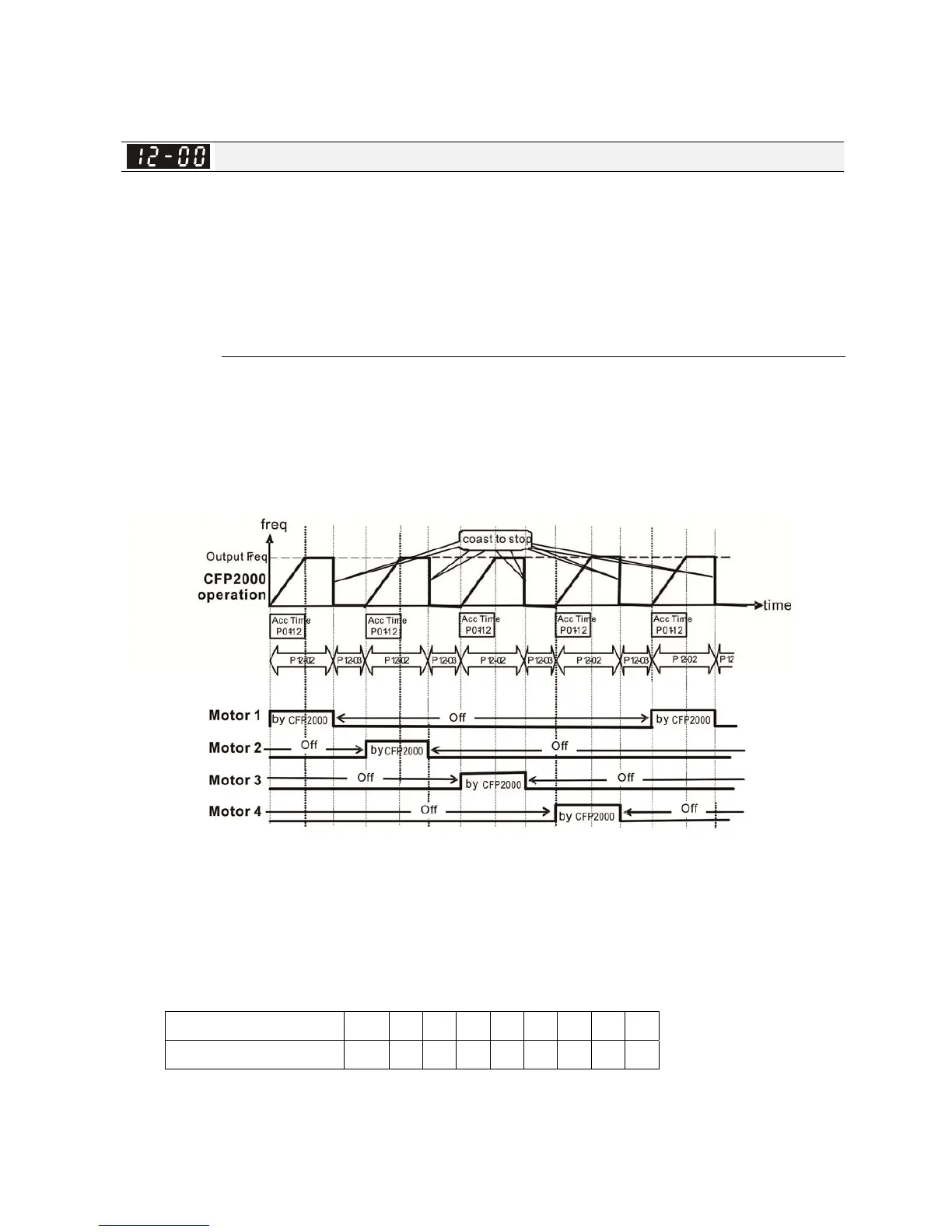
In this mode, CFP2000 can control up to 8 motors at a time. The total number of the motors can
be determined by Pr.12-01. In accordance with the Fixed Time Circulation of Pr12-02, you can
adjust the switching time between Start/Stop of each motor. That means when an operating motor
reaches the time setting of Pr12-02, CFP2000 will stop that motor. Then after the delay time
setting of Pr12-03, next motor will start operating. See diagram below.
Diagram 12-1: Sequential Diagram of the Fixed Time Circulation (by time)
Disable Motors’ Output
Set the Multifunction Input Commands as Disable Motors’ Output can stop corresponding
motors. The settings are:
P02-01~P02-06= 60 61 62 63 64 65 66 67 68
Disable Motors’ Output ALL 1 2 3 4 5 6 7 8
When a motor’s output is disabled, this motor will park freely.




 To Next Page