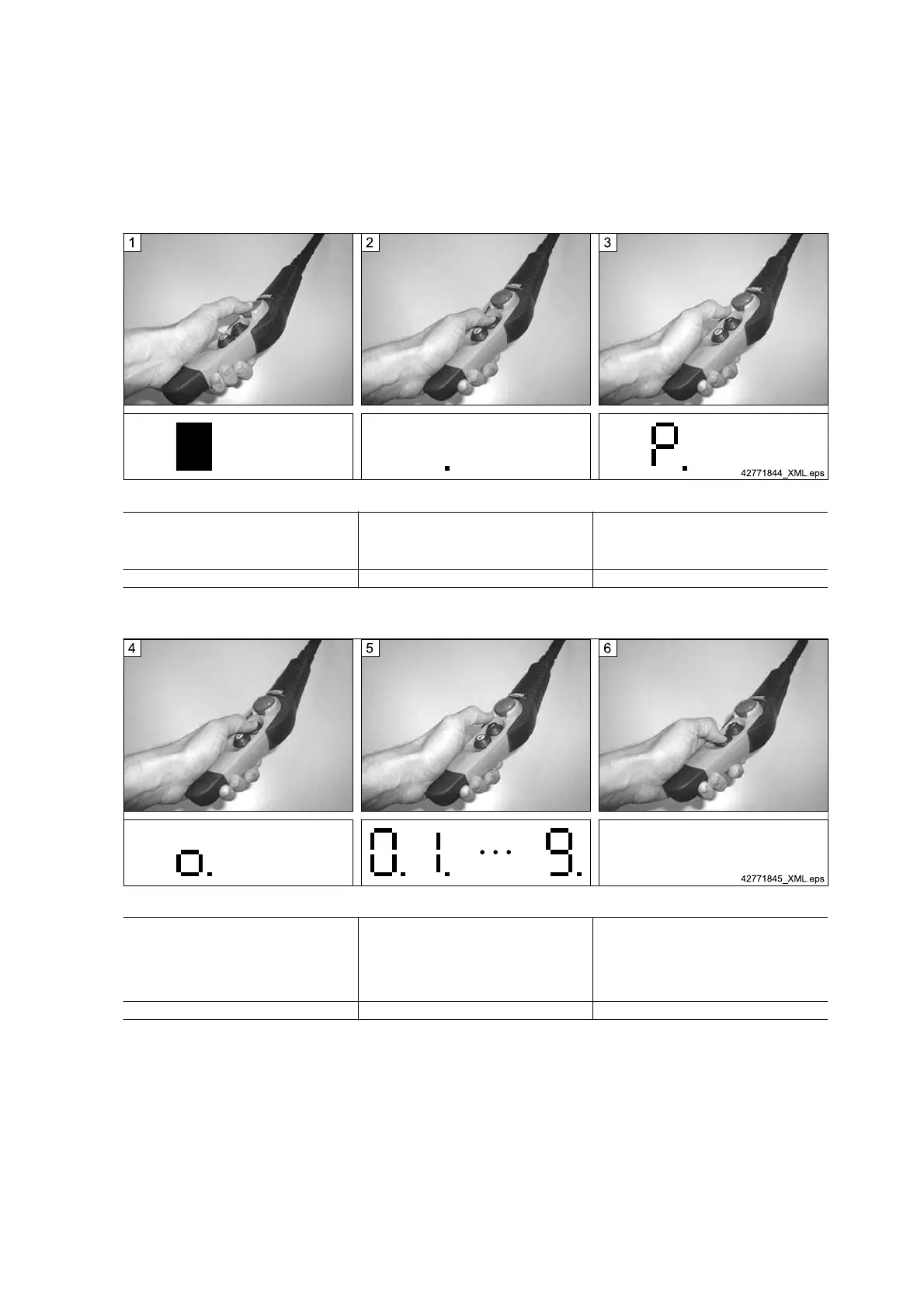
5.10.4 Starting parameter setting mode
Fig. 32
1st step:
Actuate “Emergency stop”.
2nd step:
Press and hold down the “Lift” key and unlock
the emergency stop. Wait for approx. 10 sec‐
onds.
3rd step:
When “P.” is displayed, release the “Lift” key.
7-segment display: (display dark) 7-segment display: (display spot) 7-segment display: P.
Tab. 36
Fig. 33
4th step:
“P.” extinguishes after approx. 2 seconds. Press
the “Lift” key and hold down again until “o.” (for
O.K.) is displayed.
5th step:
Release key. The parameter programming
mode is actice now.
When the parameter programming mode has
been activated, figures “0.” – “9.” are displayed
successively for 2 seconds, each.
6th step:
Press the “Lower” key to move faster through
the menu items.
Each figure represents a parameter, see
⇒ "Meaning of parameters", Page 55.
7-segment display: o. 7-segment display: 0. → 1. ··· 9. 7-segment display:
Tab. 37
56
21480244/181209



 To Next Page