Operating MATRIX control panel MATRIX control panel
32 PR-2011-0110-GB • Subject to modifications • R9-03-2016
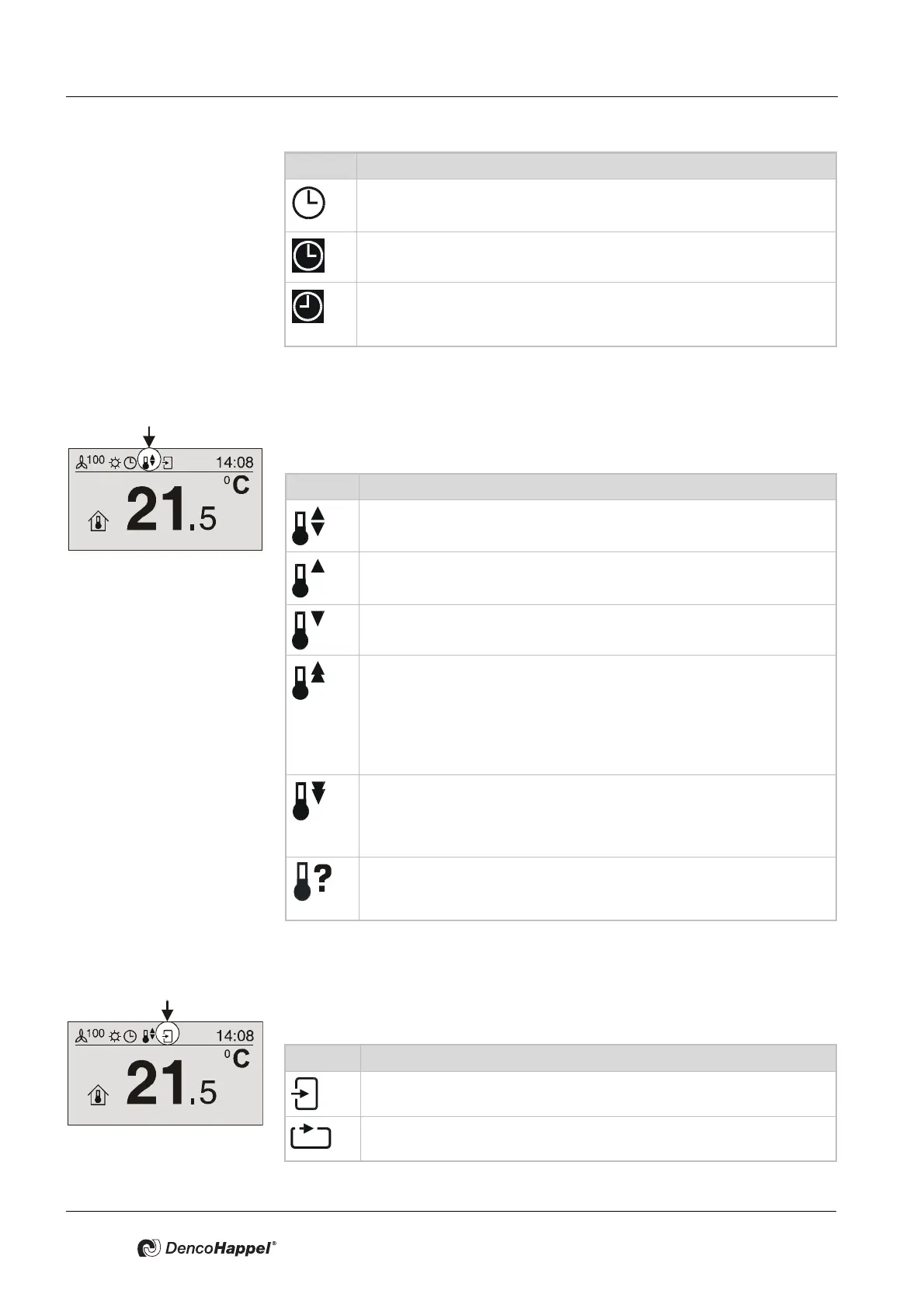
7.3.5 “Controller mode” icon
With the “Controller mode” icon the current operating mode setting of the control
system is displayed by one of six icons.
7.3.6 Icon "Recirculating air/Outside air control"
With the “Recirculating-air/Outside-air control” icon the current operating mode
setting of the air control system is displayed by one of two icons.
Icon Time Control
The “Clock timer” operating mode is set. The control is carried out
according to the times set in “Clock timer”.
A clock module is available in the network: The control is carried out
according to the setting via the clock module.
A clock contact through DI module (MATRIX.DI) is active:
The control is carried out according to the setting via the MATRIX.DI
module.
Icon Controller mode
“Automatic” controller mode: cooling and heating permitted. The con-
trol automatically works according to the pre-set values.
“Heating” controller mode: only heating is permitted. The control
works automatically according to the pre-set values.
“Cooling” controller mode: only cooling is permitted. The control
works automatically according to the pre-set values.
"Heating phase": the control works with the normal controller param-
eters, however a connected mixing-air damper remains closed. The
warmup phase is activated for the time that can be set via the MA-
TRIX.PC service tool before switching to normal operation (day oper-
ation). The heating-up phase can be activated only in case of control
by time program. Factory setting: active/10 min.
“Free cooling” controller mode: In the economy mode the room can
be cooled using outside air that is possibly colder. The limit setpoint
is adjustable. The function can be activated only for outside air units.
Factory setting: not active.
“Fast ventilation” controller mode: Irrespective of the settings, the fan
is set to the highest fan speed and the valves are closed. The frost
protection function remains active.
Icon Recirculating-air / Outside-air control
“Outside-air" or "Mixed-air” operating mode is set.
“Recirculating-air” operating mode is set.



 To Next Page