EasyManua.ls Logo

Denon AVC-3000 - Page 14

Denon AVC-3000
66 pages
Print Icon
To Next Page IconTo Next Page
To Previous Page IconTo Previous Page
Loading...
mg
AVC-3000/3000G
14
@
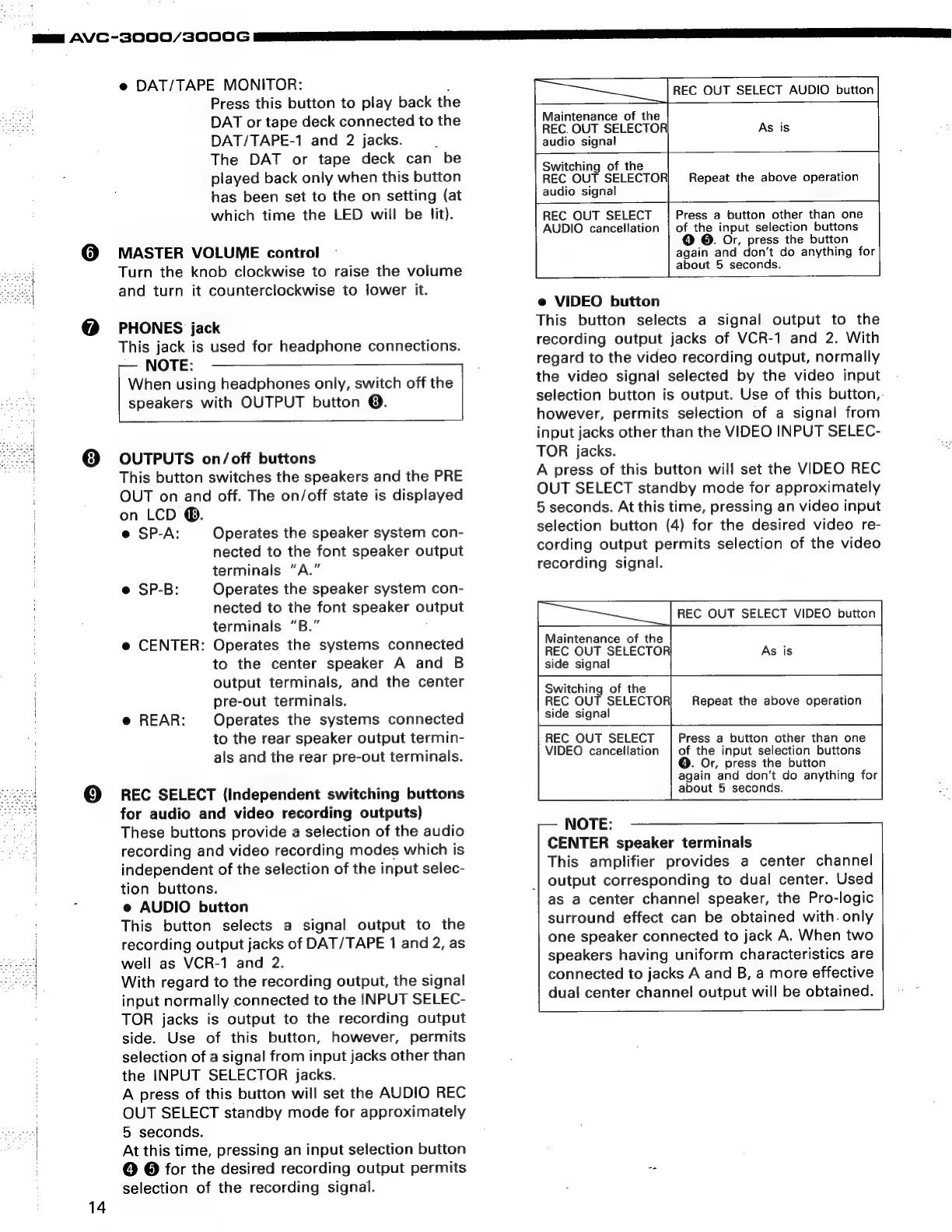
DAT/TAPE MONITOR:
:
Press
this
button
to
play
back
the
DAT
or
tape
deck
connected
to
the
DAT/TAPE-1
and
2
jacks.
;
The
DAT
or
tape
deck
can
be
played
back
only
when
this
button
has
been
set
to
the
on
setting
(at
which
time
the
LED
will
be
lit).
MASTER
VOLUME
control
Turn
the
knob
clockwise
to
raise
the
volume
and
turn
it
counterclockwise
to
lower
it.
PHONES
jack
This
jack
is
used
for
headphone
connections.
NOTE:
When
using
headphones
only,
switch
off
the
speakers
with
OUTPUT
button
@.
OUTPUTS
on/off
buttons
This
button
switches
the
speakers
and
the
PRE
OUT
on
and
off.
The
on/off
state
is
displayed
on
LCD
®.
e@
SP-A:
Operates
the
speaker
system
con-
nected
to
the
font
speaker
output
terminals
“A.”
e
SP-B:
Operates
the
speaker
system
con-
nected
to
the
font
speaker
output
terminals
“B.”
e
CENTER:
Operates
the
systems
connected
to
the
center
speaker
A
and
B
output
terminals,
and
the
center
pre-out
terminals.
Operates
the
systems
connected
to
the
rear
speaker
output
termin-
als
and
the
rear
pre-out
terminals.
@
REAR:
REC
SELECT
(Independent
switching
buttons
for
audio
and
video
recording
outputs)
These
buttons
provide
a
selection
of
the
audio
recording
and
video
recording
modes
which
is
independent
of
the
selection
of
the
input
selec-
tion
buttons.
e
AUDIO
button
This
button
selects
a
signal
output
to
the
recording
output
jacks
of
DAT/TAPE
1
and
2,
as
well
as
VCR-1
and
2.
With
regard
to
the
recording
output,
the
signal
input
normally
connected
to
the
INPUT
SELEC-
TOR
jacks
is
output
to
the
recording
output
side.
Use
of
this
button,
however,
permits
selection
of
a
signal
from
input
jacks
other
than
the
INPUT
SELECTOR
jacks.
A
press
of
this
button
will
set
the
AUDIO
REC
OUT
SELECT
standby
mode
for
approximately
5
seconds.
At
this
time,
pressing
an
input
selection
button
©
@
for
the
desired
recording
output
permits
selection
of
the
recording
signal.
REC
OUT
SELECT
AUDIO
button
ie
Maintenance
of
the
REC.
OUT
SELECTOR
audio
signal
As
is
=
Switching
of
the
REC
OUT
SELECTOR
audio
signal
REC
OUT
SELECT
AUDIO
cancellation
Repeat
the
above
operation
Le
Press
a
button
other
than
one
of
the
input
selection
buttons
@.
Or,
press
the
button
again
and
don’t
do
anything
for
about
5
seconds.
e
VIDEO
button
This
button
selects
a
signal
output
to
the
recording
output
jacks
of
VCR-1
and
2.
With
regard
to
the
video
recording
output,
normally
the
video
signa!
selected
by
the
video
input
selection
button
is
output.
Use
of
this
button,.
however,
permits
selection
of
a
signal
from
input
jacks
other
than
the
VIDEO
INPUT
SELEC-
TOR
jacks.
A
press
of
this
button
will
set
the
VIDEO
REC
OUT
SELECT
standby
mode
for
approximately
5
seconds.
At
this
time,
pressing
an
video
input
selection
button
(4)
for
the
desired
video
re-
cording
output
permits
selection
of
the
video
recording
signal.
REC
OUT
SELECT
VIDEO
button
Maintenance
of
the
REC
OUT
SELECTOR
As
is
side
signal
Switching
of
the
REC
OUT
SELECTOR)
Repeat
the
above
operation
side
signal
REC
OUT
SELECT
Press
a
button
other
than
one
VIDEO
cancellation
|
of
the
input
selection
buttons
@.
Or,
press
the
button
again
and
don’t
do
anything
for
about
5
seconds.
NOTE:
CENTER
speaker
terminals
This
amplifier
provides
a
center
channel
|
output
corresponding
to
dual
center.
Used
as
a
center
channel
speaker,
the
Pro-logic
surround
effect
can
be
obtained
with.
only
one
speaker
connected
to
jack
A.
When
two
speakers
having
uniform
characteristics
are
connected
to
jacks
A
and
B,
a
more
effective
dual
center
channel
output
will
be
obtained.

Related product manuals