EasyManua.ls Logo

Denon AVC-3000 - Page 15

Denon AVC-3000
66 pages
Print Icon
To Next Page IconTo Next Page
To Previous Page IconTo Previous Page
Loading...
aa
a
SI
TERE
AVC-3000/3000G
Emm
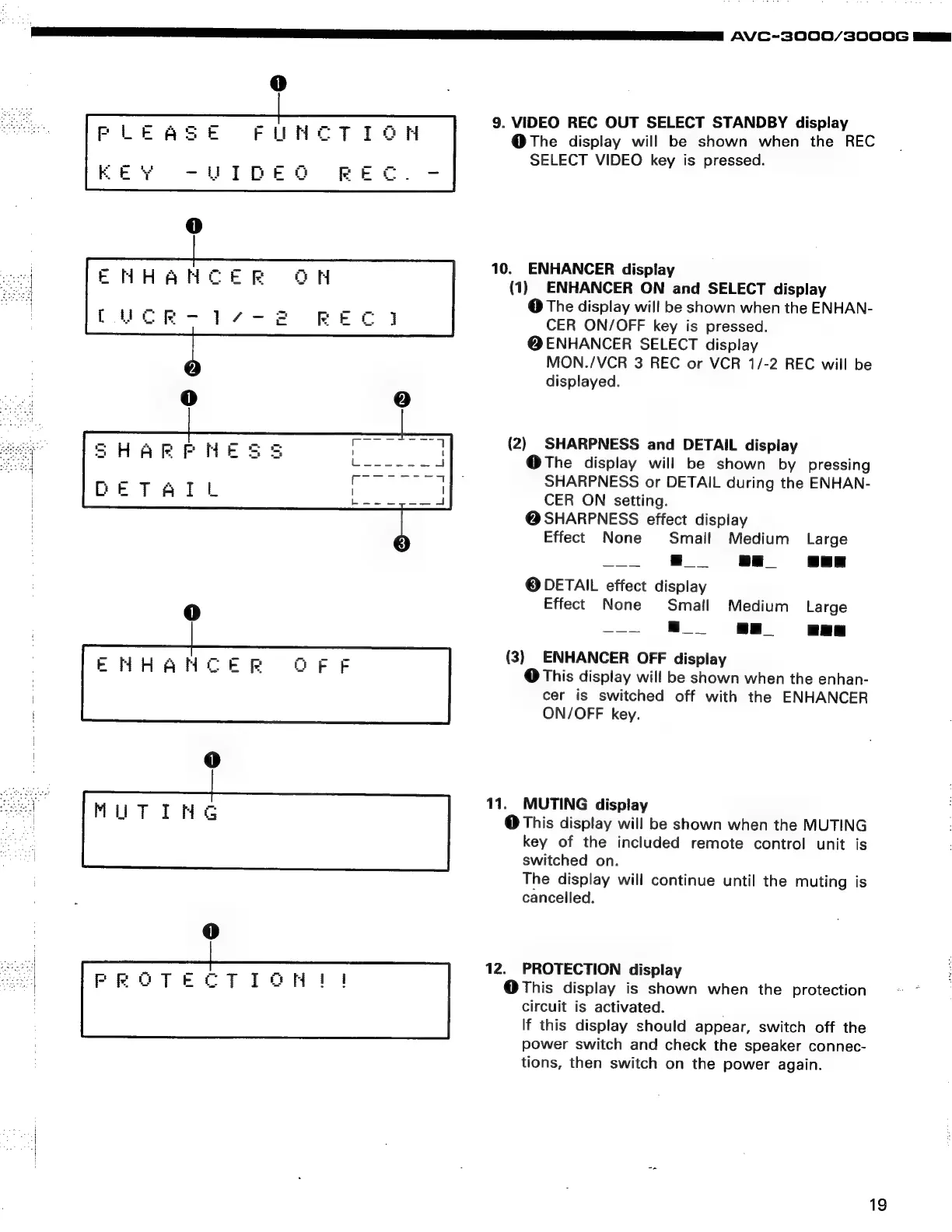
9.
VIDEO
REC
OUT
SELECT
STANDBY
display
@The
display
will
be
shown
when
the
REC
SELECT
VIDEO
key
is
pressed.
10.
ENHANCER
display
(1)
ENHANCER
ON
and
SELECT
display
@
The
display
will
be
shown
when
the
ENHAN-
CER
ON/OFF
key
is
pressed.
@ENHANCER
SELECT
display
MON./VCR
3
REC
or
VCR
1/-2
REC
will
be
displayed.
(2)
SHARPNESS
and
DETAIL
display
@The
display
will
be
shown
by
pressing
SHARPNESS
or
DETAIL
during
the
ENHAN-
CER
ON
setting.
@
SHARPNESS
effect
display
Effect
None
Small
Medium
Large
@
DETAIL
effect
display
Effect
None
Small
Medium
Large
(3)
ENHANCER
OFF
display
@
This
display
will
be
shown
when
the
enhan-
cer
is
switched
off
with
the
ENHANCER
ON/OFF
key.
Ae
11.
MUTING
display
WUTING
@
This
display
will
be
shown
when
the
MUTING
key
of
the
included
remote
control
unit
is
switched
on.
The
display
will
continue
until
the
muting
is
cancelled.
=
12.
PROTECTION
display
@This
display
is
shown
when
the
protection
Bowe
circuit
is
activated.
If
this
display
should
appear,
switch
off
the
power
switch
and
check
the
speaker
connec-
tions,
then
switch
on
the
power
again.
19