10
ENGLISH
8
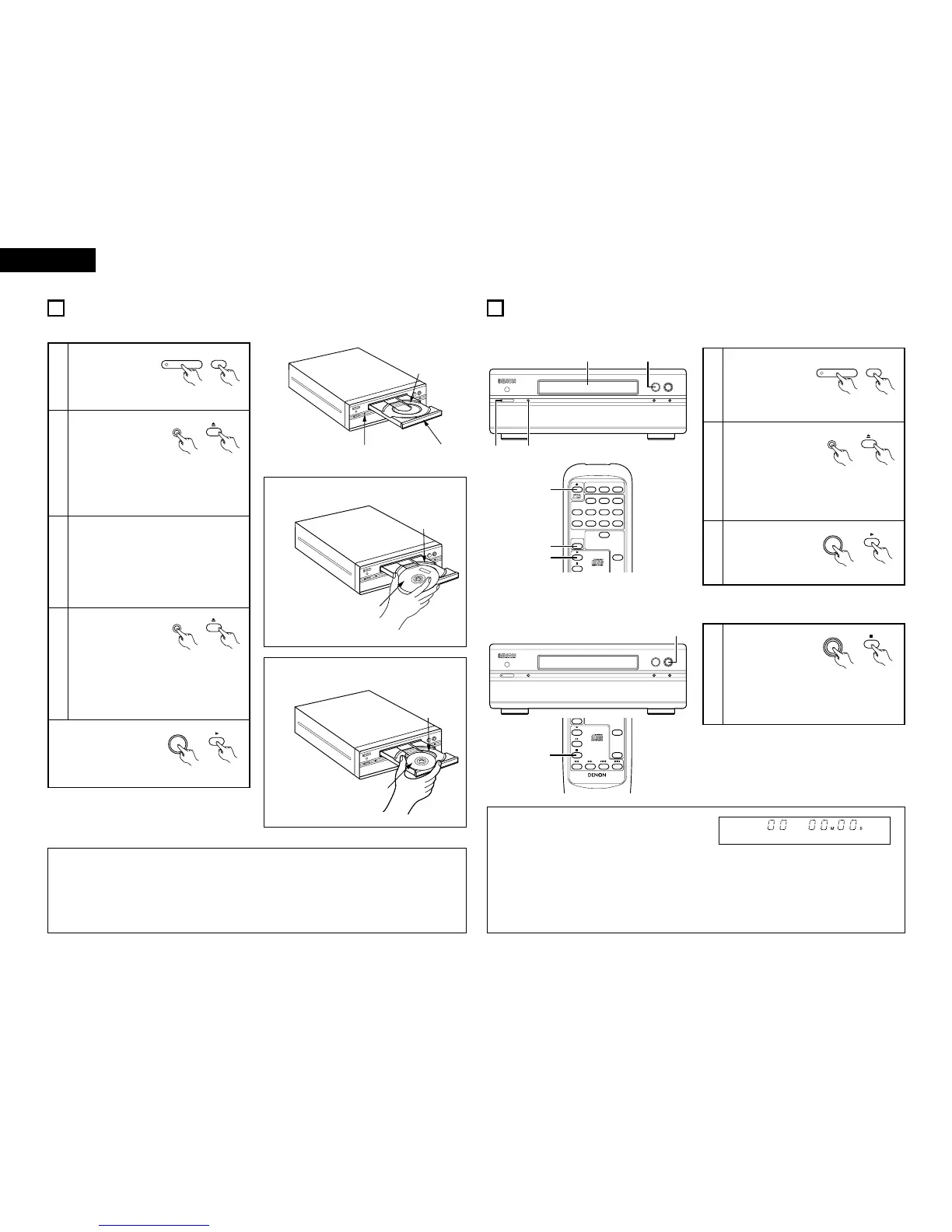
OPENING AND CLOSING THE DISC HOLDER AND
LOADING DISCS
1
Turn on the power.
2
3
Press the disc holder
open/close button.
Being careful not to touch the disc’s data
surface, set the disc in the disc tray with the
labeled side facing up.
✽ Make sure the disc holder is fully open when
loading discs.
✽ Set 12 cm discs in the outer disc guide (Fig.
1), 8 cm discs in the inner disc guide (Fig. 2).
Make sure the disc is flat.
✽ When the play button is
pressed after a disc is set
on the disc tray, the disc
holder closes and
playback starts.
NOTES:
•
Be sure to turn the power on when opening and closing the disc holder.
•
If your finger or another object should get caught in the disc holder, stay calm and press the disc holder open/close
button (
5 ).
•
Do not put foreign objects in the disc holder. Doing so could result in damage.
•
Do not press on the disc holder when the power is turned off. Doing so could damage it.
•
To not press buttons with pencils, etc.
4
Press the disc holder
open/close button to
close the disc holder.
Figure 2
(Main unit) (Remote
control unit)
(Main unit) (Remote
control unit)
(Main unit) (Remote
control unit)
Disc tray
Disc holder open/close button Disc holder
Outer disc
guide
12 cm disc
Inner disc
guide
8 cm disc
• The disc holder opens.
• When pressed in the standby mode, the
power turns on automatically and the disc
holder opens.
• When the disc holder closes, the total number
of tracks on the disc and the total playing time
appear on the display, and the numbers on the
music calendar light up to the number of
tracks on the disc.
NORMAL PLAYBACK
9
(1) Starting Playback
1
Turn on the power.
(2) Stopping Playback
1
During playback, press
the stop button.
• Playback stops.
NOTES:
•
Zeros are displayed if no disc is loaded or if the disc is
loaded upside-down.
•
The total remaining time and the remaining time per track
are not displayed if the disc data cannot be read properly due to scratches or dirt on the disc. In this case, some
time may be required for finding the beginnings of tracks, etc.
•
When the disc holder open/close button (
5 ) or play button ( 1 ) is pressed in the standby mode, the power turns
on, the disc holder closes and the play mode is set.
•
Do not use discs with cellophane tape on them, rental discs on which there is glue seeping out from under the
label, or discs on which there are traces of labels that have been peeled off. If such discs are loaded, they may get
stuck inside the player and cause damage.
✽ Playback also stops automatically after the
last track on the disc has been played.
2
3
Press the play button.
• Playback starts.
✽ For instructions on loading discs, refer to
“OPENING AND CLOSING THE DISC
HOLDER AND LOADING DISCS” (Page 10)
Load the disc.



 To Next Page