14
ENGLISH
q
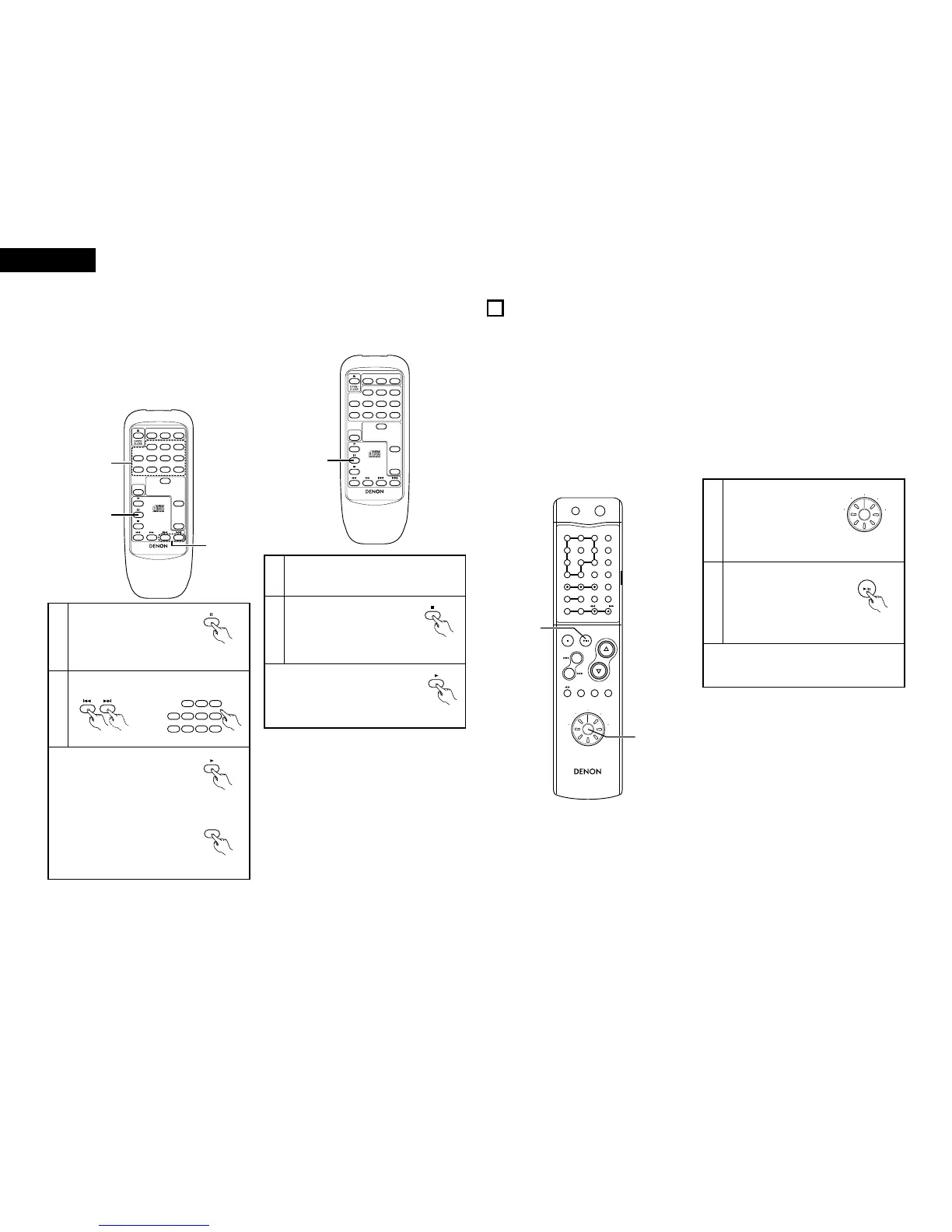
Finding the beginning of a track directly
w
Finding the beginning of a track using the
programmed play mode
2 Use this function to set the pause mode at the
beginning of a track with the direct search operation,
for example when you want to record that track onto a
cassette tape or mini-disc.
1
Press the pause button.
2
✽ To start playback, press the play
button.
✽ To perform this operation during
programmed playback, first press
the direct button to cancel the
programmed play mode.
1
Set the programmed play mode.
✽ Refer to page 12.
2
Press the pause button.
✽ The beginning of the first
programmed track is found
and the pause mode is set.
✽ To start playback, press the play
button.
(Remote
control unit)
(Remote
control unit)
(8) Setting the pause mode at the beginning
of a certain track (remote control unit) …………………………………………………
[Pause]
(Remote
control unit)
REMOTE CONTROL UNIT RC-268
CALL PROG DIRECT
REPEAT
RANDOM
TIME
123
567
9
4
8 10 +10
POWER
2
1
2
(Remote
control unit)
SYSTEM FUNCTIONS
11
2 Operation is even easier when the components in the 201SA series are connected to the DCD-201SA with system
connections. (For instructions on connections, refer to the respective operating instructions of pre-main amplifier
(PMA-201SA) or receiver (DRA-201SA).
2 The system functions will only work when the components of the 201SA series are connected. They will not work
with other components.
2 The system function signals for operating the components in the 201SA series are all output from the pre-main
amplifier (PMA-201SA). Thus, when making system connections, be sure to connect the pre-main amplifier (PMA-
201SA) or stereo receiver (DRA-201SA).
(1) System connection
REMOTE CONTROL UNIT RC-268
CALL PROG DIRECT
REPEAT
RANDOM
TIME
123
567
9
4
8 10 +10
POWER
2
(Remote
control unit)
(2) Auto power on function (when connected to the 201SA series components)
2 When the system is set to the standby mode, you can start the playback of disc simply by pressing the play/pause
button.
1
Set the function select
switch on the remote
control to
“CD” position.
(RC-906)
2
Press the play/pause button.
• System’s power turn on and
the function of pre-main
amplifier automatically
switches to “CD”.
And then, the CD starts
playing.
✽ When a CD is loaded with the DCD-201SA in the
standby mode, CD playback can be started simply
by pressing the DCD-201SA’s play button.
RC-906
REMOTE CONTROL UNIT
CLEAR
123
546
789
10
+10
CD SRS
MDTAPECD-R
TUNING
REV.
MODE
Dolby NR
REPEAT
CALL
PROG/
DIRECT
RANDOM
BAND
RDS
DIMMER
TIME/
PANEL
TIME EDIT
SYSTEM
POWER
OFF ON
STOP PLAY
VOLUME
/SELECT
SLEEP MODE
TAPE
FUNCTION
PRESET
+
-
TUNER
CD
CD-R
MD
TAPE
1
2
RC-906 (system remote control unit)
Select the track to be played.
(Remote control unit)



 To Next Page