15
ENGLISH
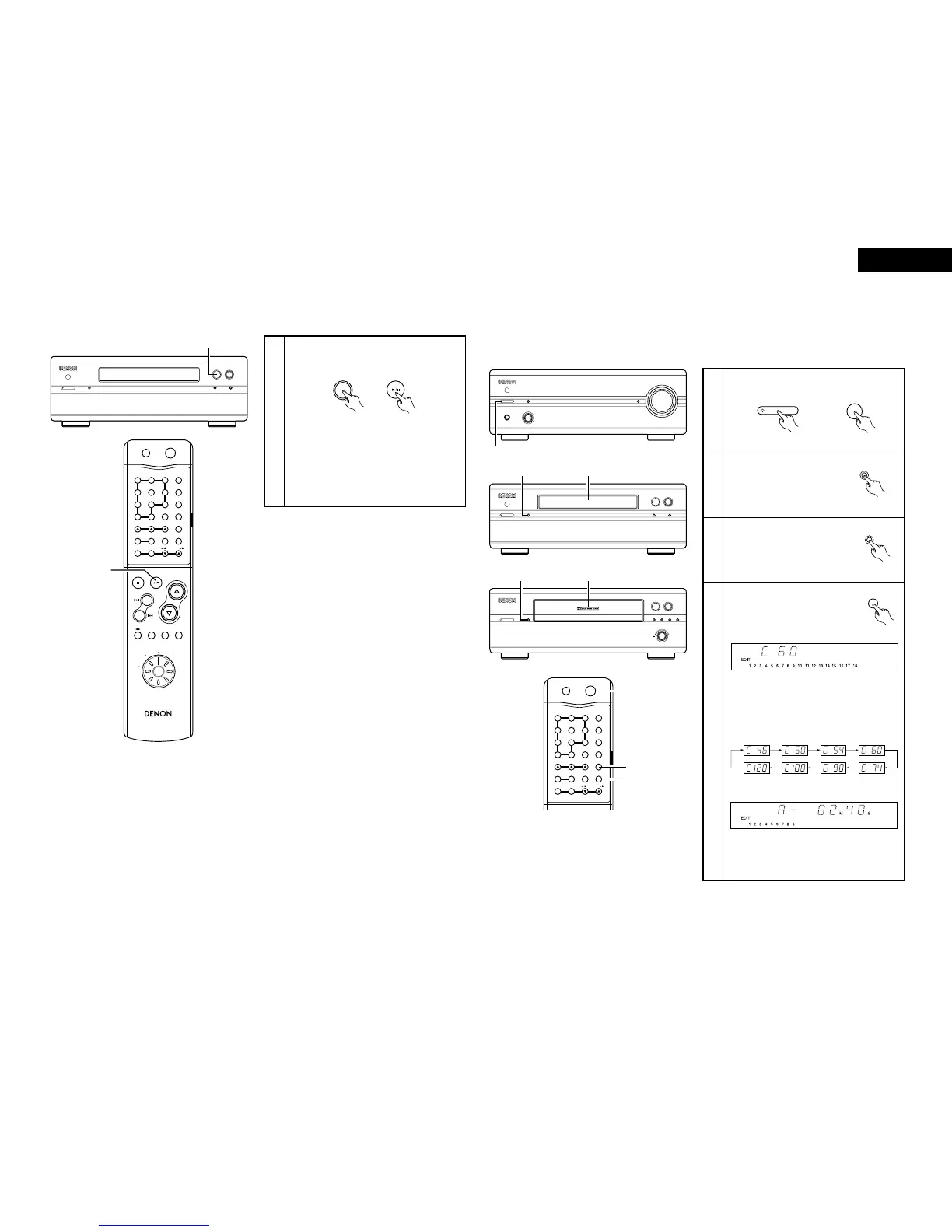
(3) Auto function selection (when connected to the 201SA series)
2 Use this function to switch the function to “CD” and start playing the disc simply by pressing a single button.
1
Press the play/pause button while a unit other
than the DCD-201SA (MD recorder or cassette
deck) is playing.
• Playback on the currently playing unit stops.
At the same time, the pre-main amplifier’s
function switches to “CD” and the CD starts
playing.
✽ To perform this operation from the system
remote control unit, first turn the remote
control unit’s function select switch and set
the function to “CD”.
DCD-201SA (this unit)
(Main unit) (RC-906)
1 3 2
5
ON / STANDBY
C
8/67/9
TRACK
INDEX
TIME
M
S
COMPACT DISC PLAYER DCD-201SA
1
RC-906
REMOTE CONTROL UNIT
CLEAR
123
546
789
10
+10
CD SRS
MDTAPECD-R
TUNING
REV.
MODE
Dolby NR
REPEAT
CALL
PROG/
DIRECT
RANDOM
BAND
RDS
DIMMER
TIME/
PANEL
TIME EDIT
SYSTEM
POWER
OFF ON
STOP PLAY
VOLUME
/SELECT
SLEEP MODE
TAPE
FUNCTION
PRESET
+
-
TUNER
CD
CD-R
MD
TAPE
1
RC-906
(system remote
control unit)
(4) Editing functions (when connected to the PMA-201SA and DRR-201SA)
2 Use this function to automatically edit the tracks on the CD to fit on the tape to be used for recording.
2 The editing function is set from system remote control unit (RC-906) included with the pre-main amplifier (PMA-201SA).
Example: Recording a disc containing 18 tracks with a playing time of 56 minutes onto a 60-minute cassette tape
1
2
Turn on the power of the pre-main amplifier.
✽ The system’s power turns on.
Load the CD, then close
the disc holder.
(PMA-201SA)
Set the function select switch to
“CD” position.
Press the edit button and select
the length of the tape.
• For example, when using a 60-minute (C-60)
tape, press the edit button (EDIT) four times.
(The tape length is the total length of sides A
and B.)
✽ The display switches as follows each time
the edit button (EDIT) is pressed:
• Approximately 3 seconds after the tape length
is set, the remaining time on side A of the
tape appears.
PHONES FUNCTION
VOLUME
SOURCE DIRECT
MODE™ON / STANDBY ¡OFF
INTEGRATED AMPLIFIER PMA-201SA
1
1 3 2
5
ON / STANDBY
C
8/67/9
TRACK
INDEX
TIME
M
S
COMPACT DISC PLAYER DCD-201SA
2
2
ON / STANDBY
12
5
-60 -40 -30 -20 -12 -6 -2 0
L
dB
R
3
DOLBY NR B
DOLBY
NR
REVERSE
/ RESET
CD SRS
REC LEVEL /
0 1
8
6
9
7
+
STEREO CASSETTE TAPE DECK DRR-201SA
4 REC
/ REC MUTE
33
CLEAR
123
546
789
10
+10
CD SRS
MDTAPECD-R
TUNING
REV.
MODE
Dolby NR
REPEAT
CALL
PROG/
DIRECT
RANDOM
BAND
RDS
DIMMER
TIME/
PANEL
TIME EDIT
SYSTEM
POWER
OFF ON
1
4
5
(RC-906)
(DCD-201SA)
3
4
Load the cassette tape onto
which you want to record into
the cassette deck, then close the
cassette holder.
(DRR-201SA)
(RC-906)
d
PMA-201SA (pre-main amplifier)
DCD-201SA
DRR-201SA (Cassette deck)
RC-906 (system remote control unit)



 To Next Page