11
ENGLISH
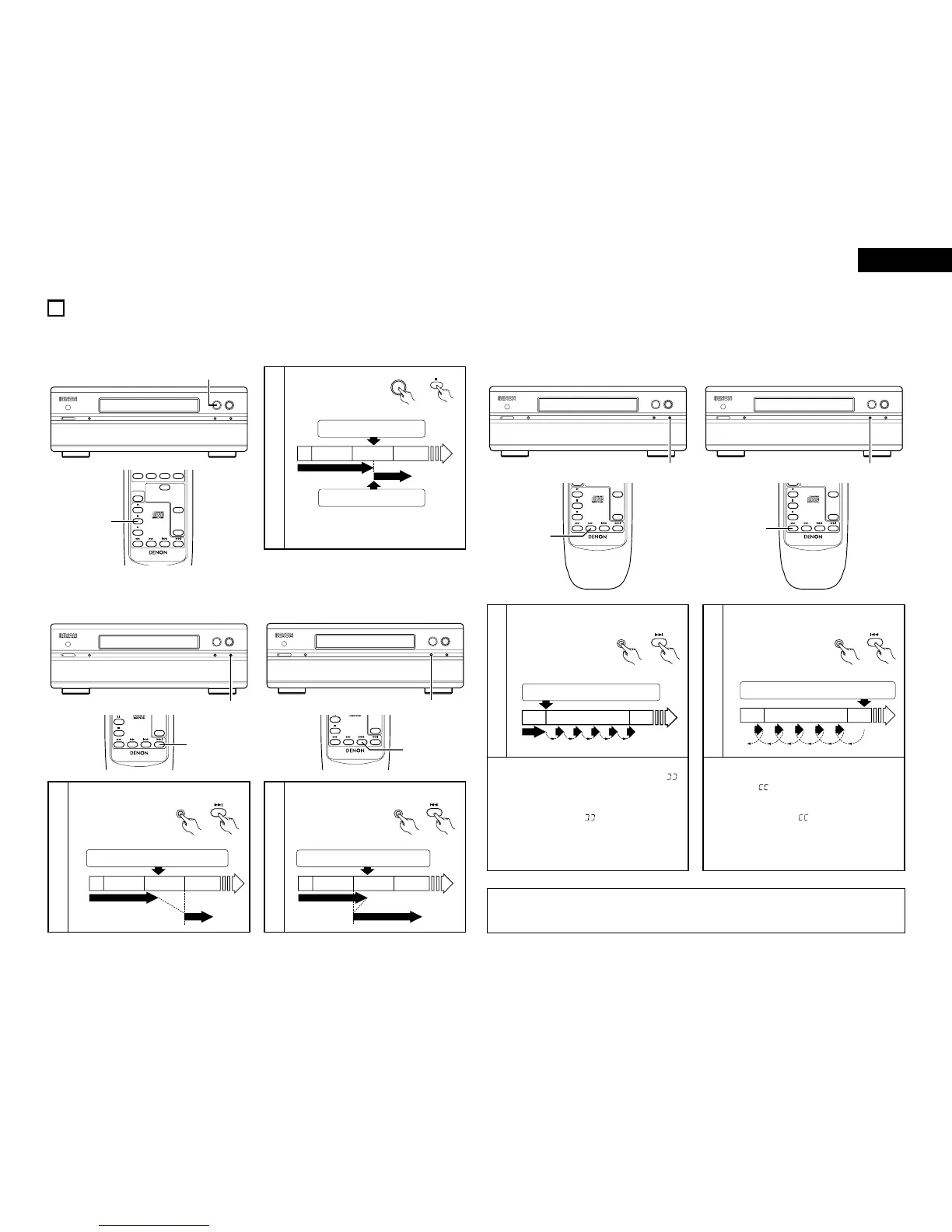
(1) Stopping playback temporarily ……………………………………………………………
[Pause
]
VARIOUS PLAYBACK FUNCTIONS
10
2 Use this function to stop playback temporarily then resume playback from that point.
1
During playback, press
the pause button.
• Playback pauses.
q
Moving ahead to the beginning of the next track
Press the 7/9 or 9 button.
1
w
Moving back to the beginning of the current track
Press the
8/6 or 8 button.
1
(2) Automatic Search
• Press the button more
than once to move
ahead to the beginning
of subsequent tracks.
• Press the button more
than once to move
back to the beginning
of previous tracks.
(Main unit) (Remote
control unit)
Press the play/pause button.
4th track 5th track 6th track
(Pause)
Press the play/pause button.
(Main unit) (Remote
control unit)
Press the 7/9 or 9 button.
2nd track 3rd track 4th track
(Main unit) (Remote
control unit)
Press the 8/6 or 6 button.
3rd track 4th track 6th track
NOTE
:
• The sound may be interrupted momentarily when resuming normal playback from the manual search mode. This is
not a malfunction.
2 Use this function to skip forward or backward while listening to the sound.
This function comes in handy for finding the desired spot in the middle of long tracks.
2 The manual search mode is set when the 7/9 or 8/6 button on the main unit is pressed for over 0.5
seconds in the play or pause mode.
(3) Finding the desired spot while listening to the sound ……………………
[Manual Search]
q
Searching forward
During playback, press and hold in the
7/9
or 7 button.
1
w
Searching backward
• When the button is
released, normal
playback resumes from
that point.
Press and hold in the 7/9 or 9 button.
2nd track
3rd track
4th track
(Playback)
Skip Skip Skip Skip Skip
✽ If the end of the last track on the disc is reached
while pressing the
7/9 or 7 button, “ ”
appears on the display and the manual search
mode is canceled.
To resume playback, press and hold in the
8
/
6
or 6 button until “ ” turns off and the track
number reappears, then perform another operation.
✽ To move ahead at high speed without listening to
the sound, press the
7/9 or 7 button while
in the pause mode.
During playback, press and hold in the 8/6
or 6 button.
1
• When the button is
released, normal
playback resumes from
that point.
Press and hold in the 8/6 or 6 button.
4th track
5th track
6th track
Skip Skip Skip Skip
✽ If the beginning of the first track on the disc is
reached while pressing the
8 /6 or 6
button, “ ” appears on the display and the
manual search mode is canceled.
To resume playback, press and hold in the
7
/
9
or
7
button until “ ” turns off and the track
number reappears, then perform another operation.
✽ To move backward at high speed without listening
to the sound, press the
8/6 or 6 button
while in the pause mode.



 To Next Page
 Loading...




