11
ENGLISH
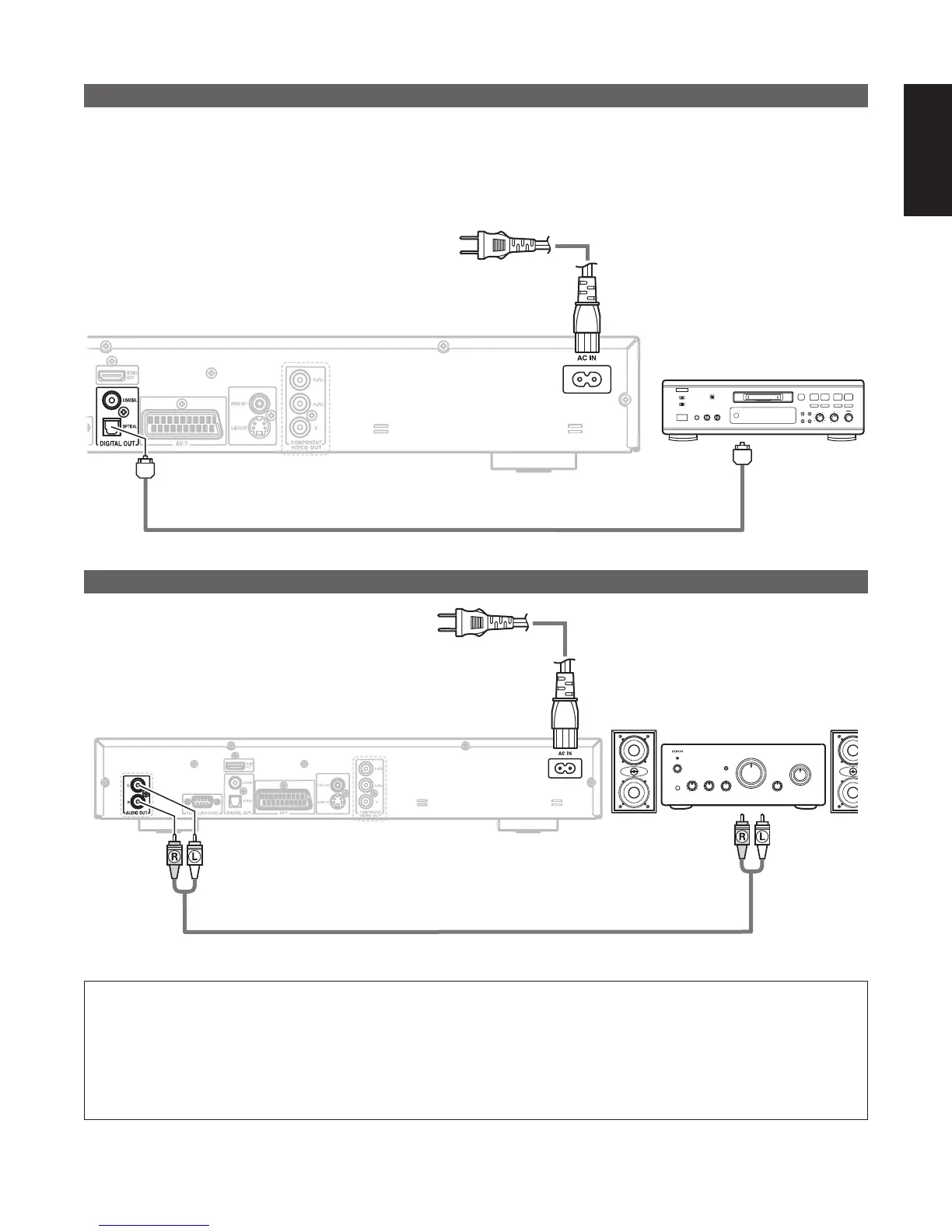
(5) Connecting to a Digital Recorder (MD Recorder, DAT Deck, etc.)
✽ Set the “AUDIO SETUP” default setting as shown below. (See page 26.)
• “DIGITAL OUTPUT” → “PCM”
“96k LPCM OUT” → “96k>48k”
Playing DVDs with incorrect settings may result noise that could damage your ears or the speakers.
89
B
DN-V210/DN-V310
Optical fiber cable
Digital audio input
connector (OPTICAL)
To power outlet
(6) Connecting to a Stereo Component
DN-V210/DN-V310
Stereo component
To power outlet
Analog audio input
connector
NOTES:
• When connecting to a stereo device with 2 audio channels
q For sources recorded in multiple channels, analog signals downmixed into two channels are output. (For sources for
which downmixing is prohibited, only the FL and FR channels are output.)
w Set “96kLPCM OUT” at “AUDIO SETUP” under “SETUP” to “96k>48k” (See page 26). (When set to “96k>48k”,
analog audio signals converted to 48 kHz or less are output for linear PCM sources.)



 To Next Page