Connection to a TV (for video) _:_
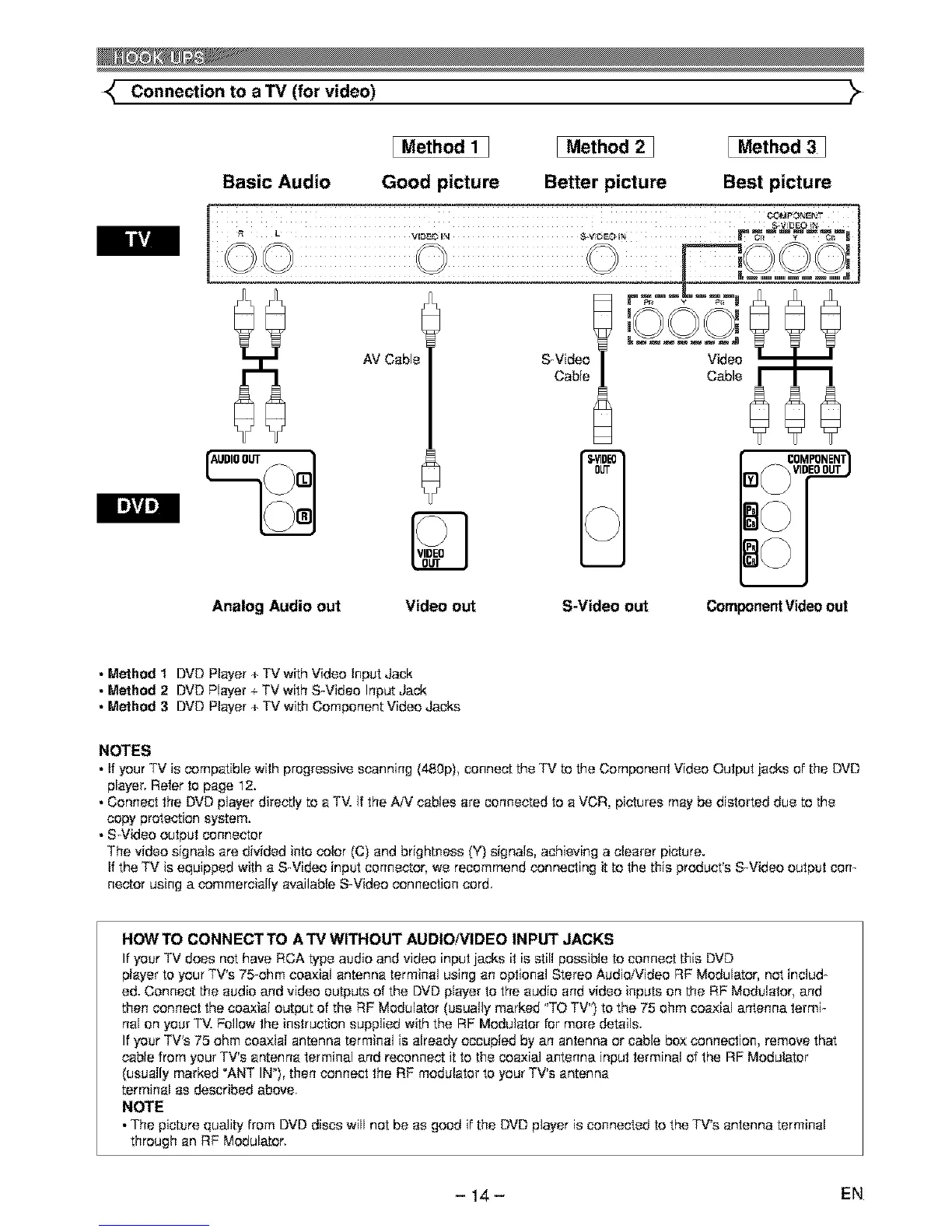
Basic Audio
[ Method 1 ]
Good picture
I Method 2 1
Better picture
I Method 3 ]
Best picture
Analog Audio out
Video out
S-Video out Component Video out
• Method 1 DVD Player + TV with Video Input Jack
• Method 2 DVD Player + TV with S-Video Input Jack
• Method 3 DVD Player + TV with Component Video Jacks
NOTES
• If your TV is compatible with progressive scanning (480p), connect the TV to the Component Video Output iecks of the DVD
player. Refer to page 12.
• Connect the DVD player directly to a TM ff the AiV cables ere connected to a VCR, pictures may be distorted due to the
copy protection system.
• S-Video output connector
The video signals are divided into color (C) end brightness (Y) signals, achieving a clearer picture.
If the TV is equipped with e S-Video input connector, we recommend connecting it to the this product's S-Video output con-
hector using a commercially available S-Video connection cord.
HOWTO CONNECTTO ATV WITHOUT AUDIONIDEO INPUT JACKS
If your TV does not have RCA type audio and video input jacks it is still possible to connect this DVD
player to your TV's 75-ohm coaxial antenna terminal using an optional Stereo Audio/Video RF Modulator, not includ-
ed. Connect the audio and video outputs of the DVD player to the audio end video inputs on the RF Modulator, and
then connect the coaxial output of the RF Modulator (usually marked "TO TV") to the 75 ohm coaxial antenna termi-
nal on your TV. Follow the instruction supplied with the RF Modulator for more details.
If your TV's 75 ohm coaxial antenna terminal is already occupied by an antenna or cable box connection, remove that
cable from your TV's antenna terminal and reconnect it to the coaxial antenna input terminal of the RF Modulator
(usually marked _ANT IN_), then connect the RF modulator to your TV's antenna
terminal as described above
NOTE
• The picture quality from DVD discs will not be as good if the DVD player is connected to the TV's antenna terminal
through an RF Modulator.
- 14- EN



 To Next Page