Tour of the remote control "_
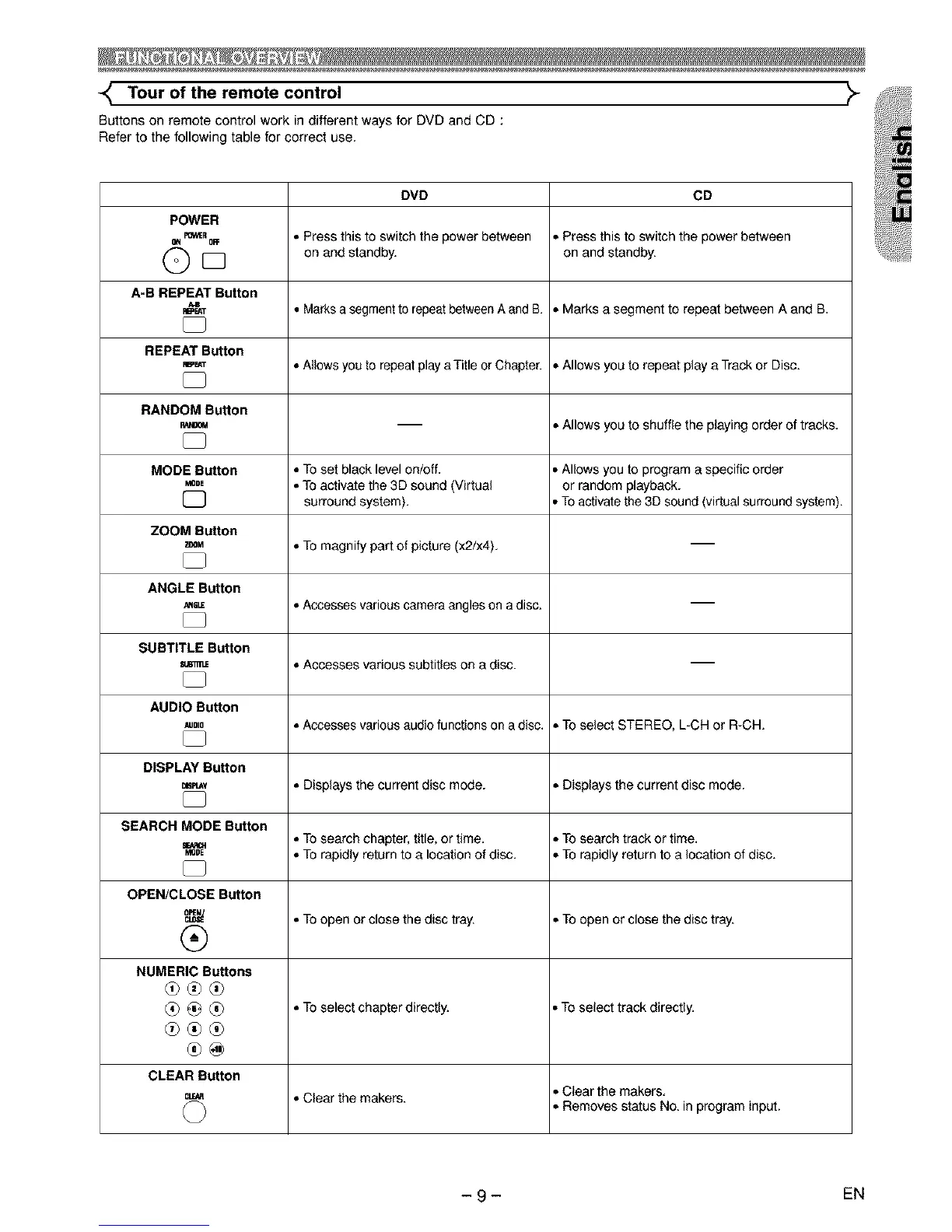
Buttons on remote control work in different ways for DVD and CD :
Refer to the following table for correct use.
DVD CD
POWER
m_,,_R , Press this to switch the power between = Press this to switch the power between
8N OFF
O on and standby, on and standby.
D
A-B REPEAT Button
_T • Marks a segment to repeat between A and B. =MarksasegmenttorepsatbstweenAandB.
REPEAT Button
m_T
_ ) =Allows you to repeat play aTitle or Chapter. = Allows you to repeat play a Track or Disc.
RANDOM Button
-- = Allows you to shuffle the playing order of tracks.
MODE Button ° To set black level on/off. ° Allows you to program a specific order
.ooE , To activate the 3D sound (Virtual or random playback.
[] surround system). ° To activate the 3D sound (virtual surround system).
ZOOM Button
ZOOM , To magnify part of picture (x2/x4).
ANGLE Button
,,_ ° Accesses various camera angles on a disc. --
SUBTITLE Button
, Accesses various subtitles on a disc.
AUDIO Button
_,=o ° Accesses various audio functions on a disc. ° To select STEREO, L-CH or R-CH.
DISPLAY Button
m_Y , Displays the current disc mode. , Displays the current disc mode.
SEARCH MODE Button
m ° To search chapter, title, or time. ° To search track or time.
Mope , TO rapidly return to a location of disc. • TOrapidly return to a location of disc.
OPEN/CLOSE Button
_ =TOopen or close the disc tray. = To open or close the disc tray.
®
NUMERIC Buttons
_ _ ° To select chapter directly. ° To select track directly.
d0®d0
®@
CLEAR Button
CL_ =Clear the makers. ° Clear the makers.
• Removes status No. in program input.
- 9- EN



 To Next Page