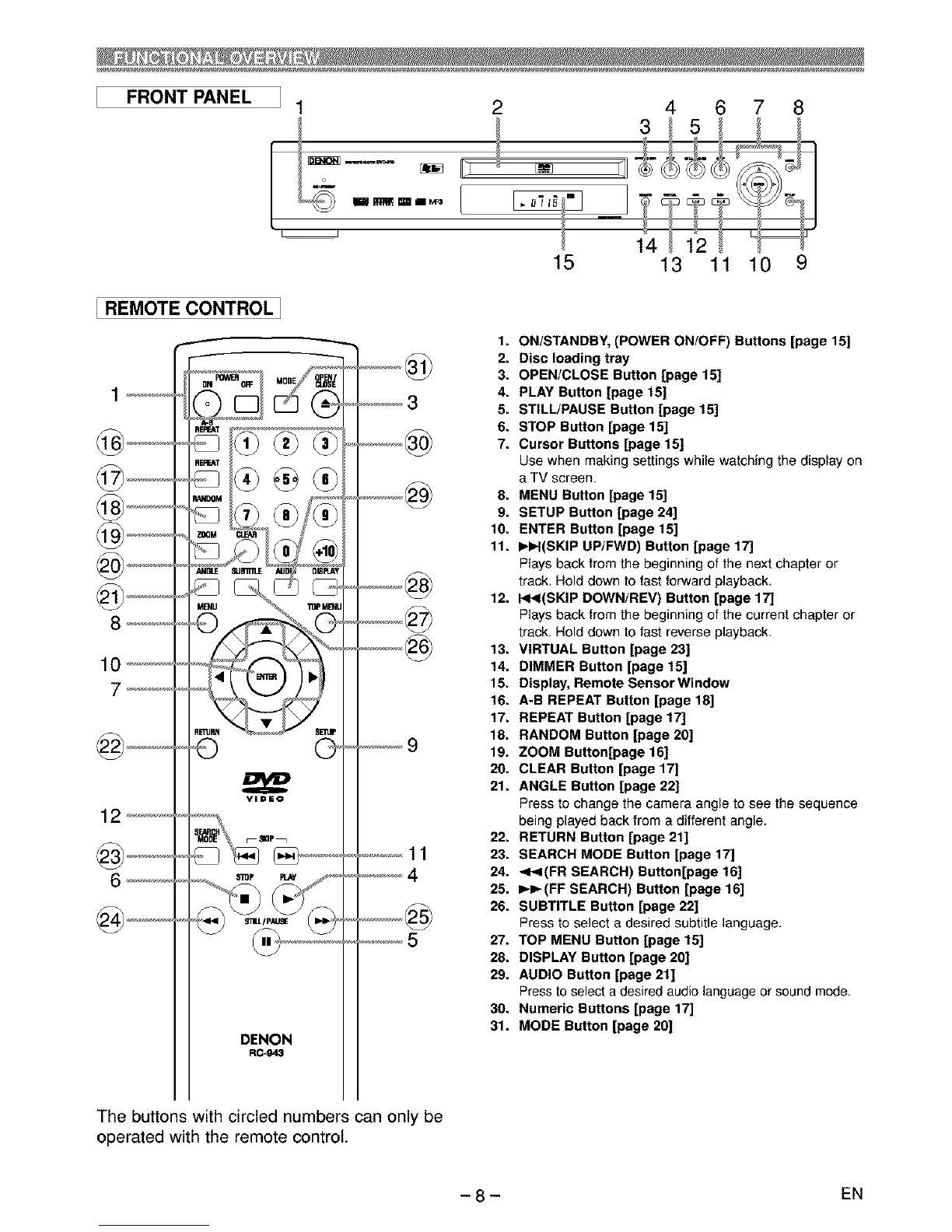
FRONT PANEL
I1 2
15
4 6 7 8
3 _ 5 _ t
'i
13 11 10 9
[ REMOTE CONTROL 1
DENON
R0-943
...........11
1. ON/STANDBY, (POWER ON/OFF) Buttons [page 15]
2. Disc loading tray
3. OPEN/CLOSE Button [page 15]
4. PLAY Button [page 15]
5. STILL/PAUSE Button [page 15]
6. STOP Button [page 15]
7. Cursor Buttons [page 15]
Use when making settings while watching the display on
e TV screen.
8. MENU Button [page 15]
9. SETUP Button [page 24]
10. ENTER Button [page 15]
11. I_I_I(SKIP UP/FWD) Button [page 17]
Plays back from the beginning of the next chapter or
track. Hold down to fast forward playback.
12. I_I_I(SKIP DOWN/REV) Button [page 17]
Pteys back from the beginning of the current chapter or
track. Hotd down to fast reverse playback.
13. VIRTUAL Button [page 23]
14. DIMMER Button [page 15]
15. Display, Remote Sensor Window
16. A-B REPEAT Button [page 18[
17. REPEAT Button [page 17]
18. RANDOM Button [page 20]
19. ZOOM Button[page 16]
20. CLEAR Button [page 1TJ
21. ANGLE Sutton [page 22]
Press to change the camera angle to see the sequence
being played back from e different angle.
22. RETURN Button [page 21]
23. SEARCH MODE Button [page 17]
24. <I<(FR SEARCH) Button[page 16]
25. I_I_(FF SEARCH) Button [page 16]
26. SUBTITLE Button [page 22]
Press to select e desired subtitle language,
27. TOP MENU Button [page 15]
28. DISPLAY Button [page 20]
29. AUDIO Button [page 21]
Press to select a desired audio tanguage or sound mode.
30. Numeric Buttons [page 17]
31. MODE Button [page 20]
The buttons with circled numbers can only be
operated with the remote control.
- 8 - EN



 To Next Page