• Exposure : Touch the exposure icon to display the exposure control in the Trypan app or for
fluorescence channels. The control is not required for brightfield counts which use a preset
value.
o Trypan Blue app: Choose the correct exposure based on the concentration of trypan dye
used.
§ If the assay is 0.4% trypan dye mixed 1/1 with cell suspension, select Normal
§ If the assay is 0.2% trypan dye mixed 1/1 with cell suspension, select Low
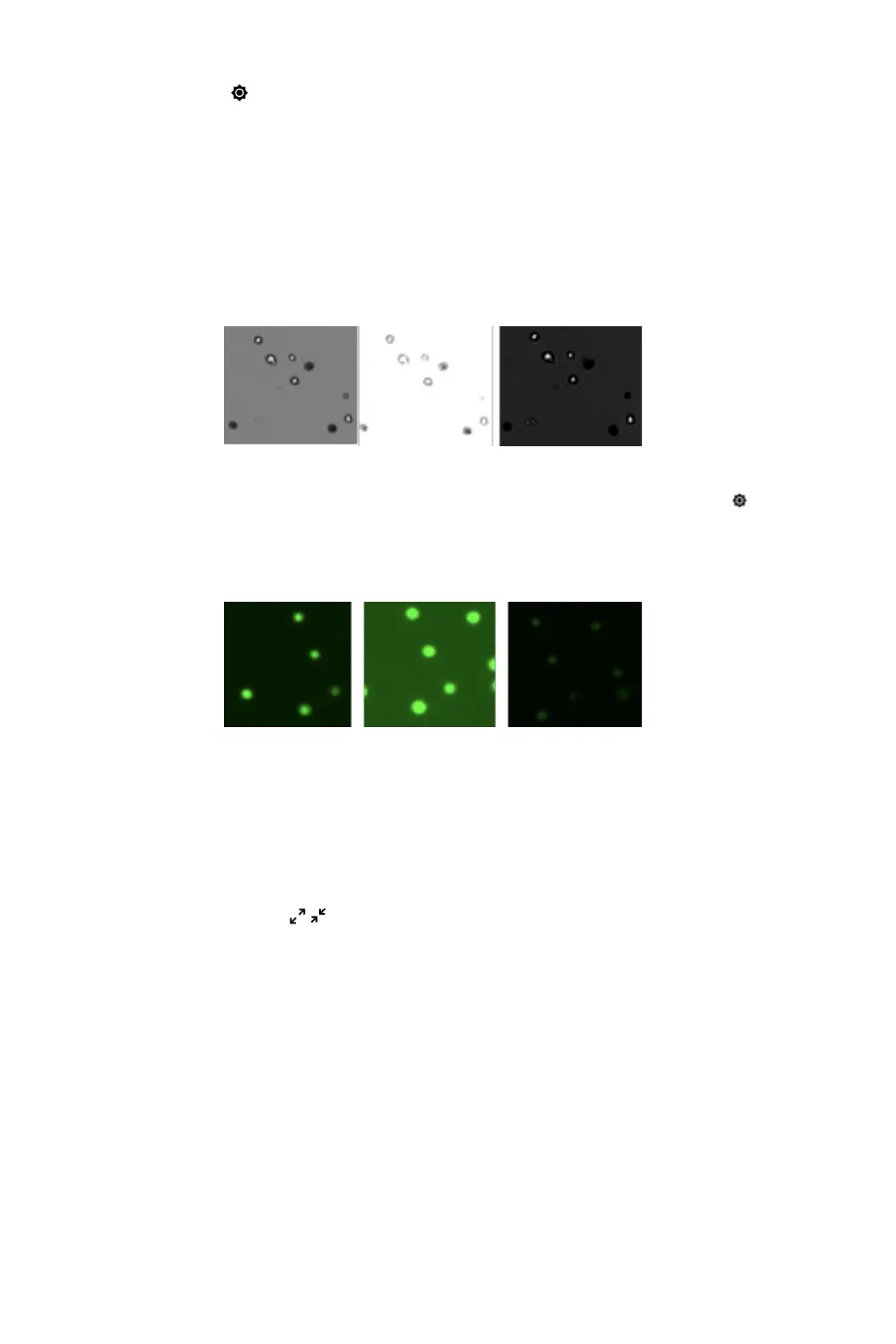
§ Live cells should have a white center with a dark ring like the image below on the
left. The middle image is overexposed and the right image is underexposed.
o Fluorescence Apps: Select a fluorescence channel. Touch the exposure icon to open
the exposure settings. Tap the arrows to adjust. The fluorescence signal should not extend
outside of the boundaries of the cell when viewed in brightfield. The image on the left is
correct. The middle image is overexposed and the right image is underexposed. Adjust the
exposure for each channel independently.
• Zoom Controls: All preview and result images on the CellDrop support zoom and pan
capabilities. Pinch and zoom using two fingers to zoom in or out. Tap and drag within the with
the image to move the preview location.
• Image map: A small position map in the top right is an indicator of what portion of the full
image is currently displayed on the screen.
• Expand/Collapse : Tapping the expand or contract icon for a preview or result will toggle
between a full screen view and the standard view.
Dilution Calculator
The dilution calculator enables the user to define target cell number or density and culture volume.
The counted result will automatically provide instructions to correctly dilute cultures to reach the
desired target.
• Tap the calculator icon to set dilution guidance parameters for the next sample count.
• Setting targets is optional for any specific count. Inputs may be added or modified post
measurement from the Results tab Calculator screen.
• Once targets are set, they will stay in effect for all subsequent sample measurements within a
session until changed.


 To Next Page