4. General Operation and Software Information
CellDrop Automated Cell Counters include pre-installed EasyApps software for rapid counting and
viability assessment. Each app is designed for a common cell counting technique such as
Brightfield, Trypan Blue, AO/PI, etc.
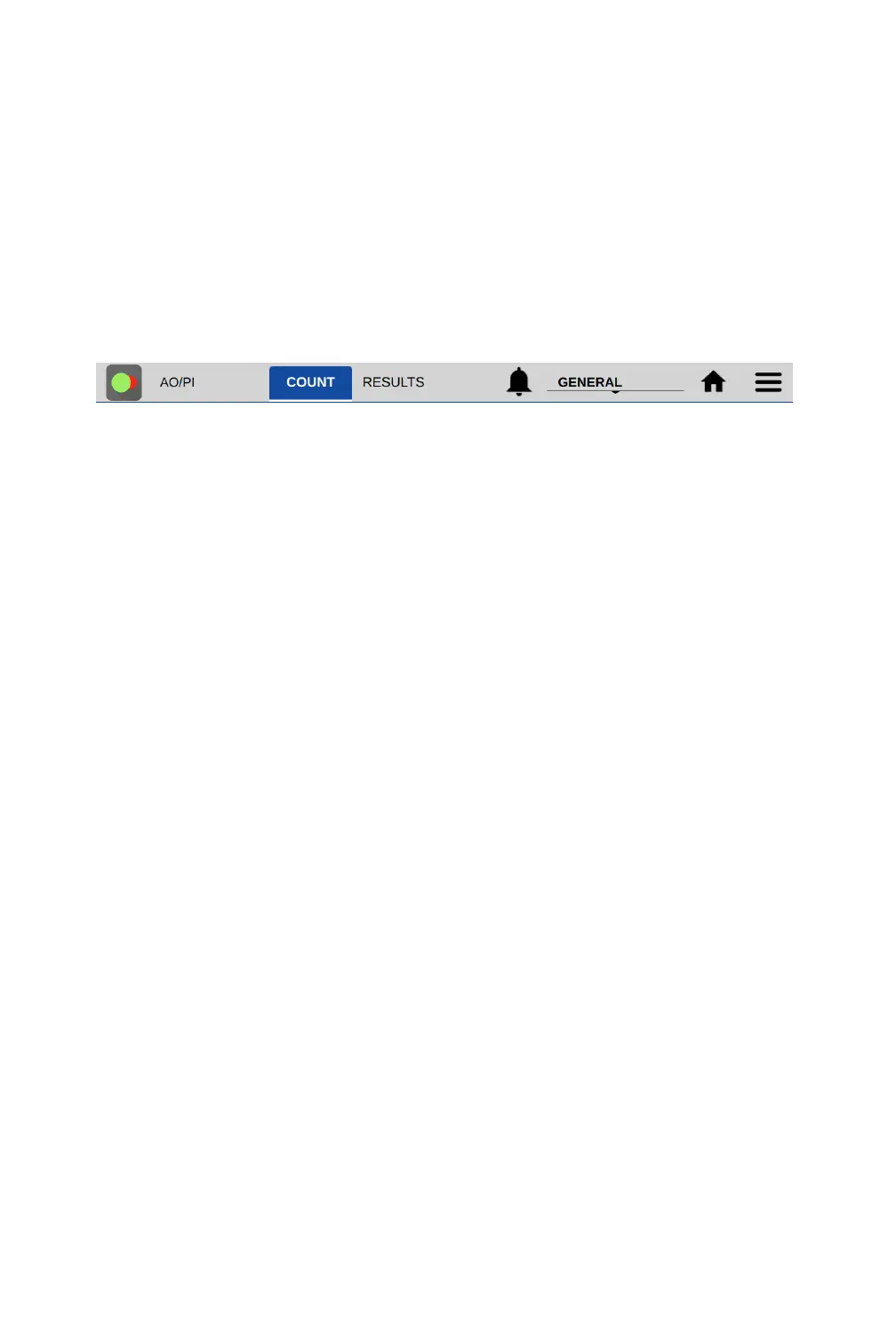
Apps include a common Top Action Bar that allows a user to easily navigate between the live
preview on the Count tab and the Result tab. Controls available from the action bar are described
below.
Top Action Bar
• Count Tab: Select to view a live preview on screen. View the loaded sample, select saved
protocols, edit protocol settings, define dilution guidance parameters and initiate a cell
count.
• Results Tab: This tab enables the user to review the data for all samples measured in the
current measurement session.
• Alert: The alert icon (bell) is displayed to notify the user of system alerts such as timer
expiration or low count alerts (Pay-As-You-Go models).
• Account: The current account in use is displayed on the top action bar. The General account
is the default account for CellDrop applications. Tap the account name to display a list of
available accounts. Changing an account will automatically use the protocol indicated as the
default option selected in the User Accounts app.
• Home Icon: Tapping the Home icon will navigate back to the Home screen and close the app
and current measurement session. All previous results are saved and accessible from the
Data app.
• Overflow: The Overflow icon is used to access a menu of screen specific options:
o Screen Capture: Screen shots may be taken of most but not all views. Refer to the Export
and Print Options chapter for more information.
o Count Code Log (PAYG models only): Displays a log of count code use.
o Tech Support: Sends an email with diagnostic information to DeNovix. Email must be
preconfigured from the Settings app for this function to work correctly.
o Set Focus: Allows the user to save a global focal position for DirectPipette mode or for
slide mode. This position is the initial position used when opening a count application
and essentially eliminates the need to adjust focus once set for CellDrop.
o About: The About feature brings up an information box displaying the current app version
number.


 To Next Page