11
www.DentalEZ.com
866-DTE-INFO
11
DentalEZ
®
Equipment
PN: 2717-256E
Section III Installation
Left and Right Spring Covers
Tools Required
• Phillips-head Screwdriver
Replacing Spring Covers
1. Remove the following hardware from the bag of
supplies:
• 10-32 Pan Head Screws (4)
• Spring Cover Brackets (2)
• Spring Cover Bracket Screws (8)
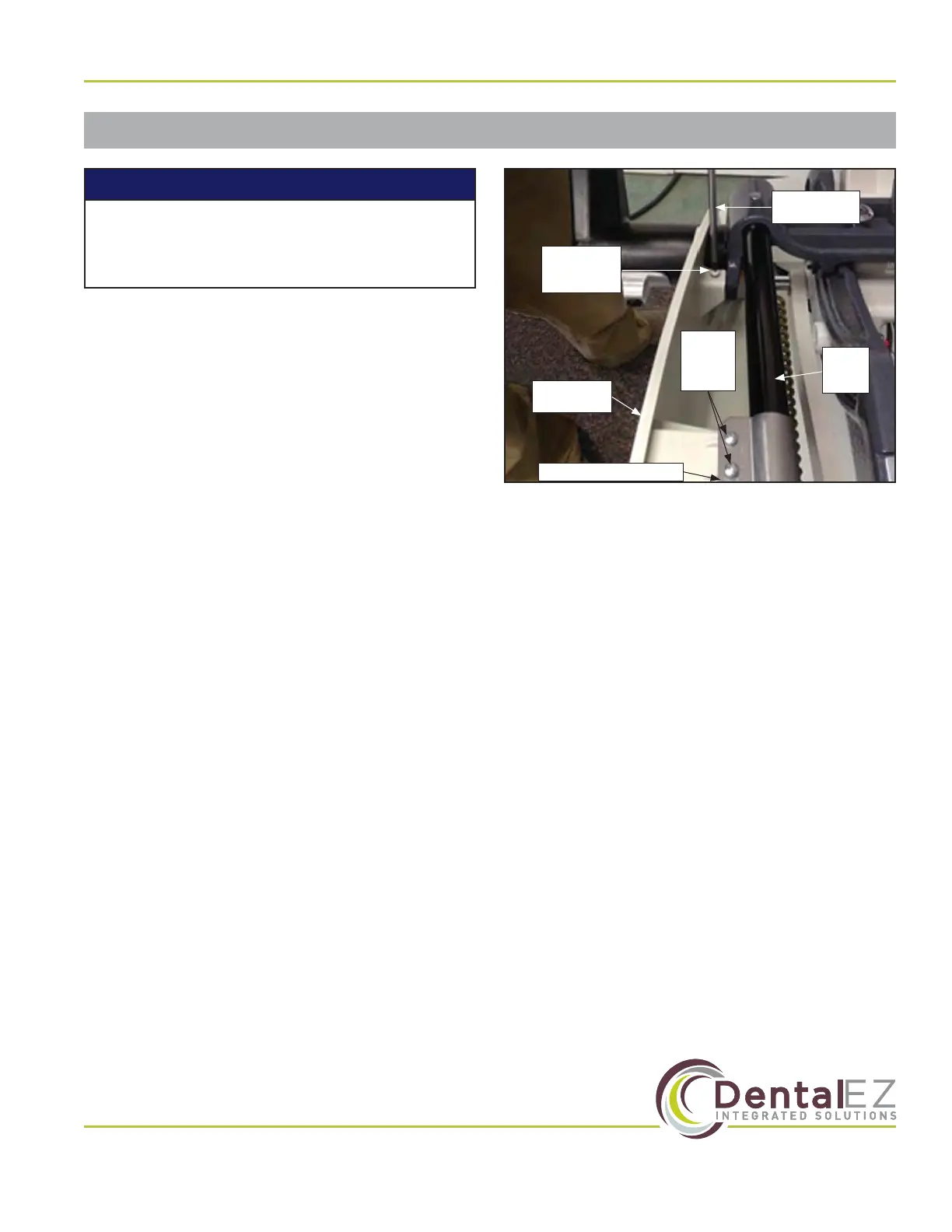
2. Install a spring cover bracket (Figure 6) to the
seat frame tube.
3. Using a Phillips-head screwdriver and two
10-32 pan head screws (one in front and one in
the rear), install a spring cover.
4. Secure using four spring cover bracket screws
(two on top and two underneath).
5. Repeat steps 2 through 4 for the opposite
spring cover.
10-32 Pan
Head Screw
(Rear)
Spring
Cover
Bracket
Screws
Seat
Frame
Tube
Spring Cover Bracket
Spring
Cover
Phillips-head
screwdriver
Figure 6. NuSimplicity Chair spring cover
The left and right spring covers are now
factory installed. Follow the instructions
below if there is a need to replace them.
NOTICE


 To Next Page