www.DentalEZ.com
866-DTE-INFO
22
NuSimplicity
TM
Chair
PN: 2717-256E
Section IV Operation
Manual Chair Positioning
To prevent possible injury caused by accidental operation, do not leave young children unattended.
WARNING
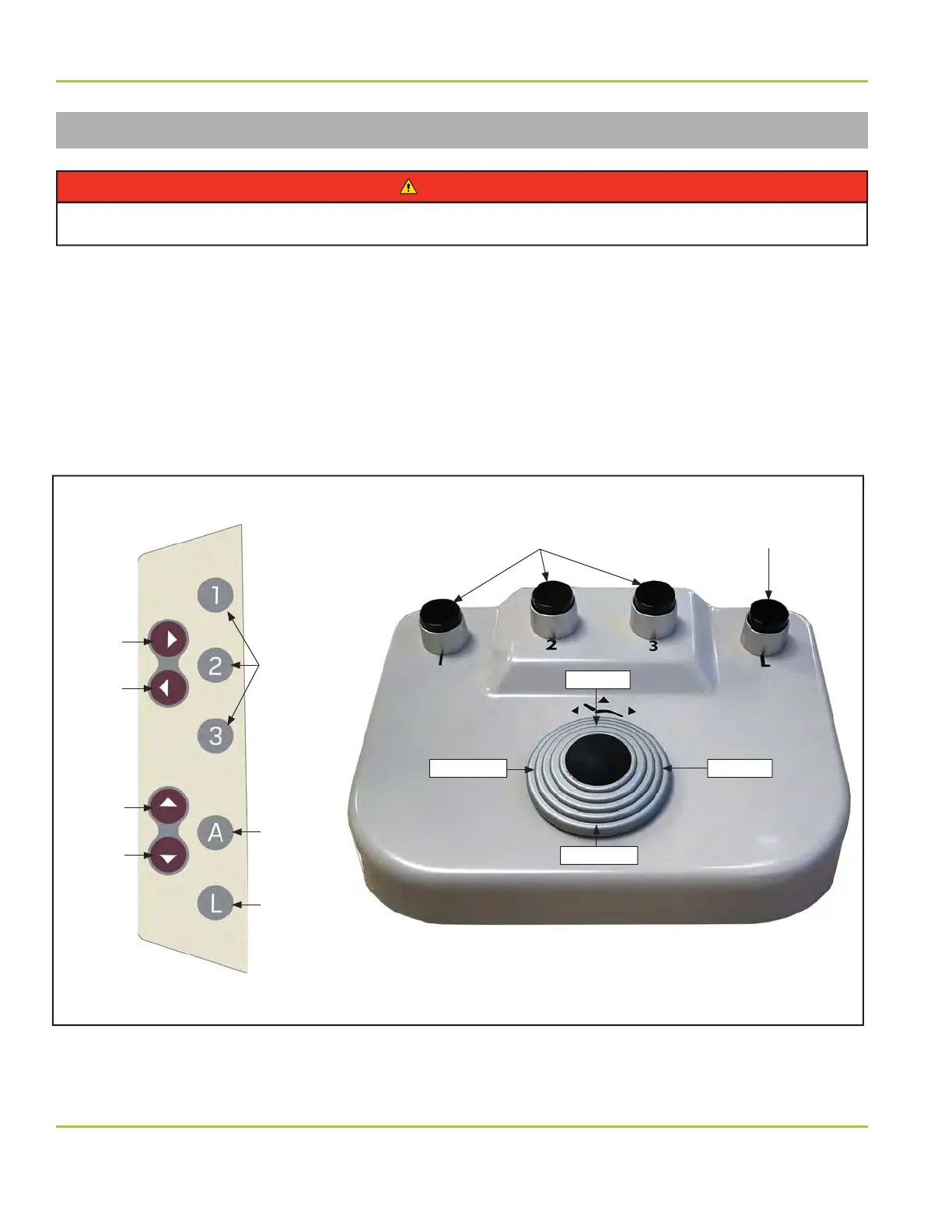
Manual positioning of the NuSimplicity Chair is accomplished by using the touchpad controls located on
each side of the chair back, the foot control, or the delivery unit touchpad control (Figure 28).
To operate these controls:
1. Select the direction of travel: base up, base down, back up, or back down.
2. Depress and hold the corresponding button to move chair to factory-set travel limit.
NOTE: The chair will continue running until the directional button is released.
Back Up
Button
Figure 28. NuSimplicity Chair touchpad control and foot control
Base Down
Auto Buttons
1, 2 and 3
Back
Down
Button
Base Up
Button
Base
Down
Button
Auto
Buttons
1, 2 and 3
Auto
Return
(Exit) Mode
Button
Last
Position
Mode
Button
Touchpad (Chair Back)
Foot Control (Wired or Wireless)
Last Position
Button
Back Down Back Up
Base Up


 To Next Page