21
www.DentalEZ.com
866-DTE-INFO
21
DentalEZ
®
Equipment
PN: 2717-256E
Section IV Operation
Double Articulating Headrest (Opt)
To position the optional double articulating
headrest:
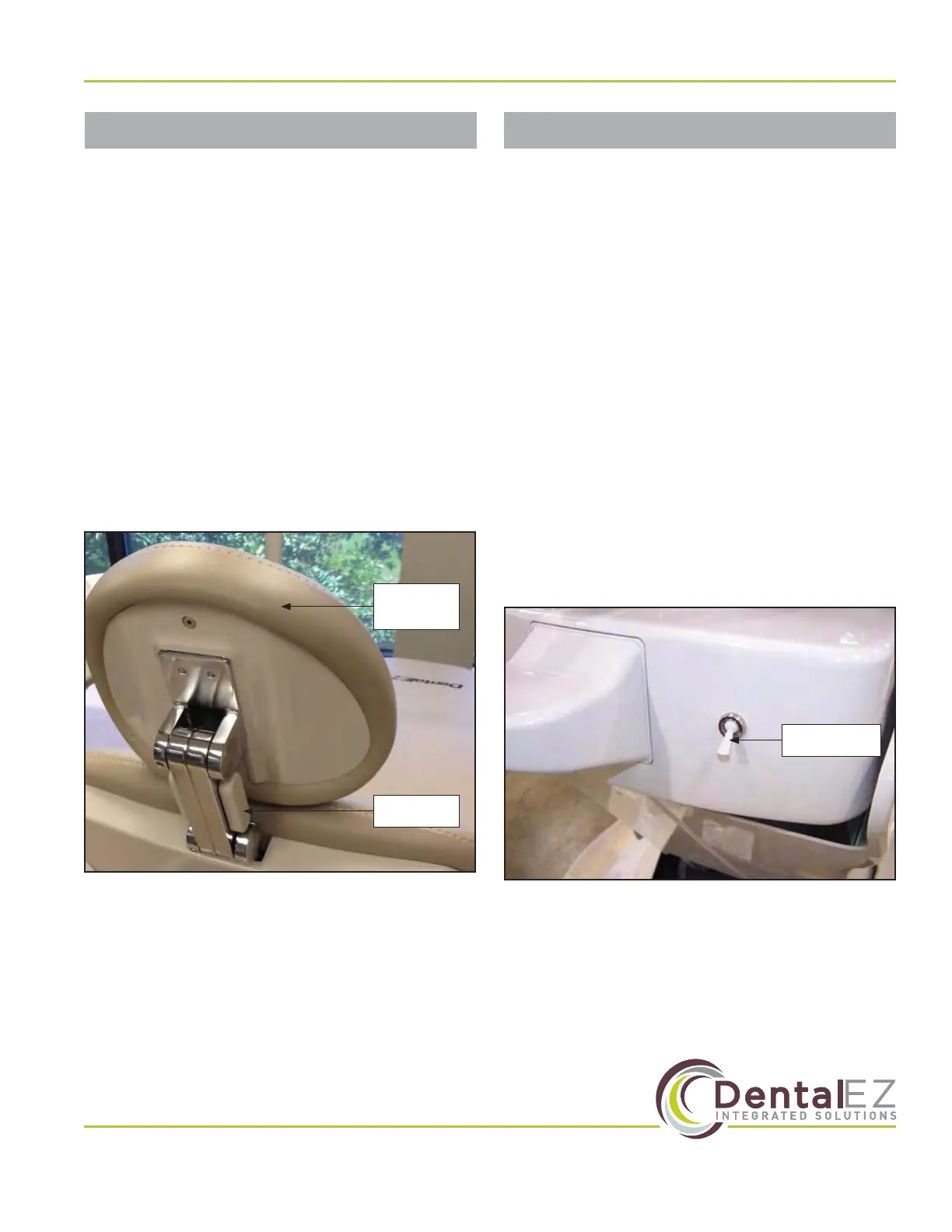
1. While facing the back of the headrest, fully
depress the release mechanism (Figure 26).
2. Keep the release mechanism depressed and
tilt the headrest until the desired position is
reached.
3. Release the mechanism to lock the headrest
in place.
NOTE: The use of disposable headr
est covers is
recommended to prevent soiling of the headrest.
These covers may be purchased through a local
dental supplier.
Release
Mechanism
Double
Articulating
Headrest
Figure 26. Double articulating headrest
The optional air glide aids the operator in
repositioning the chair.
To operate the air glide option:
1. Make sure the chair is on a smooth, hard, level
and non-obstructive surface.
2. Activate the air regulator toggle switch on
the base cover at the rear section of the chair
(Figure 27).
3. The rear of the chair base is supported by an
air pillow and lifts o the oor.
4. When the base rear is raised, it allows the
rollers on the front of the base plate to contact
the oor.
5. While the chair is supported only by the rollers
and air pillow, reposition the chair as desired.
Air Regulator
Toggle Switch
Figure 27. Air regulator toggle switch for glide option
Air Glide (Optional)


 To Next Page