Dexcom ONE User Guide
20
Display device screens
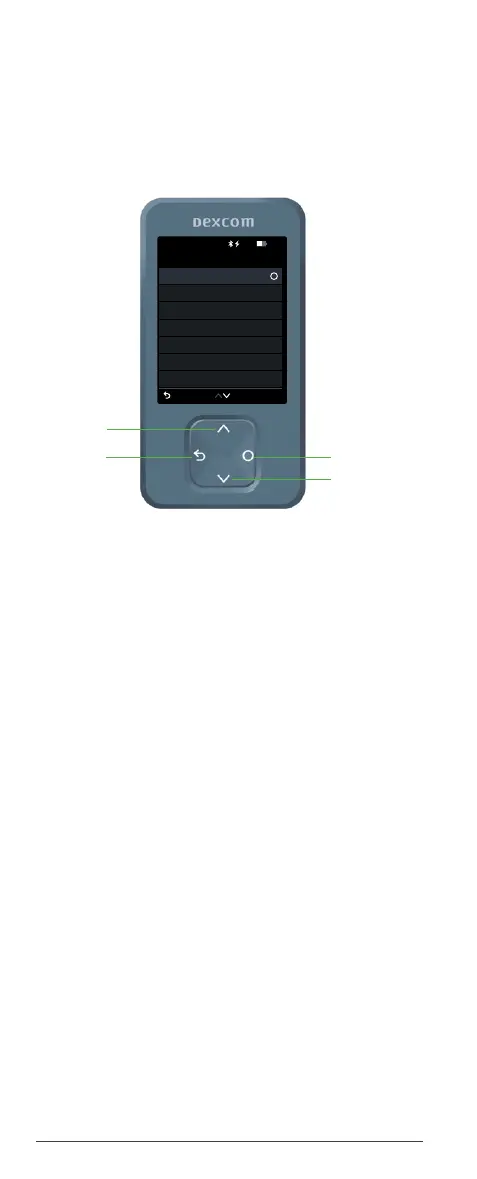
Receiver navigation menu
From the home screen, press the Select button to
access the Menu. This gets you to other features.
Use the navigation buttons to move around the
receiver. The receiver screens show you where to
press.
• Reports: Get your summary glucose information
for a specific period.
• Settings: Edit alerts, change settings,
customize sounds, and more. (More in Chapter
4: Alerts.)
• Information: Find out how much time you
have left in your sensor. You can also test the
speaker.
• Replace sensor and stop sensor session:
Stop this sensor and start a new one. (More in
Chapter 6: Starting a new sensor.)
• Power off: Turn off the receiver. No readings or
alerts when powered off.
Menu
Reports
Settings
Information
Help
Power Off
Back
Replace Sensor
Stop Sensor Session
10:30 50%
Scroll down
Select
Go back



 To Next Page