Transmitters 9 November 2001 89
Next Chapter
Tran sm it te r
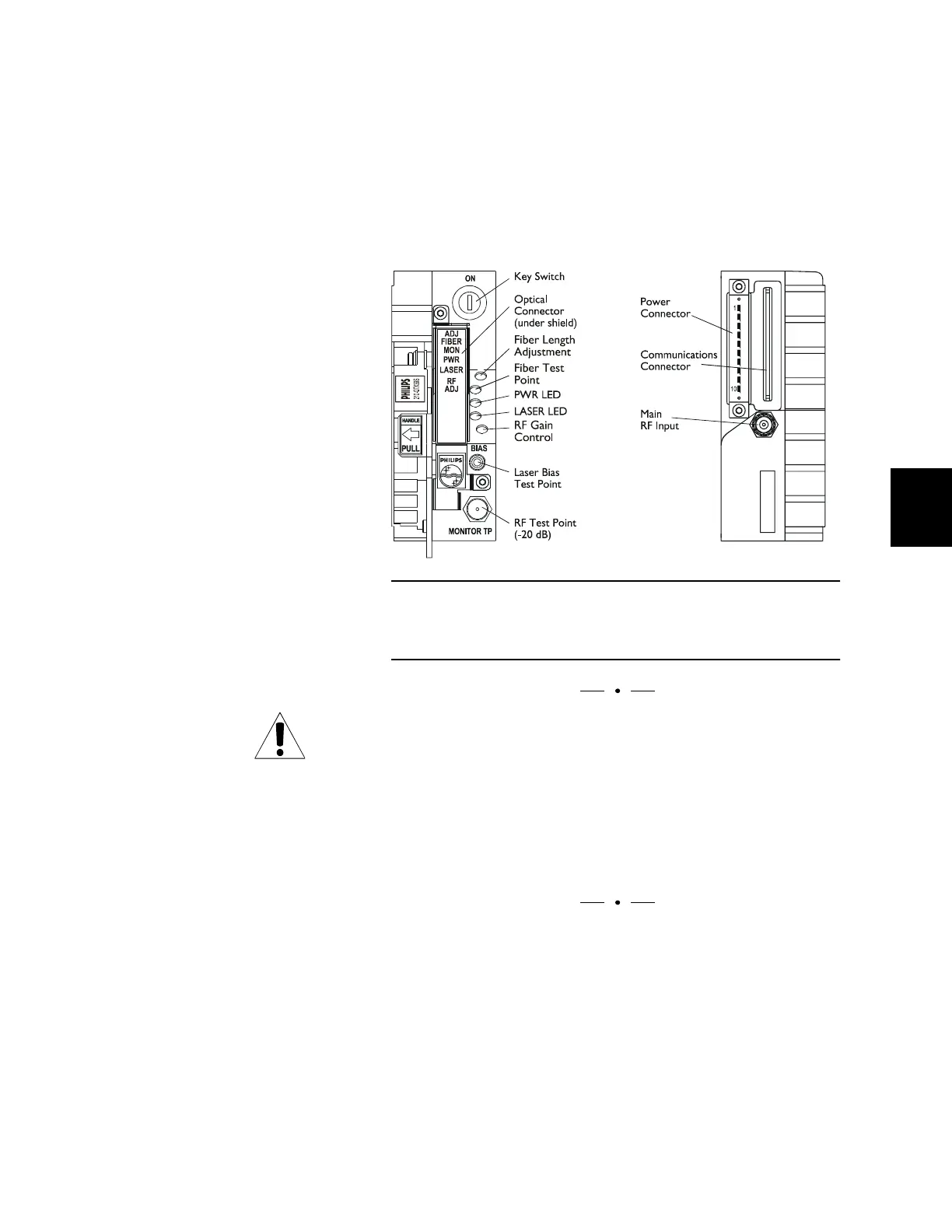
DT-QTX Controls and
Connectors
Standardized controls, indicators, and connectors simplify
installation and use of QTX series transmitters.
Connectors on the rear of the transmitter modules plug into
the Diamond Transport shelf. Cabling is connected to the
shelf backplane, not directly to the module
CAUTION
The bulkhead and optical connector on a Diamond
Transport transmitter are covered by a protective shield. To
make connections or to clean connectors, you must remove
the two screws holding the shield in place and then remove
the shield. DO NOT put the screws back into the
transmitters without the shield; doing so damages the Laser
Safety Interlock switch.
Figure 37. DT-QTX Controls and Connectors
DT-810-QTX fiber-length setting may be optimized through the
front panel.



 To Next Page