HI, MI, WI-700 service manual - 4 –servicing
4-109 Issue 9 04/2020
Servicing & adjustments
Software settings
For side labeller applicator, the labeller board software version will be a minimum of:
CP = 40002
PHP = 50046
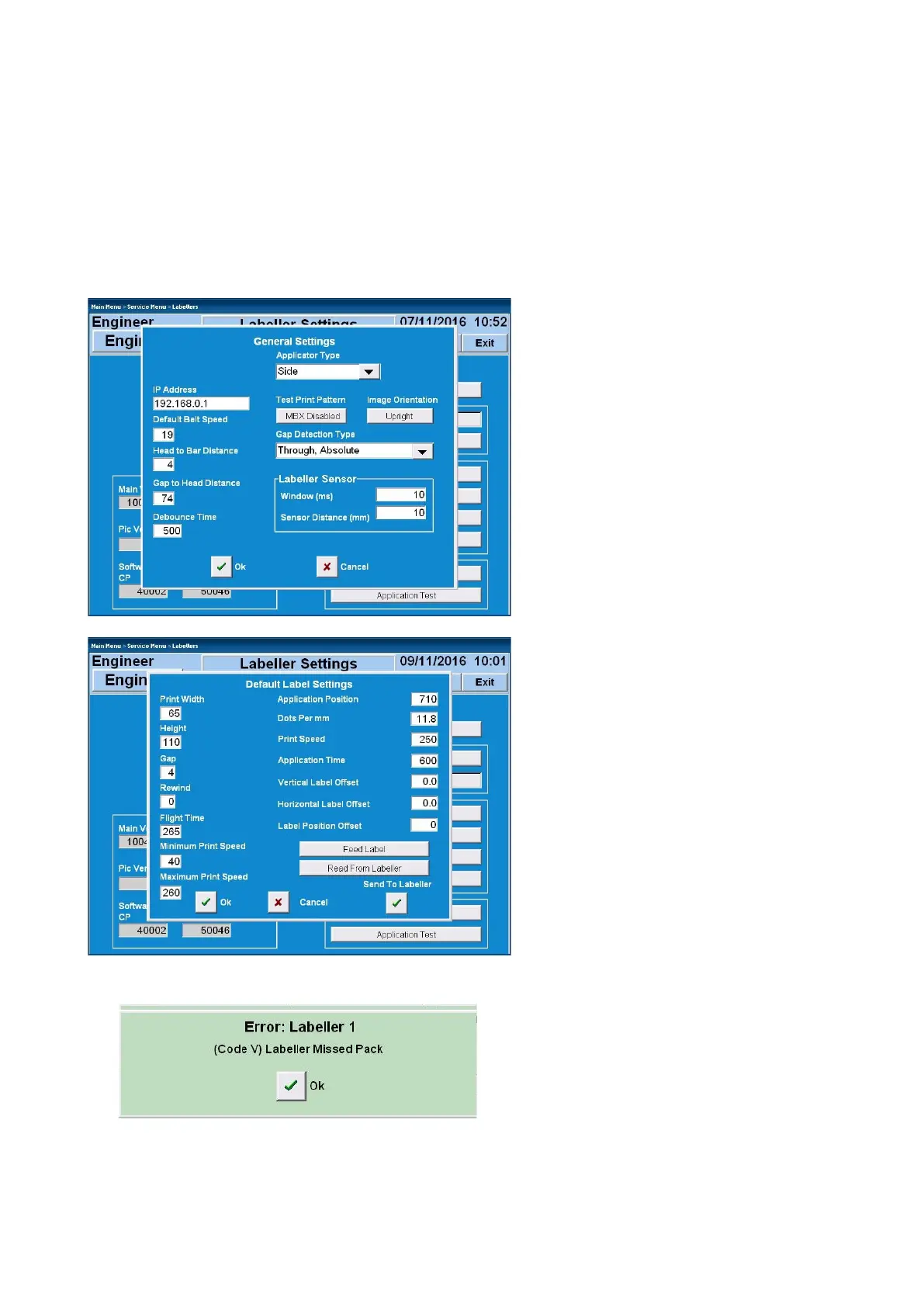
For labeller settings (in Console software)
go to:
Service menu / Labeller(s)
General settings
• Applicator type = Side
Labeller parameters
• Applicator position - has the same
operation and setting as a standard
applicator. Set value as required for
correct timing of label application to
pack
• Application time - the length of time
the applicator arm stay out. Typical
value = 600. Can depend on box /
label size, adjust between 400 to
2000. Ensure enough time is given to
allow arm to fully push applicator
shoe against spring pressure to
activate proximity sensor
If proximity sensor is not made in the
allowed time (application time) the machine
will display an error and the applicator will
return to its home position



 To Next Page