HI, MI, WI-700 service manual - 2 - component parts
2-12 Issue 9 04/2020
Relays 5v
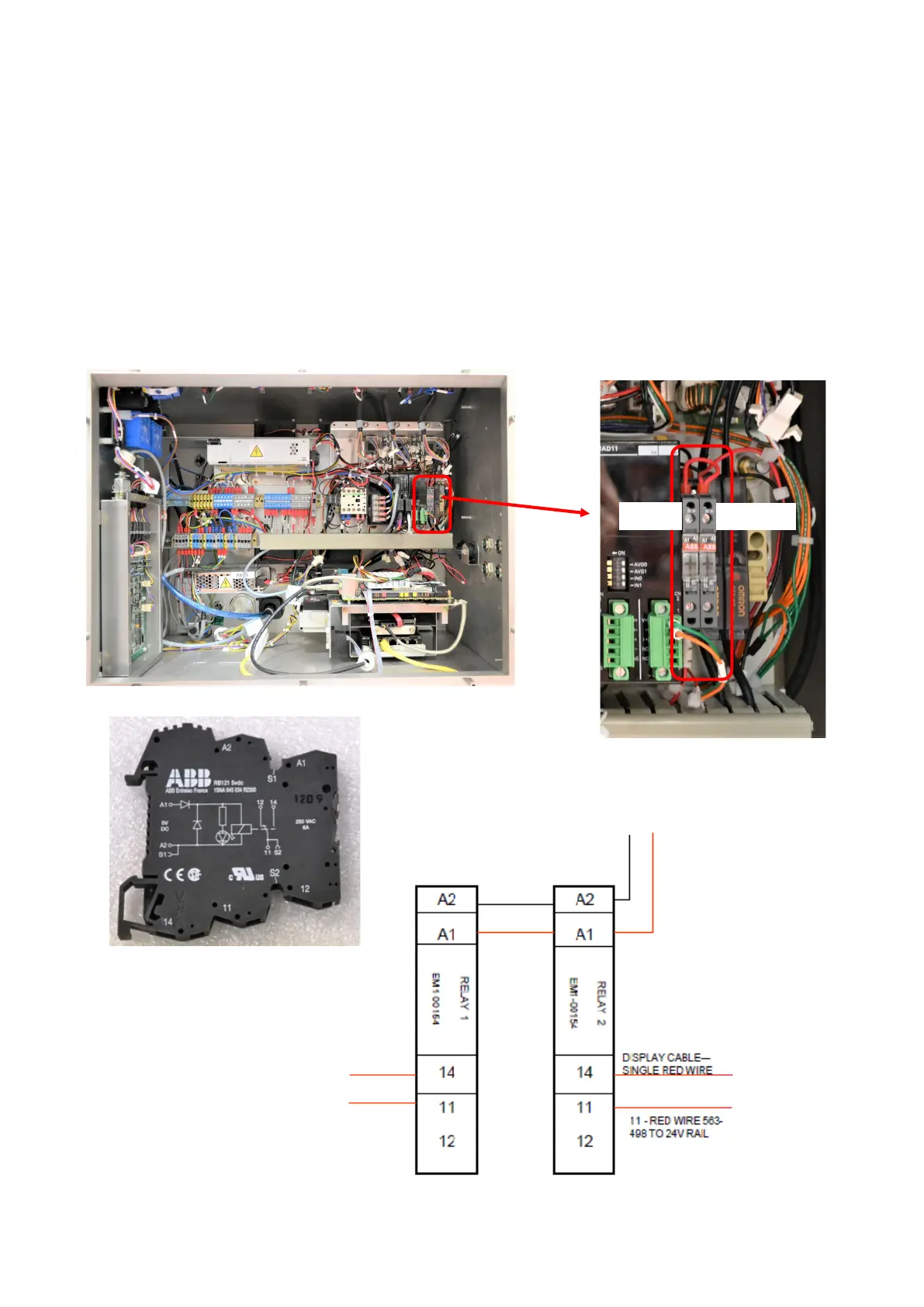
There are two relays (both the same type) in the cabinet
Relay 1 - acts as the ‘switch’ for the backup voltage (battery) to take over if the normal power fails.
The relay coil is connected to the hard drive 5v supply on the PC (at relay positions A1 & A2). The battery &
UPS board is connected to the relay (at positions 14 & 11) and is switched to this if the 5v supply fails.
Relay 2 - is used to switch on the green LED on the front of the touch screen assembly.
The relay coil is connected to the hard drive 5v supply on the PC (at relay positions A1 & A2).
Relay position 11 is connected to the 24v rail
Relay position 14 is connected to the green LED in the touch screen assembly
To 24v rail
To UPS board
(BAT+)
To battery +ve
5v power from
main PC board
To green LED
Relay 1
Relay 1 Relay 2
Relay 2



 To Next Page