HI, MI, WI-700 service manual - 7 – fault finding
7-14 Issue 9 04/2020
HOW TO ‘PING’ THE LABELLER TO CHECK COMMUNICATION
If the labeller has failed in its communication to the machine software a simple check using the Windows®
command prompt can quickly establish if there is a hardware failure or if the machine software / labeller
software is not communicating.
It is useful to plug in a USB keyboard for this check
To access the command prompt function the machine needs to be at Windows® level or access the
Windows start menu with a Keyboard.
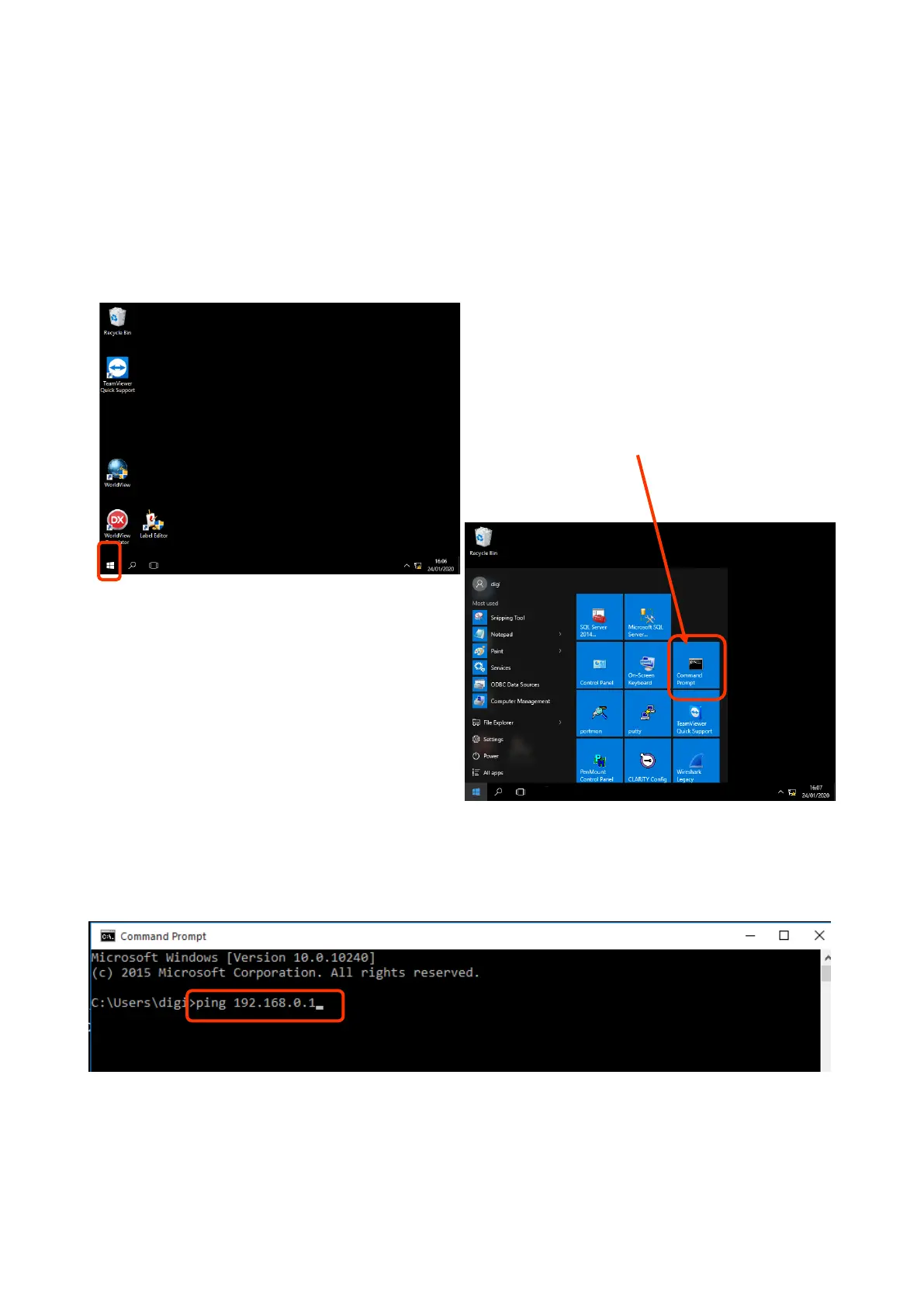
Therefore, when logged in as engineer level,
closed machine down to Windows®
Select the Windows® icon in lower left of
screen
Select Command prompt
Note: IP address will be different depending on labeller type
Classic / 2nd stage will be: 192.168.0.X (X being 1 for labeller 1, 2 for labeller2 etc.)
Cassette / LC labeller will be: 1.1.1.X (X being 210 for labeller 1, 211 for labeller 2 etc.)
When the command prompt box appears, type in:
Ping 192.168.0.1 (this address is the standard for the 1st labeller (Signature type)
For subsequence labellers the last number of the IP address increases (e.g. - lab 2 = 192.168.0.2)
Touch – return
Note: after the word ping, always leave a single space before typing in the IP address numbers.



 To Next Page