HI, MI, WI-700 service manual - 4 –servicing
4-125 Issue 9 04/2020
Labeller - Classic type - Drive & pinch roller adjustment
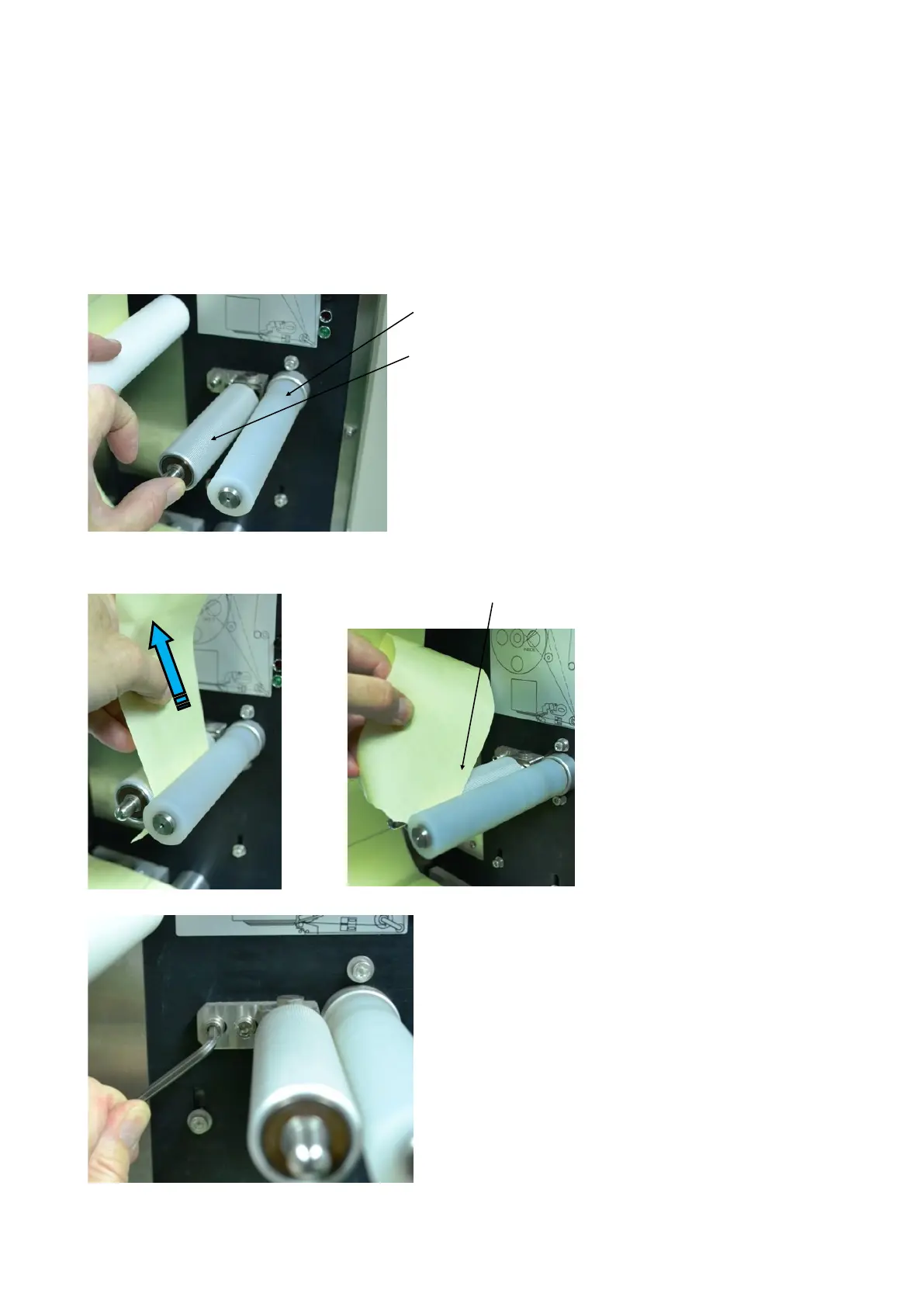
The drive and pinch roller pull the backing paper through the labeller and therefore need to be kept clean
and correctly adjusted to ensure the correct feeding of the labels.
For cleaning care, refer to Routine maintenance section.
The metal pinch roller can be adjusted in its lateral position to the rubber drive roller. This is important to
obtain a good drive of the paper through the rollers
Drive roller
Pinch roller
The pinch roller is sprung loaded against the drive roller.
To check the adjustment of pinch is correct, place a piece
of backing paper between the rollers and slowly pull to see
if the paper slips within the rollers.
Normally if adjustment is incorrect, the paper will tend to
slip at one end and grip at the other.
To adjust lateral position of pinch roller, loosen the pinch
roller mounting screws (2 off).
As the roller is sprung loaded against the drive roller, it
will want to push itself away from the drive roller.
Pull the pinch roller towards the drive roller until it has
even pressure against the drive roller and tighten
screws.
Retest grip with backing paper and adjust until backing
paper is gripped along it full width.



 To Next Page