Operator’s Manual DigiPump LP8 Infusion Pump - Digicare Biomedical Technology Inc.
- 21
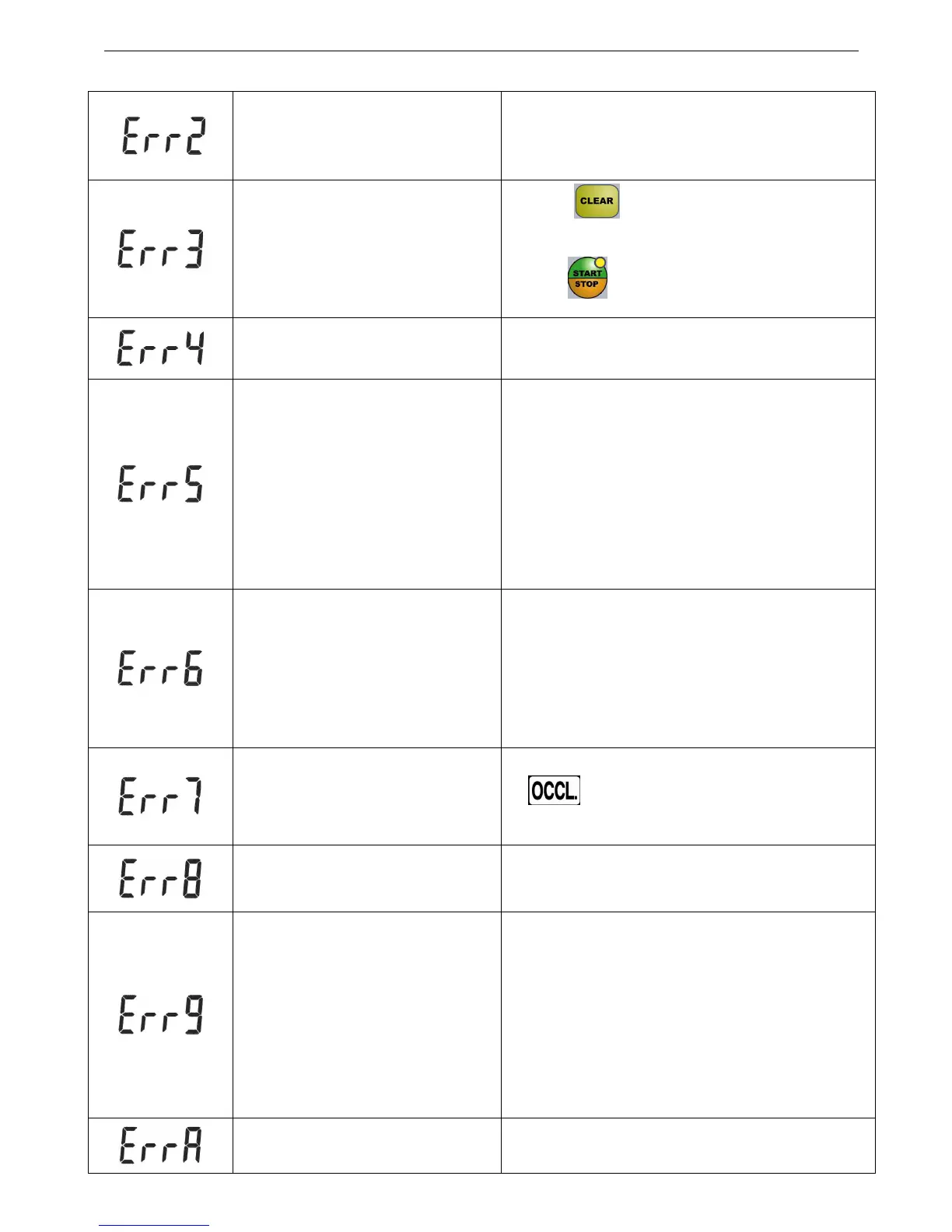
Drop detector disconnected
1. Check and make sure the Dro
connected and mounted properly.
2. Check whether the connector is broken.
Pause overtime
(>2 min)
1. Press“ ”to clear warning. But pause is
maintained.
2. Press“ ”to restart infusion。
Leakage
1. Check whether the IV set is mounted correctly.
2. Check whether the drop detector is violently
disturbed or shacked.
No drops detected
1. Check if the solution container is empty.
2. Check whether there are too many fog drops
the drop chamber or the drop chamber is
sloping, the liquid is not dripping but flowing
through the sidewall of the chamber.
Pump Cassette not running
1. Defective IV set or
causing the pump blocked.
2. Pump cassette can’t run due to residues and dirty
Abnormal pressure detection
Refer to the solutions of eliminating the problem
on‘ ’alarm. If failed again, contact customer
service
IV type setting error Check whether the type of the IV set is correct.
Abnormal Infusion
1. Check whether the dro
and mounted properly.
2. Check whether there are too many fog
the drip chamber or the liquid level of chamber
is too high.
3. Check
whether the air inlet of solution
container is blocked.
Abnormal audio Stop using and contact customer service


 To Next Page