Mobile Notify
The system can send an event notification to the mobile device registered with the NVR.
The mobile app “VMAX Plus” must be installed on your smartphone device and the NVR site must be
added to the mobile application before registration for mobile push notifications can occur. The “USE
PUSH CHECK” setting must be enabled in the VMAX Plus application for the NVR site.
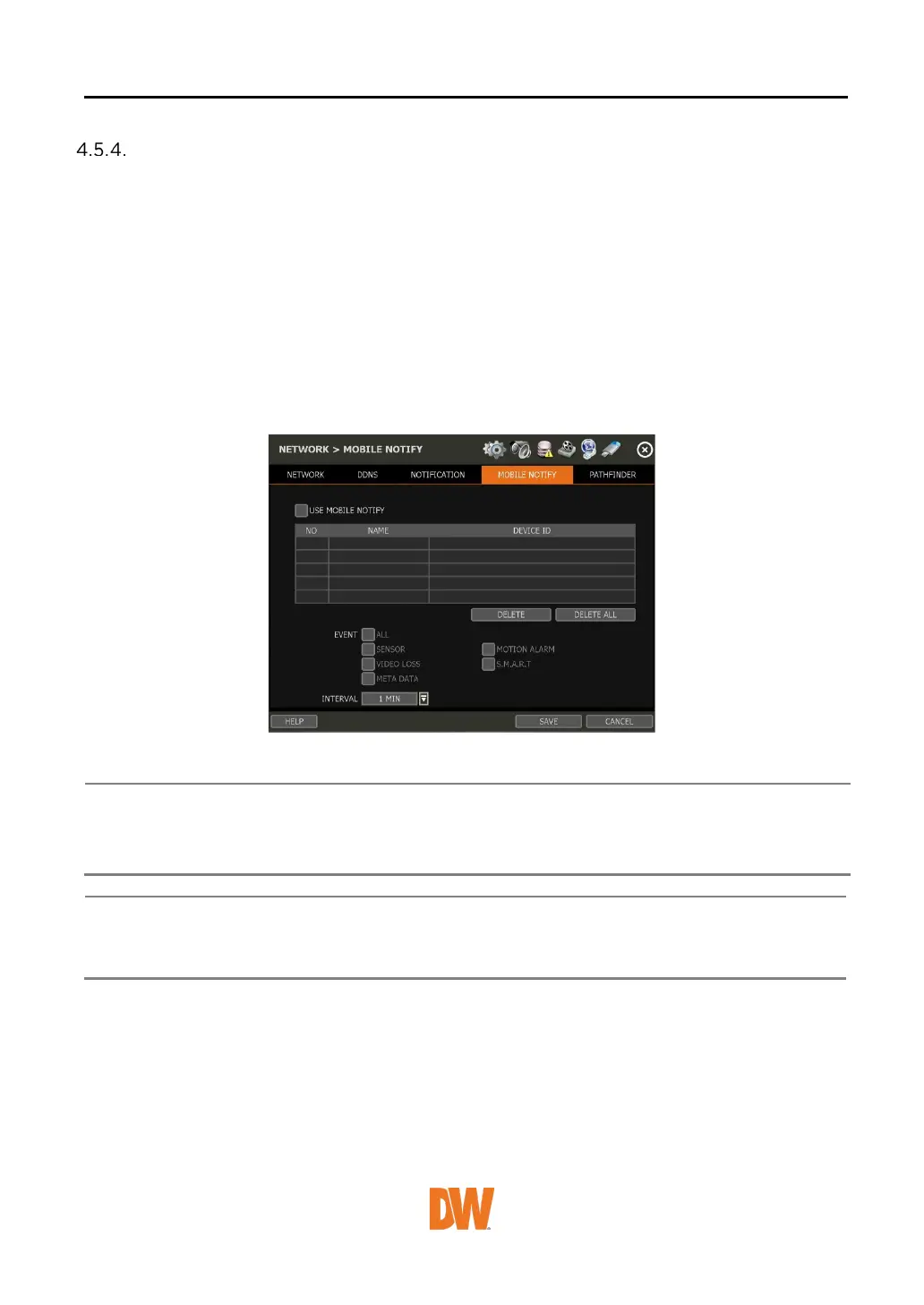
When the mobile device is registered to the NVR correctly, it will appear on the Mobile Notify list,
alongside a unique Device ID for the registered mobile device.
• USE MOBILE NOTIFY: Enable this setting to use mobile push notifications.
• EVENT: Select the event to notify.
• DELETE: To d elete a listed mobile device, select the device then click the ‘Delete’ button. The
USE PUSH CHECK setting in the VMAX Plus mobile application will then also be disabled.
1. The Mobile Push Notification function is available for iPhone, iPad & Android devices
using the VMAX Plus mobile application. Otherwise, the mobile application “DW
Mobile Plus” can be used for general remote viewing with the NVR.
2. The maximum number of mobile devices is 50.
Push Notification will only work when both the NVR and mobile devices have a direct
connection using the local network (LAN) or over a remote Internet connection. Direct
connection (IP address) is needed as PathFinder connections may not support push


 To Next Page
 Loading...






