HYBRID Coater Service Manual ver1.1 Chapter 9
73
9.5 Replacing Stepper Motors
With the HC-100 there are stepper motors on the X, Y and Z axis. With the HC-200 there are
stepper motors on the X, Y, Z, and Ø axis. The procedure for replacing the stepper motors of
the X, Y, and Z axis on the HC-100 and replacing the stepper motors of the X and Y axis of
the HC-200 are the same. The stepper motors on the HC-200 for the Z and Ø axis have a
different construction.
9.5.1 Replacing the Stepper Motors of the X and Y axis
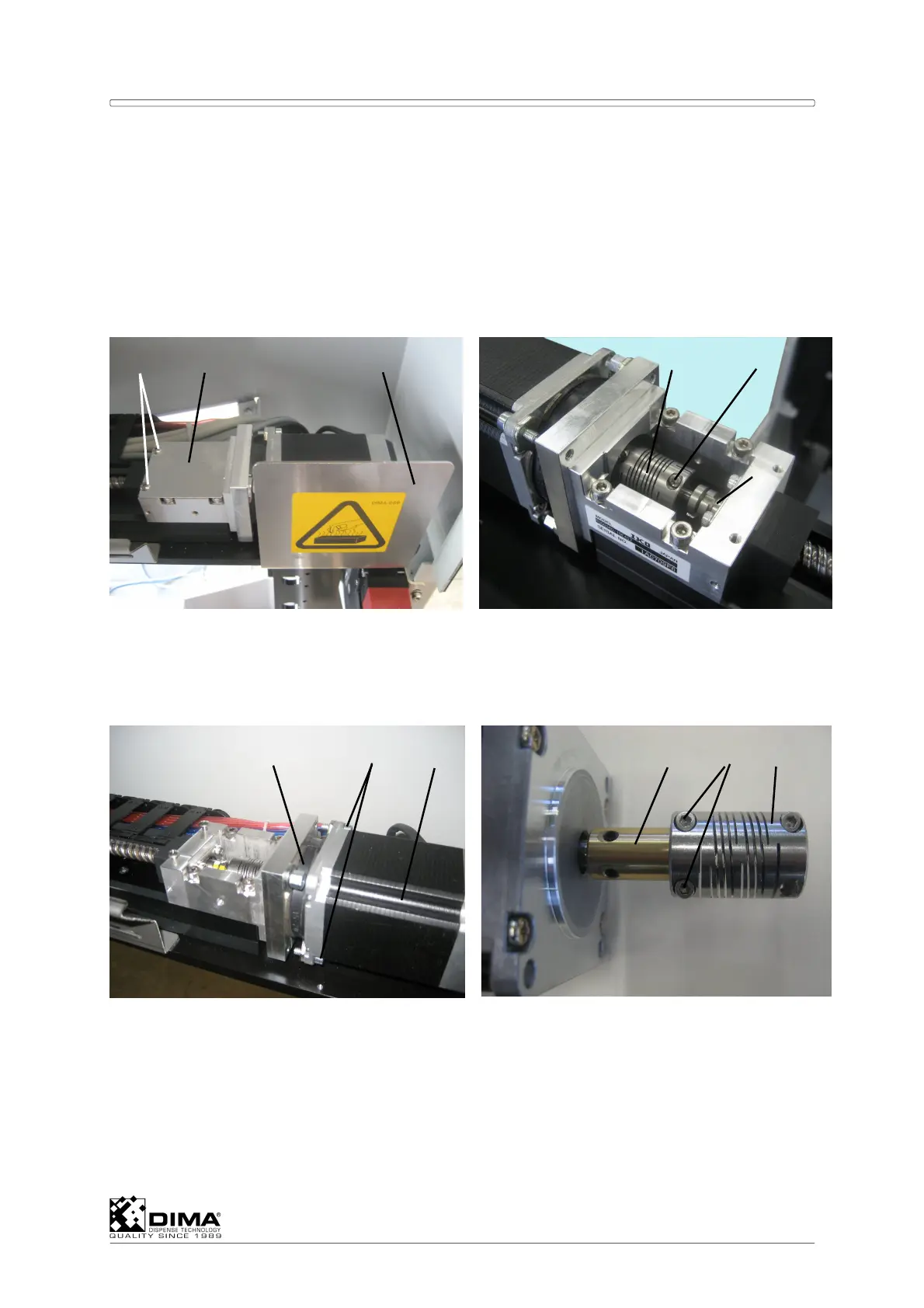
A When replacing the motor of the Y axis first cut the tie wraps on the cable and then undo
the connector of this stepper motor. Then remove the Heat Warning shield (#3)
completely. Loosen the two bolts (#1) which hold the cover (#2) to the coupling (#4) and
remove the cover (#2). Loosen the securing bolts (#5) of the coupling (#4), on one side
only, the side towards the end (#6) of the ball bearing shaft.
B Then undo both bolts (#8) which hold the motor (#9) to the rubber middle piece (#7). Now
you can retract the motor. Remove the coupling (#4) together with the bushing (#10) from
the old motor. Don’t loosen the other securing bolts (#11).


 To Next Page