8
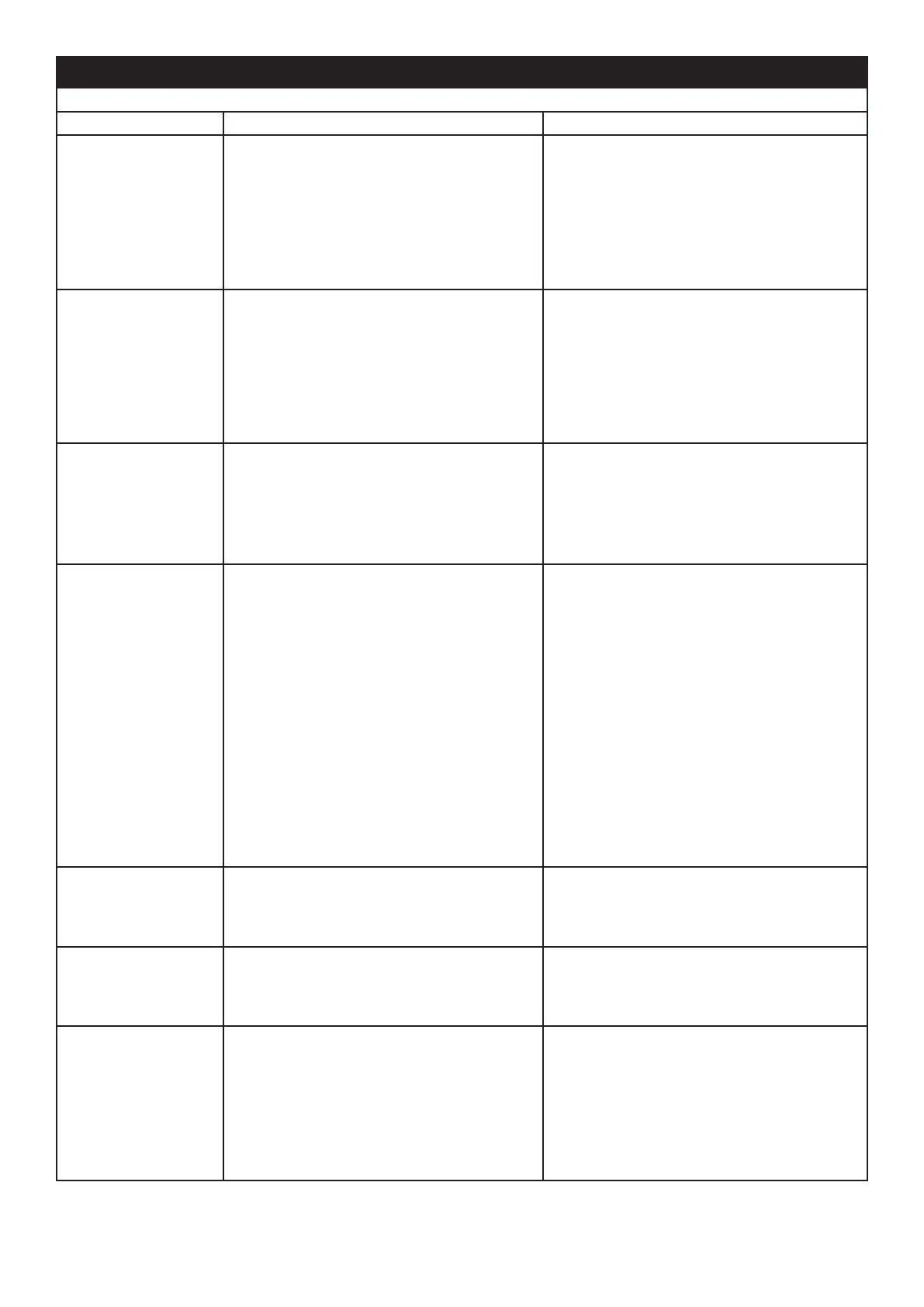
Symptom Cause Corrective Action
Product will not oper-
ate.
Electrical connection issue
Low water reading
Ensure product has working electrical con-
nection.
Rell the water tank(s) of the product. See
“Low Water / Relling the Water Tanks”
above.
Product will not oper-
ate. The LED fuel bed
only operates.
Low water reading
Product is not level
Rell the water tank(s) of the product. See
“Low Water / Relling the Water Tanks”
above.
Ensure the product is level by checking the
on-board level (Fig 8).
LEDs blink twice and
product beeps twice
Product is approaching low water Rell the water tank(s) of the product. See
“Low Water / Relling the Water Tanks”
above.
Little or No Mist Gen-
eration
Transducer not operating correctly
Transducer is dirty
Transducer is not sitting correctly in sump
Fan is obstructed or blocked
Nozzle is not on sump correctly
Nozzle is blocked
Check operation of transducer
Clean sump and transducer thoroughly
Switch off product, take nozzle off sump and
ensure transducer is tted in sump correctly
Remove air lter and clean. Ensure it is
placed back in product correctly.
Ensure Nozzle is sitting on sump correctly
Clean sump, transducer and nozzle thor-
oughly
The ame effect has
too much smoke.
Flame effect setting is too high Turn down the ame effect. Give the product
time to adjust to the new setting
Bluetooth Receiver
stops working
Loose connection Check connection to jack (Fig 11)
Remote Control stops
working
Bluetooth range issue
Bluetooth Receiver connection is loose
Remote control batteries need replacing
Check positioning of Bluetooth Receiver. En-
sure it is not encased in metal or concrete.
Check connection to jack (Fig 11)
Replace batteries with two new AAA batteries
Troubleshooting





 To Next Page