13
Flip the top panel over and rest it on the top of the 3.
replace.
Use caution when ipping top panel over as
there are components attached to the top panel which are
wired to the internal cavity of the replace.
Open the bi-fold doors and steel curtain.4.
Locate the On/Off Switch mounted on the top of the 5.
replace on the right side (Figure 13) and disconnect the
two (2) wiring clips, noting their original locations.
Depress the two (2) retainer clips on the sides of the 6.
switch and push the switch through the sheet metal and
into the replace display cavity. Remove from the front
of the replace
Properly orient the new switch and push it through 7.
the sheet metal from inside the rebox. Push until the
retainer clips on either side of the switch snap into place.
Re-connect the two (2) wire clips to the back of the 8.
switch.
Reassemble in the reverse order as above.9.
Phillips Head Screwdriver
If unit was operating prior to servicing allow
at least 10 minutes for lights, heating elements and top panel
to cool off to avoid accidental burning of skin.
Disconnect power before attempting any
maintenance to reduce the risk of electric shock or damage
to persons.
Remove the rebox from the mantel.1.
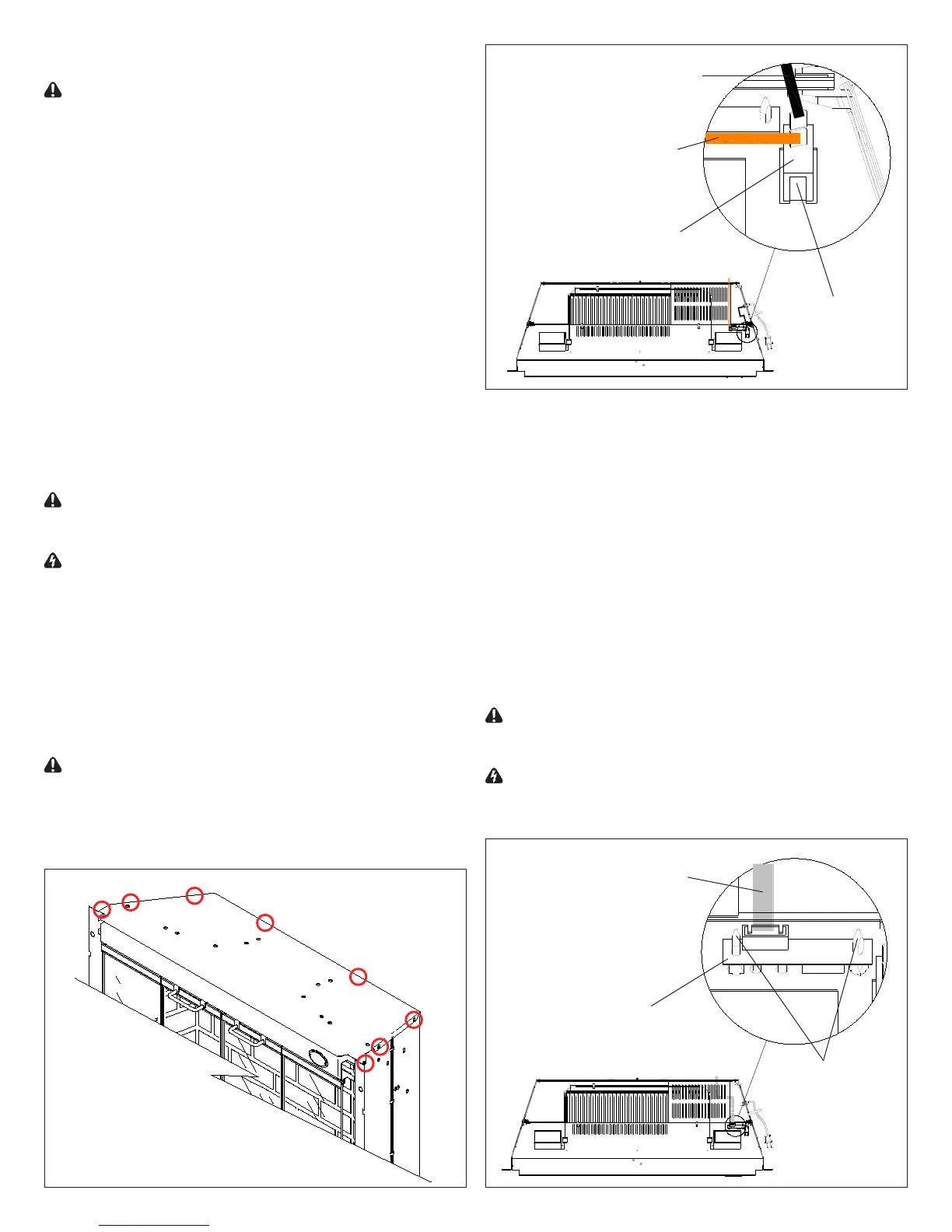
Remove the eight (8) Philips screws that fasten the top 2.
cover to the rest of the rebox. There are: three (3)
screws on each side along the top edge; and two (2)
screws on the back along the top edge (Figure 12).
Flip the top panel over and rest it on the top of the 3.
replace.
Use caution when ipping top panel over as
there are components attached to the top panel which are
wired to the internal cavity of the replace.
Open the bi-fold doors and steel curtain.4.
Locate the Switchboard mounted on the top of the 5.
replace on the right side (Figure 14) and disconnect
the one (1) wide white ribbon cable, noting its original
location.
The Switchboard is fastened to the sheet metal by 6.
two (2) mounting studs, one on each side (Figure 14).
Squeeze both mounting studs clasps to release and
remove the Switchboard.
Properly orient the new Switchboard. Snap onto the 7.
mounting studs and reconnect the ribbon cable as
before.
Reassemble in the reverse order as above.8.
Phillips Head Screwdriver
If unit was operating prior to servicing allow
at least 10 minutes for lights, heating elements and top panel
to cool off to avoid accidental burning of skin.
Disconnect power before attempting any
maintenance to reduce the risk of electric shock or damage
to persons.
Top Section of Fireplace
Black wire to
Power Cord
Orange wire to
Remote Control
Receiver
Retainer Clip
On/Off
Switch
Wide white ribbon
cable to Remote
Control Receiver
Mounting
Studs (2)
Switchboard



 To Next Page