15
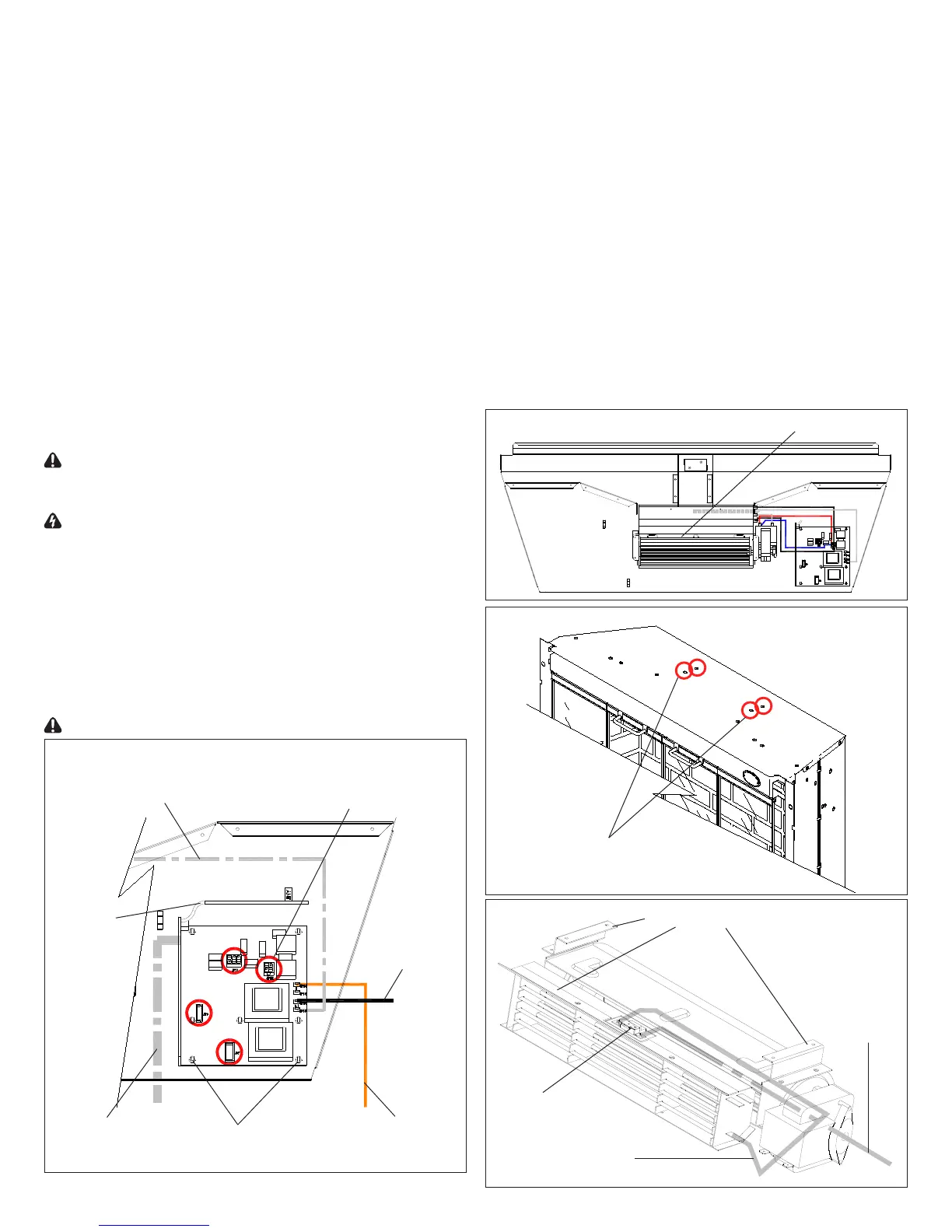
The Remote Control Receiver is fastened to the 6.
underside of the top panel by seven (7) Mounting Studs,
one (1) in each corner, and three (3) down off center
as shown in Figure 16. Either squeeze each mounting
studs clasps to release, or use side cutters to cut and
remove each of the Mounting Studs on the board.
!
If mounting studs are cut, replacement mounting
studs will need to be inserted through the top panel.
Replacement Mounting Studs are supplied.
Remove both ends of each cut Mounting Stud from the 7.
remote control receiver and the top panel.
Properly orient the new Remote Control Receiver. Run 8.
the Antenna Wire out the side of the replace as it had
been and re-connect all of the wiring connections (refer
to notes taken in step 5 and Figure 16).
Reassemble in the reverse order as above.9.
Phillips Head Screwdriver
If unit was operating prior to servicing allow
at least 10 minutes for lights, heating elements and top panel
to cool off to avoid accidental burning of skin.
Disconnect power before attempting any
maintenance to reduce the risk of electric shock or damage
to persons.
Remove the rebox from the mantel.1.
Remove the eight (8) Philips screws that fasten the top 2.
cover to the rest of the rebox. There are: three (3)
screws on each side along the top edge; and two (2)
screws on the back along the top edge (Figure 12).
Flip the top panel over and rest it on the top of the 3.
replace.
Use caution when ipping top panel over as
Antenna
Wire
White Wire to Heater Assembly
Black Wire to
Power Cord
Orange Wire to
On/Off Switch
White ribbon cable
to Switchboard
Mounting
Studs (7)
Cable Connectors (4)
there are components attached to the top panel which are
wired to the internal cavity of the replace.
Locate the Heater Assembly in the center of the upturned 4.
top panel (Figure 18).
Disconnect all six (6) wire connections at the side of the 5.
Heater Assembly, noting all of their original positions.
Turn the top panel over and while supporting the Heater 6.
Assembly and panel in one hand, remove the four (4)
heater mounting screws (Figure 19).
Carefully separate the Heater Assembly from the top 7.
panel, as the Cutout is mounted to the Heater Assembly
(Figure 20).
Remove the Philips screw that holds the Cutout to the 8.
Heater Assembly - Replace the cutout if required. Follow
wiring reference in Figure 20.
!
Reassemble in reverse order from this point if
repair is complete. Continue if replacing Heater Assembly.
Remove the three (3) Mounting Brackets as shown in 9.
Heater Assembly
Top section of replace
Screws to remove for
Heater Assembly (4)
Mounting Brackets (3)
Cutout
White wire
to Remote
Control
Receiver
White wire from left
side of Cutout to
bottom terminal of
Heater Element



 To Next Page