26
© 2016 Directed. All rights reserved.
HD Remote Control:
1. With the HD remote screen blank, press and hold the menu wheel (located on the side) for 3 seconds
until the
Settings
screen appears.
2. Toggle the menu wheel until the
Adjustments
screen appears.
3. Press in on the menu wheel to enter the
Adjustments
menu.
4. In the
Adjustments
menu, toggle the menu wheel to highlight the
Remote Pair
feature and press
in the menu wheel to access
Pair
. The remote is now ready to pair with the system.
Vehicle Setup for Pairing:
• Open at least 1 vehicle door.
• Turn ON the vehicles ignition to the RUN position.
• Within 5 seconds press and release the Control Center button on the Control Center one time then
press it once more and hold it.
• The Control Center LED begins flashing in a single flash pattern and the siren will chirp once to confirm
the system is in pairing mode.
• Now release the Control Center Button.
5. With both the remote and system in pairing mode, press and hold the button on the remote. The
siren chirps to indicate the system has learned the remote ID and is sending its ID to the 2-way remote.
6.
Successful
or
Failed
pair: The HD remote control will indicate a
Successful
or
Failed
pairing
and returns to the
Adjustments
menu. If pairing fails, the remote will go back to the
Remote Pair
screen, press the button on the remote again to attempt another pairing.
7. Once the pairing is completed turn OFF the ignition in the vehicle, the siren will sound to confirm
exiting. Now test the remote for functionality.
8. When both the system and remote have exited the Pairing mode, you may now test for functionality.
To exit Pairing Mode on the remote:
• Wait 30 seconds without pressing a button on the remote.
• Press and release the
button on the remote.
To exit Pairing Mode on the system:
• Turn OFF the ignition.
• Close the open door.
• Wait 60 seconds for the system to automatically exit.
• The siren will sound to confirm exiting.
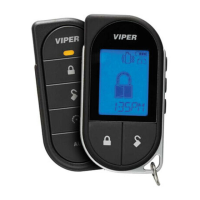
LCD Remote Control:
1. Press and hold the button on the remote for 8 seconds, the remote beeps once,
Main Menu
is
displayed on the screen. Release the button.
2. Press and release the button or the button until
Remote Pair
is displayed on the screen.
3. Press and hold the button until the remote beeps 3 times then release the button.
4. Now release the Control Center Button. The remote is now ready to pair with the system.
Vehicle Setup for Pairing:
• Open at least 1 vehicle door.
• Turn ON the vehicles ignition to the RUN position.
• Within 5 seconds press and release the Control Center button on the Control Center one time then
press it once more and hold it.
• The Control Center LED begins flashing in a single flash pattern and the siren will chirp once to confirm
the system is in pairing mode.
• Now release the Control Center Button.




 To Next Page