Chapter 3
22
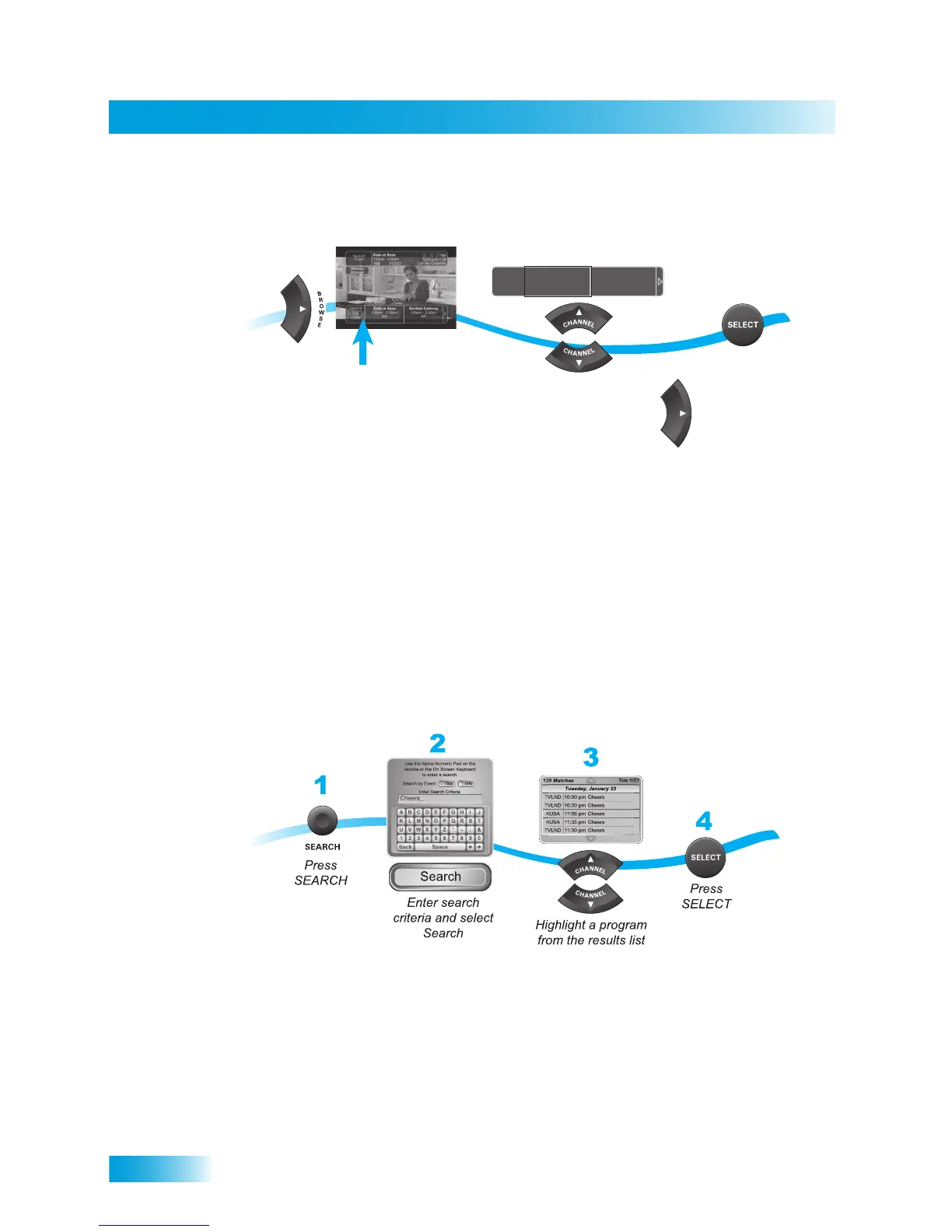
Using Search to Find a Program
To see what is coming up on other channels, press the UP or DOWN ARROW while the
Browse Banner is open.
If you select a current program, the receiver will tune to that channel. If you choose a
future program, the Create Timer screen will display. See Chapter 8: Timers for more
information.
USING SEARCH TO FIND A PROGRAM
You can find programs to watch by using the Search feature of the receiver. This feature
will search all channels, including over-the-air channels (if an over-the-air antenna is
connected to the receiver), and find programs that match keywords that you enter.
Using the Search Feature
You can search for events two ways:
• Select Title to search for the words that appear in the title of a program.
• Select Info to search for words that are in the program description or title.
Enter the search word(s) in the Search Criteria Field in one of two ways:
• Use the on-screen keyboard.
• Use the letters on the NUMBER PAD.
While watching
a program, press
BROWSE
Use the UP or DOWN
ARROWS to browse current
programs and the RIGHT
ARROW to browse future
programs
Press
SELECT
1
2
3
TUE 6/19
110
FOOD
Giada at Home
1:30pm - 2:00pm
NR
Barefoot Contessa
2:00pm - 2:30pm
NR













 To Next Page