Favorites Lists
31
Naming Favorites Lists
1 Press MENU on your DISH remote control. Select Preferences, and then Favorites.
2 Select the list that you want to change, or select List 1, List 2, List 3, or List 4 to create a
list.
3 Select Modify List.
4 Using the SELECT button, add or delete channels from the list.
5 Select DONE.
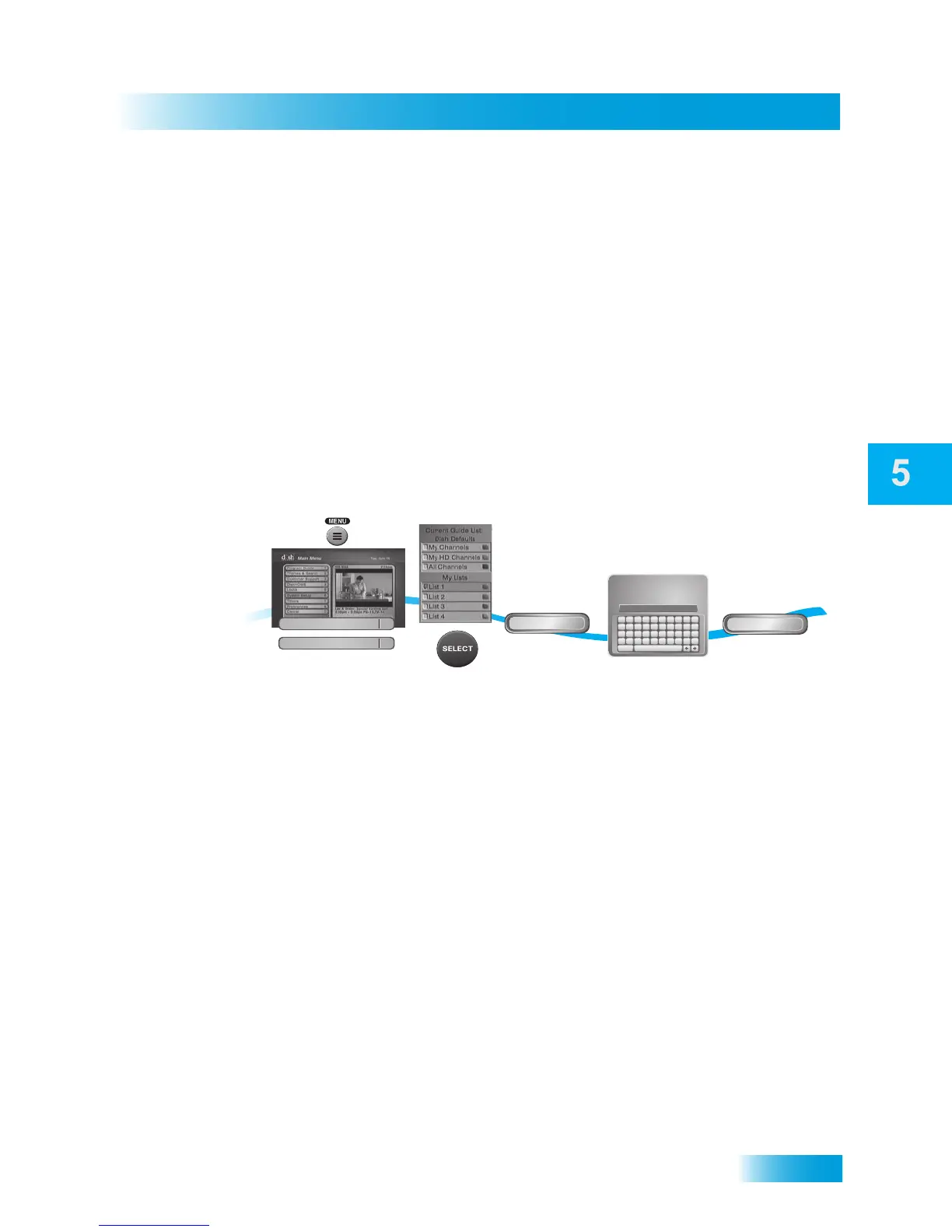
NAMING FAVORITES LISTS
You can name your Favorites Lists whatever you want, up to eight characters long.
1 Press MENU on your DISH remote control. Select Preferences, and then select
Favorites.
2 Select the list that you want to rename.
3 Select Edit Name.
4 Enter the name you want for the list.
5 Select Done.
Done
Edit Name
Enter the name
for the list
Select Done
1
2
3
4
5
Select Edit
Name
Select list to
change
A B C D E F G H I J
K L M N O P Q R S T
U V W X Y Z ' - . &
1 2 3 4 5 6 7 8 9 0
Space
Back
Family_
Use the Alpha-Numeric Pad on the
remote or the On Screen Keyboard
to edit Favorite List Name
Enter List Name:
Press MENU,
select Preferences,
then Favorites
Preferences
8
Favorites
2













 To Next Page